Devseccops

Author: Admin

  • Why Businesses Need Advanced Security Scanning Solutions Today  

    Why Businesses Need Advanced Security Scanning Solutions Today

    Introduction

    In a digital-first world today, businesses basically rely on technology for growth, innovation, and efficiency. Be it cloud computing infrastructure services or Automated CI/CD pipelines , technology has become the backbone of modern enterprises. However, this rampant dependence on digital tools brings with it a much larger scope for threat from cyber-assaults. Cyber-attacks have become very sophisticated, and the consequence of a breach could be disastrous. This is where Security Scanning Solutions take charge.  

    In this blog, we will look at the reasons why businesses want these advanced Security Scanning Solutions, the risks they experience without these, and how these tools offer cohesive integration with ubiquitous systems, such as log monitoring systems, MLOps pipelines, and CI/CD ArgoCD. We will also discuss how DevSecCops.ai helps businesses shore up their security posture. 

    The Growing Threat of Cyberattacks

    The frequency and complexity of cyber attacks nowadays are alarming increasing. According to Cybersecurity Ventures, by the year 2025, worldwide response to cybercrime could go up to $10.5 trillion annually. The small- and medium-sized enterprises are more exposed to attacks because they do not have any of the stringent security measures that bigger organizations put into practice.

    Common cyber threats include:

    • Attacks by Malware and Ransomware: Malicious software designed to disrupt, damage, or gain unauthorized access to systems.  
    • Phishing Attacks: This involves masquerading such that some information appears trustworthy but is actually aimed at the capturing of sensitive information.
    • DDoS Attacks: These are Denial-of-Service attacks that use flooding tactics with traffic.
    • Zero-day exploits: This form of attacking exploits software vulnerabilities prior to the installation of the patches that removes such vulnerabilities. 
    • Insider threats: These refer to malicious or negligent actions perpetrated by employees or contractors. 
    cyber threat

    What are Security Scanning Solutions?

    High-end security scanning solutions are used to detect, analyze, and mitigate any vulnerabilities posed by an enterprise itself in the digital landscape. These solutions integrate the latest advances in AI and Machine Learning to detect threats that would have usually escaped the radar of traditional security mechanisms. 

    The general conception refers to the use of technologically advanced and sophisticated methods for threat detection, analysis, and expulsion of digital infrastructure vulnerabilities from one’s business. These solutions use state-of-the-art AI and machine-learning technologies to single out threats that are mostly invisible to conventional mechanisms. 

    Key features of Security Scanning Solutions include:

    • Vulnerability Scanning: Scan automatically particles, programs, and systems for frailties. 
    • Penetration Testing: Simulate real-life penetrations to find the loopholes in security.
    • Threat Intelligence Integration: Scanning tools are combined with live threat data for proactive defence. 
    • Automated Security Compliance: Adherence to regulations specific to industries such as GDPR, HIPAA, or PCI-DSS.
    • Real-time Risk Assessment: The continual monitoring and assessment of risks for ongoing risk insights. 

    Such tools are necessary for businesses that leverage cloud computing infrastructure services, Automated CI/CD pipelines, and MLOps pipelines since such environments are quite complex and have high vulnerability to attacks from cybercriminals. 

    Why Businesses Need Security Scanning Solutions

    • Proactive threat detection: Traditionally, security measures have been reactive, responding only to known threats. Security scanning solutions, however, rely primarily on a more proactive approach by monitoring for vulnerabilities and threats that recently begin to appear. This stands critical when it comes to businesses utilizing log monitoring systems to track system activity and observe anomalies.  
    • Zero-Day Vulnerability Detection:  Zero-day exploits are that, a hundred percent deadly, because they are focusing on those vulnerabilities, that never reached the vendor’s eye. Security Scanning Solutions apply AI and machine learning to find vulnerabilities, track unusual behavior, and spot other zero-day potential threats, thereby providing an additional layer of protection.  
    • CI/CD Pipeline Integration: Modern software development has become more reliant on automated CI/CD pipeline development that allows for faster and more reliable code development and deployment. Nevertheless, speed shouldn’t come at a security price. Security Scanning Solutions can be integrated within CI/CD ArgoCD workflows to allow us to check codes for any vulnerabilities before they go live and thus ensure secure and reliable releases.  
    • Clouds as Infrastructure Protecting us: of Data Integrity and Compliance With the migration to cloud computing, organizations become increasingly vulnerable to attackers interested in exploiting this new type of environment’s weak spots. In light of the aforementioned scenarios, Security Scanning Solutions provide all-inclusive protection of cloud-based systems ensuring data integrity and compliance.  
    • Enhanced Compliance:  Most industries have specific regulatory requirements. Security scanning solutions help ensure compliance with regulations and standards by identifying vulnerabilities and confirming that appropriate safeguards are in place. This consideration is regarded as critical for industries dealing with sensitive information like healthcare and finance. 
    • Cost Savings :The cost of a data breach is likely to be downright astronomical. Based on IBM’s 2023 Cost of a Data Breach, the average cost of a data breach is $4.45 million. With Security Scanning Solutions, a business can gain and keep from incurring the cost of any such breach, maintaining both financial and reputational respect. 
    • Scalability Be it a small startup or a large enterprise as a business grows, the infrastructure will, therefore, become more complex. With Security Scanning Solutions, the scalability comes in that they can be adapted as per the changing need of the business. These solutions provide protection from every angle, whether starting small or growing big. 

    How Security Scanning Solutions Integrate with Modern Systems

    • Log Monitoring Systems:   Log monitoring systems represent that arm that tracks system activity checking for authenticity. Security Scanning Solutions integrated into the Log Monitoring System enhance it with real-time threat intelligence for automated vulnerability detection, ensuring early identification and quick remediation of potential threats. 
    • Automated CI/CD Pipelinesenable: rapid code deployment, but they could also introduce vulnerabilities when not reasonably secured. Security Scanning Solutions integrated with CI/CD ArgoCD workflows are implemented to scan the code for vulnerabilities before it is deployed and, therefore, assure that it is secure during the release.  
    • MLOPS Pipeline: MLOps pipelines are therefor to improve upon the work of all machine-learning workflows, whereby such pipelines represent very prime targets for opportunities of cyberattacks. Security Scanning Solutions incorporate features towards the development lifecycle of MLOps pipeline to assure end-to-end protection with the constant vision of ensuring data and models remain secured.  
    • Cloud ComputingInfrastructureServices: It is quite elementary that with the ever-increasing reliance of businesses on cloud computing infrastructure services, there has to be worthy and strong security to ward off intrusions against the assets of any business in data or applications. Security Scanning Solutions extend utmost protection commensurate with any security model to the cloud environment assuring data integrity and compliance.

    Real-World Examples of Security Breaches

    Real-world events, such as the following three examples of breaches, illustrate one of the reasons Scam is of such great importance:  

    Equifax used a web application vulnerability to leak the personal information of 147 million individuals. It has cost the company well in excess of $1.4 billion in dollars in settlements and fines.Target hackers accessed the network of Target through a third-party vendor and compromised the credit card data of 40 million customers. That costs Target an estimated $202 million. 

    The Colonial Pipeline Company suffered a cyberattack from ransomware in 2021 which leveraged heavy systems and processes for its attackers. This disruption caused fuel shortages all across the United States. To unpalatable ends, $4.4 million was paid in ransom by the company owing to the ransomware attack-it serves as an eye-opener of what havoc cyberattacks may wreak on critical infrastructure. 

    All these horror stories put good reason for businesses to invest in Security Scanning Solutions as a clever way to ensure such incidents do not occur. 

    How to Choose the Right Security Scanning Solution

    When choosing a security scanning solution, certain factors must be looked upon:  

    • Comprehensive coverage: The solution should provide coverage for the entire digital landscape, which could be a network, application, or cloud environment. 
    • Integrability : The solutions must integrate smoothly into all log monitoring-, automated CI/CD-, and MLOps-and other systems currently in place.
    • Real-time monitoring: Hence, it has to provide alerts and updates in real time to allow for immediate response in case of a threat.   
    • Scalability: The solution should be expandable with the company’s future growth and changing necessities.  
    • Reputation and support: The reliability of a vendor for a certain product used to judge by a long positive history with its user experience and providing customer support.   

    Conclusion

    With the rapidly changing landscape of cyber threats, businesses cannot risk depending on outdated security options. Security Scanning Solutions provides proactive and holistic protection against potential threats, ensuring digital assets are secured, compliance maintained, and customer trust established.

    These solutions guarantee that your systems using cloud computing infrastructure services, automated CI/CD pipelines, or MLOps pipelines stay secure and resilient.   It will boost the security stance through DevSecCops.ai, security scanning solutions can be integrated into Devsecops workflows that allow automation of security processes, discovery of vulnerabilities early in the software development lifecycle, and continuous compliance With DevSecCops.ai, achieve a seamless speed-security balance and empower your business to innovate with confidence, protected at all times.  

    Don’t become a victim waiting until it’s too late. Protect your enterprise today with Security Scanning Solutions. Secure your future in the digital landscape. 
  • How We Can Enhance Cloud Security: 8 Expert Strategies

    How We Can Enhance Cloud Security: 8 Expert Strategies

    Introduction

    Cloud security is more critical than ever in today’s digital landscape. With cyber threats becoming more sophisticated, businesses must adopt expert strategies to safeguard their cloud environments. In this guide, we explore eight powerful ways to enhance cloud security effectively.

    Understanding Cloud Security

    What is Cloud Security?

    Cloud security refers to the measures and technologies designed to protect cloud computing environments, including data, applications, and infrastructure. It ensures data confidentiality, integrity, and availability.

    Importance of Cloud Security
    • Prevents data breaches 
    • Ensures regulatory compliance
    • Safeguards sensitive information
    • Enhances business continuity

    Expert Strategies to Enhance Cloud Security

    1. Implement Strong Identity and Access Management (IAM)

    A robust IAM framework prevents unauthorized access to cloud resources. Key practices include:

    • Multi-Factor Authentication (MFA) for additional security layers
    • Role-Based Access Control (RBAC) to restrict user permissions
    • Regular audits to monitor access logs and adjust permissions
    2. Encrypt Data at Rest and in Transit

    Encryption is a non-negotiable aspect of cloud security:

    • End-to-End Encryption protects sensitive data from cybercriminals.
    • TLS Protocols secure data during transmission.
    • Encryption Key Management ensures secure handling of cryptographic keys.
    3. Enable Continuous Security Monitoring and Threat Detection

    Proactive security monitoring helps detect threats before they cause damage:

    • SIEM Solutions analyze security logs for anomalies.
    • AI-Powered Threat Detection enhances real-time response capabilities.

    Incident Response Plans ensure quick detection, containment, and resolution of potential data breach

    4. Secure APIs and Cloud Applications

    Since APIs are often the weakest link, securing them is crucial:

    • OAuth and OpenID Connect for secure authentication.
    • API Rate Limiting and Throttling to prevent misuse.
    • Web Application Firewalls (WAFs) to block malicious requests.
    5. Utilize Zero Trust Security Model

    Zero Trust ensures that no entity is inherently trusted:

    • Microsegmentation restricts lateral movement within networks.
    • Continuous Authentication verifies user and device integrity.
    • Device Security Posture Checks ensure compliance before access.
    6. Secure Cloud Storage and Backups

    Proper data storage and backup strategies prevent loss and corruption:

    • Automated Backups for regular data preservation.
    • Immutable Storage prevents accidental or malicious deletions.
    • Redundant Backup Locations ensure disaster recovery readiness.
    7. Ensure Compliance with Industry Standards and Regulations

    Compliance frameworks enhance cloud security:

     The European Union (EU) enforces strict data protection regulations, such as GDPR, to ensure that businesses within its member states manage personal data responsibly and securely, especially when stored in cloud environments.

    The Health Insurance Portability and Accountability Act (HIPAA) is a U.S. law that mandates secure handling of patient health information to protect privacy and prevent unauthorized access.

    • GDPR for data protection in the EU.  
    • HIPAA for healthcare data security.   
    • ISO 27001 for comprehensive information security management.
    8. Protect Against Insider Threats

    Employees and contractors can pose significant security risks:

    • User Behavior Analytics (UBA) detects unusual activities.
    • Strict Access Policies limit exposure to critical data.
    • Security Awareness Training educates employees about phishing and cyber threats.

    Advanced Cloud Security Measures

    Cloud Security Posture Management (CSPM)

    CSPM tools help identify and remediate misconfigurations:

    • Automates security assessments
    • Provides real-time compliance monitoring
    • Enhances cloud visibility and risk managemen
    Firewalls and Intrusion Detection Systems (IDS)

    Modern firewalls and IDS protect against cyber threats:

    • Web Application Firewalls (WAFs) shield applications from attacks.
    • Next-Gen Firewalls (NGFWs) use AI to enhance security.
    • Intrusion Prevention Systems (IPS) actively block malicious traffic.

    Conclusion

    Cloud security can be improved by a proactive process that combines IAM, encryption, continuous monitoring, and complianceUsing DevSecCops.ai, these professional strategies are easily integrated, significantly lowering cyber threats and keeping cloud environments safe.

  • Blogs

    Blog post with DevSecCops.ai

    Want more click through? Leverage the blog post with meta info button style

  • AI Lending Platform Transformation Case study

    AI Lending Platform TransformationA Fintech Success Story Meant to Scale

    When Everything Was on the Line

    In early 2024, a leading Artificial Intelligence (AI)–driven fintech platform transforming how financial services operate in India reached out for support. Their no-code platform was designed to simplify loan origination, KYC processing, and personalized offer generation — but just before launch, challenges emerged.

    “We expect 3,000 to 4,000 users simultaneously during promotional spikes, and our AI agents will need to process thousands of credit applications in real time,” said the CTO.
    “Our on-premises MySQL deployment can’t scale fast enough without risking downtime or compliance issues.”

    The Harsh Reality We Unearthed

    From our assessment, the infrastructure was in complete disarray. During testing, legacy hardware struggled to handle even simple workloads, resulting in query latencies exceeding 500 ms. For loan decisions, which must occur rapidly, this level of delay is unacceptable—every millisecond counts, and opportunities can be lost. Single-instance databases pose additional risks, as they can fail unexpectedly. Furthermore, in line with regulatory guidelines, borrower data that is not properly encrypted or monitored may be at risk of compromise. This isn’t just a technical concern; outages or slow processing in lending can erode customer trust and attract regulatory scrutiny, turning potential growth into tangible risks.

    Building Something That Might Actually Work

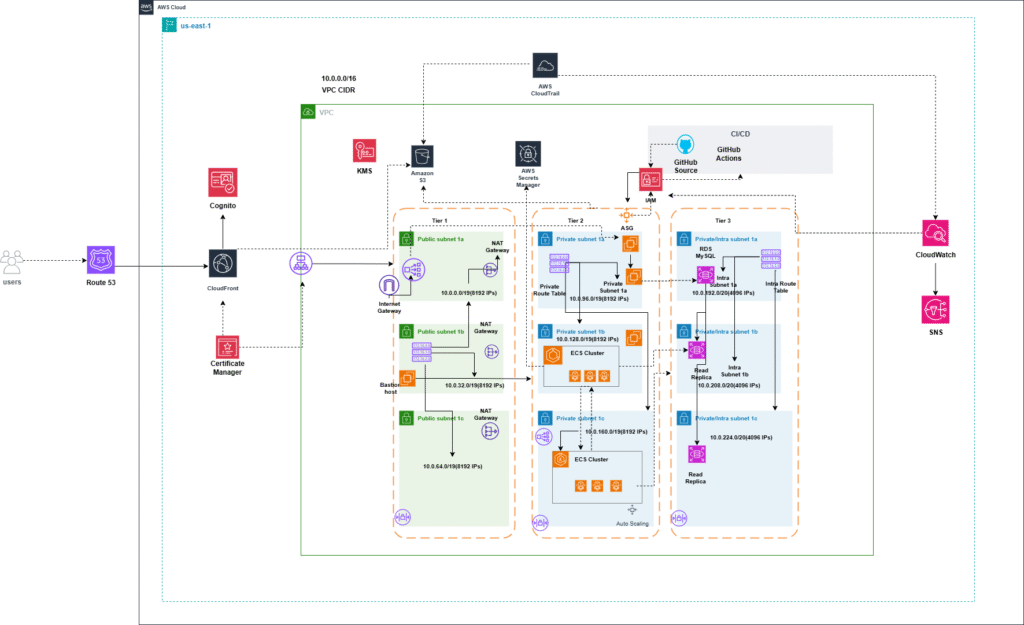
    We built a robust foundation using Amazon RDS for PostgreSQL in a Multi-AZ deployment, allowing loan processing to continue uninterrupted with dynamic switching between availability zones. The database was designed for 200 tables, 140 constraints, 60 indexes, 25 sequences, and 10 triggers, ensuring smooth operation of modular ECS-based microservices. It started at 150 GB, with a planned 30% annual growth.

    Read replicas across zones handled reporting and analytics, reducing read-heavy traffic on the main instance—like adding express lanes to a slow-moving motorway—keeping offer generation under 100 ms even during peak hours. For CI/CD, we implemented OIDC with GitHub Actions to publish container images to ECR and run ECS tasks for deployments. This setup allowed AI-driven processes to evolve securely without interrupting the credit flow.

    Making Sure Everything Can Be Watched and Is Secured

    We integrated RDS Performance Insights with Amazon CloudWatch to ensure complete visibility. A real-time dashboard tracked CPU, IOPS, replication latency, and query times. Before issues—such as connection spikes from ELB-routed API calls—could affect customers, SNS notifications sent detailed alerts.

    For security, AWS KMS protected data at rest and in transit with SSL, while Secrets Manager rotated service passwords every 90 days, creating a highly secure environment for sensitive information. IAM roles enforced least-privilege access, giving users visibility into specific reports while limiting ECS task access. VPC security—via Security Groups, subnets, and NAT Gateways—isolated ingress and egress traffic, safeguarding KYC documents and financial data. Additionally, GuardDuty detected anomalies without adding latency, helping the platform stay compliant with RBI requirements.

    Addressing Real Time Processing Challenges

    The AI-powered lending platform required near real-time data to generate consumer offers. To handle this, we leveraged read replicas and auto-scaling to efficiently manage 3,000–4,000 concurrent connections during campaign spikes. Route 53 ensured DNS failover, while CloudFront cached static compliance assets closer to the edge. This setup delivered fast performance, allowing user interactions across India in under a second.

    The Move That Needed to Be Perfect

    Migrating from on-premise MySQL to RDS PostgreSQL posed significant challenges. We used the AWS Schema Conversion Tool (SCT) to assess compatibility and Database Migration Service (DMS) to move data and schemas in UAT mode. Leveraging Infrastructure as Code, Terraform spun up the environment consistently every time, and blue-green deployments on ECS kept downtime under 15 minutes. A fully tested contingency plan—on-premise read-only mode with S3 snapshot restoration—ensured no loan records would be lost.

    Launch day attracted tremendous interest, with thousands of applications submitted. The system scaled seamlessly: Multi-AZ failover handled simulated zone loss in seconds, read replicas absorbed the read demand, and auto-scaling expanded capacity automatically. At peak load, warm queries at p95 remained under 20 ms, connections peaked at 4,000 without affecting responsiveness, and the platform maintained 99.99% uptime—delivering thousands of AI-driven outcomes flawlessly.

    Not just operational, but effective

    There were unexpected wins as well. Over 95% of buffer cache hits were successful, and monthly CloudWatch checks ensured the database stayed appropriately sized. Costs were reduced by archiving old loan data using S3 lifecycle rules. Even with over 30% annual growth, a combination of reserved instance pricing and on-demand scaling reduced total cost of ownership by more than 50%. Lambda automations further helped prevent issues such as replication latency before they could impact the platform.

    What we learned along the way

    Just a note, for finance workloads that are reading heavy, read replicas can help prevent bottlenecks by adding more reads in an event time period. Performance Insights can help us identify slow queries early and adjust indexes for AI routeing.  OIDC-driven CI/CD allows us to deploy versions with confidence, while ECS ensures upgrades can occur without downtime. VPC isolation and KMS rotations increased security significantly without additional labour to meet RBI requests.

    Keeping Security Robust

    During the setup, we required hardware MFA for root access, logged all activity in CloudTrail with S3 backups, and conducted IAM reviews on a quarterly basis.   Our de-sanitization scripts used fake data for testing, to obscure PII in non-production use cases. This ensured private loan information remained separate and legal. ​ 

    Life in the Large

    RDS enables fintech organizations to churn out new ideas at scale by permitting real-time loans to thousands of people. Crego is a great example. Their AI keeps customers engaged from KYC to offers, encouraging digital finance trust. This positive change wasn’t just about technology, it advocated to streamline loan access when borrowers needed it most, through a stable infrastructure in the background. ​

    Architecture Diagram

    Metrics Demonstrate the Validity: 99.99% uptime during peak traffic, API responses under 100ms, RTO under 15 minutes, and RPO under 5 minutes through Cross-Region Replication. People were able to support any surges, because the auto-scaling did all the work. Crego processed millions of loans without any issue, and still provided a simple and secure way for individuals to obtain credit. Clearly, this demonstrates that a scalable infrastructure delivers a needed service of providing access to money.

    Trusted By

  • Manual DevOps is Dead: Why Automation is No Longer Optional?

    1.Introduction: The End of an Era in DevOps

    Let’s face it, manual DevOps processes are not just outdated—they’re dangerous. In my 17+ years of experience in this field, I’ve seen the DevOps landscape evolve dramatically, and one thing is clear: clinging to manual methods is like trying to steer a ship through a storm with a broken compass. Today, DevOps automation, including Infrastructure as Code (IaC) and continuous integration/continuous delivery (CI/CD), is not just a tool; it’s a necessity for survival. If you’re still relying on manual processes, you’re not just behind—you’re at risk. make seo freindly readable content or seo keywords ke sath refine kro

    2.Manual DevOps: A Relic of the Past

    There was a time when manually setting up your DevOps environment made sense, but that time has long passed. Today, relying on manual processes is more of a liability than an asset. They slow down your operations, introduce errors, and burden your teams with unnecessary complexity.

    The Outdated Practice of Setting Up VPCs Manually

    Setting up a Virtual Private Cloud (VPC) manually? You might as well be carving your network architecture from stone. This outdated process involves configuring numerous network settings, subnets, and security groups by hand. One wrong click or a missed setting can expose your entire infrastructure to risks that could have been easily avoided.

    Manual CI/CD Pipelines: A Recipe for Disaster

    Building CI/CD pipelines manually is not just outdated—it’s reckless. This method demands painstaking attention to detail at every step, from scripting and configuring environments to managing deployments. The risk of human error isn’t just a possibility—it’s a certainty. And when things go wrong, the cost of fixing these issues can be astronomical.

    Don’t believe me? A major finance company lost over $400 million in just 45 minutes due to a manual deployment error. Another giant experienced a massive outage when a team member accidentally deleted a database. These aren’t just mistakes; they are catastrophic failures that could have been avoided with the right DevOps automation in place.

    Embrace Automation for a Safer Future

    To mitigate these risks, it’s time to embrace DevOps automation. Implementing solutions like Infrastructure as Code (IaC) and fully automated CI/CD processes can streamline your operations, enhance security, and drastically reduce the likelihood of human error. Don’t wait for a disaster to happen; take the necessary steps to modernize your DevOps practices today.

    cicd devops trends

    3.Automation: The New Pillar of Modern DevOps

    In contrast, automated DevOps practices offer speed, reliability, and, most importantly, peace of mind. Automation is not about replacing people; it’s about empowering them to focus on what truly matters—innovation, growth, and staying ahead of the curve.

    Automating VPC Creation: The Right Way

    Automated VPC creation eliminates the need for manual intervention, significantly reducing the risk of errors and speeding up the process. Automation tools ensure that every aspect of your VPC is configured correctly, securely, and in record time. The days of manually piecing together your network are over—automation gets it right the first time, every time.

    CI/CD Pipelines on Autopilot

    Why waste time manually building and managing CI/CD pipelines when automation can handle it for you? Automated pipelines not only cut down on setup time but also ensure consistency and reliability. With automation, you can deploy faster, with fewer errors, and with the confidence that your pipeline is always optimized for performance.

    Infrastructure as Code (IaC): The Future is Here

    Infrastructure as Code (IaC) is the backbone of modern DevOps automation. With IaC, your infrastructure is defined in code, allowing for version control, peer reviews, and rapid deployments. This approach ensures that your environments are always consistent, repeatable, and scalable—eliminating manual tweaks and inconsistencies.

    4. Why Manual Processes Have No Place in Today’s DevOps

    Let me be blunt: manual processes have no place in today’s DevOps landscape. The world is moving faster than ever, and the margin for error is shrinking. If you’re still relying on manual processes, you’re a ticking time bomb. DevOps automation isn’t just a nice-to-have; it’s a must-have. It’s the key difference between thriving and merely surviving.
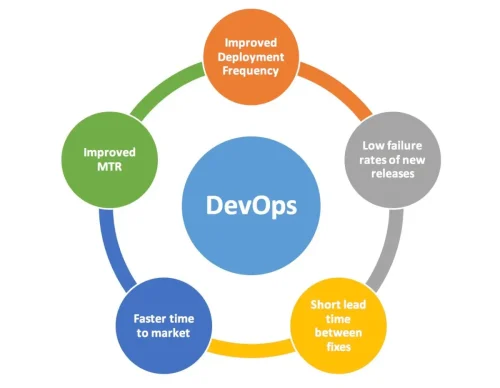
    In today’s competitive market, the companies that succeed are the ones that can innovate quickly and scale rapidly. You simply cannot achieve this if you’re bogged down by manual processes. Automation is crucial for unlocking your team’s full potential, allowing them to focus on driving the business forward rather than getting lost in the details.

    By embracing DevOps automation, you empower your teams to streamline operations, reduce errors, and accelerate delivery. This shift not only enhances productivity but also positions your organization to adapt swiftly to changing market demands. Don’t wait for the competition to leave you behind—take action now and embrace the future of DevOps.

    screen-shot-2017-10-17-at-4.38.37-pm-100739216-large

    5. Market Realities: The Automation Revolution

    The shift towards automation in DevOps is not just a trend; it’s a revolution. Companies that have embraced automation are experiencing a remarkable 70% reduction in deployment times and a 50% decrease in errors. This transformation goes beyond mere efficiency—it’s about survival in a competitive landscape.

    As more organizations recognize the substantial benefits of automation, the market for DevOps automation tools is booming. This surge highlights the critical importance of adopting automated solutions to streamline operations, enhance productivity, and mitigate risks. Companies that fail to adapt will find themselves left behind in an increasingly fast-paced environment.

    By integrating DevOps automation, businesses can not only optimize their workflows but also position themselves for future growth and innovation. Don’t get caught in the past; embrace the revolution of DevOps automation and ensure your organization thrives in today’s dynamic market.

    6.How DevSecCops.ai is Leading the Era of Automation

    DevSecOps.ai is at the forefront of DevOps automation, leveraging open-source technologies like Jenkins, Spinnaker, and others. We provide a fully automated solution for Kubernetes onboarding, CI/CD pipelines, and infrastructure security, enabling streamlined, efficient, and reliable DevOps practices with just a few clicks.

    7.Conclusion: Adapt or Perish

    The bottom line is this: if you’re not automating, you’re falling behind. The days of manual DevOps are over, and the future belongs to those who embrace automation. This is not just about keeping up with the competition—it’s about staying ahead. Adapt to the new reality of DevOps automation, or risk being left behind.

  • What is ArgoCD? Your Guide to CI/CD Simplified

    How DevSecCops.ai build your automated CI/CD pipelines using open source tools like argo CD

    What is Argo CD

    what is argocd

    Argo CD is a popular open-source tool for continuous delivery in Kubernetes environments. It follows the GitOps methodology, where Git repositories act as the single source of truth for application configurations and infrastructure management. By using Argo CD Kubernetes, teams can automate application deployments to Kubernetes clusters by defining their desired application state in Git

    Advantages of argoCD

    Advantages of argocd

    Argo CD Key Advantages for Managing Kubernetes Deployments

    Argo CD is a robust tool that simplifies and optimizes the deployment process for Kubernetes environments. By leveraging a GitOps workflow, declarative configuration management, and automated deployments, Argo CD Kubernetes ensures efficiency, reliability, and security for managing applications at scale. Below are the core benefits of using Argo CD for Kubernetes deployments::

    GitOps Workflow:

    Argo CD adheres to a GitOps workflow where all configuration and deployment changes are managed through Git commits. This workflow enhances visibility, traceability, and auditability of changes, promoting better collaboration and reducing the risk of human errors. As one of the leading GitOps tools, Argo CD enables teams to maintain a reliable and secure deployment process by leveraging Git as the single source of truth for managing infrastructure and application configurations.

    Declarative Configuration:

    With Argo CD, you define the desired state of your applications using declarative Kubernetes manifests or Helm charts. It then continuously reconciles the actual state of the application with the declared state, ensuring consistency and minimizing configuration drift. This declarative approach enables predictable and repeatable deployments, making it easier to manage infrastructure changes at scale.

    Automated Deployments:

    Argo CD automates deployments by continuously monitoring Git repositories for changes and automatically updating Kubernetes clusters. This reduces manual intervention, accelerates release cycles, and minimizes operational overhead.

    Rollback and Rollforward Mechanisms:

    In case of failures during deployment, Argo CD offers built-in rollback and roll-forward capabilities. You can easily revert to a previous state or deploy a specific version, ensuring resilience and minimizing downtime for production environments.

    Multi-Cluster and Multi-Tenancy Support:

    Argo CD allows you to manage multiple Kubernetes clusters from a single instance. With multi-tenancy support and role-based access control (RBAC), organizations can securely manage deployments across various environments.

    Integration with CI/CD Pipelines:

    Argo CD seamlessly integrates with CI/CD pipelines, enabling automatic deployments triggered by changes in your CI workflow. This ensures a fully automated pipeline, from code commits to production deployments.

    Customization and Extensibility:

    Argo CD is highly customizable and supports hooks for pre-sync, post-sync, and pre-deployment tasks. You can integrate external systems, perform custom validations, or execute additional logic as part of your deployment workflow.

    Observability and Monitoring:

    With Argo CD’s web-based UI and CLI, you gain real-time visibility into deployment status, cluster resources, and application health. This observability helps in proactive troubleshooting and optimization of your Kubernetes environments.

    Optimize Kubernetes Deployments with Argo CD

    Argo CD offers a comprehensive set of features that cater to both small-scale and enterprise-level Kubernetes deployments. By using its GitOps approach, automated synchronization, and built-in monitoring capabilities, you can ensure that your applications remain consistent, scalable, and resilient in any production environment.

    Why ArgoCD ?

    argo cd why

    ArgoCD is a popular tool used in the realm of continuous delivery (CD) and GitOps. It’s chosen by many because of its simplicity, scalability, and powerful features. Here’s why ArgoCD might be the tool of choice for many:

    1. GitOps Methodology: ArgoCD is built around the GitOps methodology, which promotes using Git as the single source of truth for declarative infrastructure and application code. This means that all changes to your infrastructure and application configurations are managed through Git, enabling versioning, history tracking, and collaboration.

    2. Declarative Configuration: ArgoCD allows you to define the desired state of your applications and infrastructure using declarative YAML files. This simplifies the management and automation of complex application deployments.

    3. Automated Synchronization: ArgoCD continuously monitors your Git repositories for changes to the configuration files and automatically synchronizes the desired state with the live state in your Kubernetes clusters. This ensures that your clusters are always in the desired state without manual intervention.

    4. Multi-Tenancy Support: ArgoCD supports multi-tenancy, allowing you to manage multiple environments (such as development, staging, and production) within a single ArgoCD installation. This simplifies the management of complex application deployments across different environments.

    5. UI and CLI: ArgoCD provides both a user-friendly web-based UI and a command-line interface (CLI), giving users flexibility in how they interact with the tool.

    6. Integration with Kubernetes: ArgoCD is specifically designed for Kubernetes environments and provides native integration with Kubernetes resources, such as Deployments, Services, ConfigMaps, and Secrets.

    7. Extensibility: ArgoCD is highly extensible and can be easily integrated with other tools and systems in your CI/CD pipeline. It also supports custom plugins and hooks for extending its functionality.

    8. Community and Ecosystem: ArgoCD has a vibrant community and ecosystem, with active development, documentation, and community support. This ensures that users have access to resources and assistance when deploying and managing applications with ArgoCD.

    Overall, ArgoCD offers a robust and flexible solution for implementing continuous delivery and GitOps practices in Kubernetes environments, making it a popular choice for many organizations and teams.

    Companies pain point without GitOps and ArgoCD

    Pain Points of Not Leveraging GitOps and Argo CD for Kubernetes Deployments

    In the modern cloud-native landscape, deploying and managing applications without a tool like Argo CD can be challenging and error-prone. Below, we explore the key pain points that organizations face when they do not adopt GitOps principles and automation through Argo CD:

    Manual and Error-Prone Deployments

    Traditional deployment methods often involve manual steps, making the process susceptible to human errors. Teams may encounter inconsistencies and discrepancies between development, staging, and production environments. This can lead to failed deployments, service outages, or unexpected behavior. Without the automation that GitOps and Argo CD provide, maintaining consistency and reliability becomes a daunting task, increasing the risk of downtime and failed releases.

    Lack of Version Control and Auditability

    In the absence of GitOps, configuration changes are typically made directly to live environments. This practice bypasses version control, making it difficult to track changes, understand who made them, and why. It also complicates the rollback process in case of failures. Argo CD’s integration with Git repositories ensures that all configuration changes are versioned, providing a transparent audit trail. This is critical for compliance, troubleshooting, and maintaining operational governance.

    Difficulty in Managing Configuration Drift

    In dynamic Kubernetes environments, configurations can drift away from their desired state due to manual changes, scaling activities, or external modifications. This drift increases complexity and operational risk. Without Argo CD continuously monitoring and reconciling the actual state against the desired state, companies struggle to maintain consistency across environments, which can lead to misconfigurations, security vulnerabilities, and degraded performance.

    Slower Time-to-Market

    Manual deployment processes and the lack of automation can significantly delay the release cycle. Without a streamlined GitOps workflow and the automated capabilities of Argo CD, teams spend more time managing deployments and resolving issues, which ultimately slows down the delivery of new features and updates. This slower time-to-market can place companies at a competitive disadvantage, especially in fast-paced industries where agility is crucial.

    Limited Visibility and Control

    Without a centralized tool like Argo CD, gaining visibility into the deployment status and health of applications can be challenging. Teams lack a clear view of what has been deployed, where, and in what state. This lack of visibility makes it difficult to detect and resolve issues promptly, leading to prolonged troubleshooting times and decreased operational efficiency.

    Overcoming Deployment Challenges with GitOps and Argo CD

    By adopting a GitOps workflow with Argo CD, companies can eliminate manual, error-prone processes and gain complete visibility and control over their deployments. Argo CD’s automation capabilities help prevent configuration drift, enforce version control, and provide a single source of truth for both infrastructure and application configurations.

    Key Benefits of Argo CD:

    • Automated Deployments and Rollbacks: Ensure consistency and reliability in production environments.
    • Enhanced Security and Compliance: Maintain an audit trail of changes for better governance.
    • Faster Release Cycles: Accelerate time-to-market by streamlining the CI/CD pipeline.

    Summary

    Without GitOps and Argo CD, organizations face significant challenges related to manual processes, lack of visibility and control, managing configuration drift, and deployment efficiency. These pain points can hinder their ability to innovate and respond quickly to market demands. Implementing Argo CD helps address these issues, enabling smoother, faster, and more reliable Kubernetes deployments.

    What is CI/CD ?

    Let’s delve deeper into the pain points companies encounter without leveraging GitOps and ArgoCD:

    Without the right tools and automation, managing Kubernetes deployments can be overwhelming and error-prone. Let’s explore the key challenges companies face when they don’t implement GitOps principles or utilize a tool like Argo CD:

    Manual and Error-Prone Deployments:

    Traditional deployment methods typically involve numerous manual steps, such as copying configuration files, applying manifests, or manually updating environment variables. This approach is not only time-consuming but also highly prone to human errors. Mistakes like deploying the wrong version, incorrect configurations, or missing dependencies can lead to inconsistencies across environments, resulting in failed deployments and potential downtime.

    Impact: Manual processes introduce inconsistencies between development, staging, and production environments, causing unreliable deployments. The lack of automation makes it difficult to detect errors early, increasing the risk of service outages and degraded application performance.

    Lack of Version Control and Auditability:

    Without GitOps, changes to configurations and infrastructure are often made directly to live environments. This can bypass crucial version control mechanisms, making it challenging to trace who made changes, what was altered, and when it happened. Without a history of changes, rolling back to a stable version becomes a guessing game rather than a strategic decision.

    Impact: Lack of version control and auditability complicates troubleshooting and compliance. When issues arise, it’s harder to identify the root cause, resulting in prolonged recovery times and potential non-compliance with regulatory requirements.

    Difficulty in Managing Configuration Drift:

    Configuration drift occurs when the actual state of your Kubernetes environment diverges from the desired state defined in your configurations. This can happen due to manual updates, unintended changes, or external factors such as dynamic scaling activities. Without automated reconciliation, configurations across multiple environments can quickly become inconsistent.

    Impact: Configuration drift increases operational complexity and risks, leading to misconfigurations, vulnerabilities, and performance degradation. Resolving drift manually can be time-consuming and error-prone, further compounding the problem.

    Slower Time-to-Market:

    When deployment processes rely on manual intervention, releasing new features and updates can be slow and cumbersome. The absence of automation in the CI/CD pipeline makes it challenging to maintain a consistent release schedule, resulting in delays in delivering value to customers.

    Impact: Slower time-to-market means companies struggle to keep up with competitors who are leveraging automation to deploy updates faster and more frequently. This lag can translate into lost market opportunities and reduced customer satisfaction.

    Limited Visibility and Control:

    Without a centralized tool like Argo CD, it’s difficult to gain visibility into the deployment status, health of applications, and configuration changes. Teams often lack a clear picture of which applications are deployed where and in what state. This makes it challenging to detect issues early or identify discrepancies between environments.

    Impact: Limited visibility and control over deployments hinder teams’ ability to monitor applications proactively and ensure consistency across environments. This can result in increased troubleshooting time and slower response to incidents.

    Overcoming Challenges with GitOps and Argo CD

    Implementing a GitOps workflow with Argo CD addresses these pain points by providing a single source of truth for both infrastructure and application configurations. With Argo CD’s automation, companies can maintain consistency across environments, prevent configuration drift, and accelerate deployment processes.

    Key Advantages:

    • Automated Deployments and Rollbacks: Minimize manual intervention and reduce the risk of errors during deployments.
    • Version Control and Auditability: Track every change made to your infrastructure, ensuring compliance and facilitating easy rollbacks.
    • Continuous Reconciliation: Maintain the desired state of your environment by automatically correcting drift, reducing operational overhead.
    • Faster Release Cycles: Accelerate time-to-market by automating deployments and streamlining CI/CD pipelines.
    • Enhanced Observability: Gain real-time visibility into your deployments, making it easier to identify and resolve issues.

    Summary

    Without GitOps and Argo CD, companies face significant challenges in managing deployments, maintaining consistency, and accelerating release cycles. These pain points hinder innovation and put companies at a competitive disadvantage. Adopting a GitOps approach with Argo CD enables organizations to automate deployment processes, maintain a clear audit trail, and respond quickly to changing market demands, ensuring they remain agile, resilient, and competitive.

    cicd pipeline
  • Kubernetes-journey with DevSecCops.ai

    Adopt Kubernetes in minutes with DevSecCops.ai

    Kubernetes is a leading container orchestration platform designed to automate deploying, scaling, and managing containerized applications. Originally developed by Google, it is now under the stewardship of the Cloud Native Computing Foundation (CNCF). Kubernetes simplifies the management of cloud-native applications across a cluster of machines, offering robust solutions for microservices management, load balancing, and dynamic scaling.

    With Kubernetes, you gain streamlined application deployment and operations automation, reducing the complexity of managing containers. It enables efficient handling of container clusters, supports multi-cloud deployments, and provides tools for high-availability configurations. By leveraging Kubernetes, you can enhance scalability and resilience in your infrastructure, ensuring your applications perform optimally in dynamic environments.

    kubernetes

    Why Kubernetes?

    why_kubernetes

    Kubernetes offers several key benefits that make it a top choice for managing containerized applications:

    Portability: Kubernetes is inherently platform-agnostic, enabling seamless operation across various cloud providers (such as AWS, Google Cloud Platform, and Microsoft Azure) and on-premises infrastructure. This flexibility helps avoid vendor lock-in and allows you to deploy applications in the most suitable environment for your organization.

    Scalability: Kubernetes excels in application scaling, allowing you to dynamically adjust the number of containers based on demand. It automates the distribution of workloads across your cluster, ensuring efficient resource allocation.

    Resilience: Kubernetes enhances application resilience with built-in features for automatic container recovery. It can restart failed containers, replace unhealthy ones, and balance traffic across healthy instances to maintain high availability.

    Resource Efficiency: Kubernetes optimizes resource utilization by efficiently packing containers onto nodes within your cluster. It supports autoscaling based on resource consumption, ensuring that resources are allocated as needed and reducing waste.

    Service Discovery and Load Balancing: Kubernetes simplifies service discovery and load balancing within your cluster. It automatically assigns network addresses to containers and distributes traffic, making it easier for services to communicate and maintain service reliability.

    Flexibility: Kubernetes supports a wide range of workloads and use cases, including stateless applications, stateful databases, batch processing jobs, and machine learning workloads. Its extensive features and configurations provide the flexibility needed to manage diverse applications.

    Community and Ecosystem: Kubernetes benefits from a vibrant community and a rich ecosystem of tools and integrations. The active participation of developers and contributors helps continually enhance the platform and streamline its adoption and integration into your existing workflows.

    Advantages of Kubernetes

    kubernetes_benefits

    Kubernetes provides a range of benefits for managing containerized applications:

    Scalability: Kubernetes facilitates effortless application scaling, both horizontally and vertically, enabling applications to handle fluctuating loads without manual intervention. This includes dynamic scaling to adjust resources based on demand.

    High Availability: Kubernetes ensures high availability with features like self-healing, automatic rollout, and rollback. These capabilities make applications resilient to failures and maintain consistent performance.

    Resource Efficiency: Kubernetes enhances resource utilization by dynamically allocating resources based on application needs. This leads to cost-effective operation and maximizes efficiency.

    Portability: Applications running on Kubernetes enjoy high portability, allowing them to operate seamlessly across diverse environments, including on-premises data centers, public clouds, and hybrid clouds.

    Automated Operations: Kubernetes automates key operational tasks such as deployment, scaling, and updates, reducing the administrative burden and accelerating the delivery of applications.

    Declarative Configuration: Kubernetes utilizes declarative configurations, enabling users to define the desired state of their applications and infrastructure. This approach simplifies deployment and management by focusing on end goals rather than manual steps.

    Ecosystem and Community: Kubernetes benefits from a rich ecosystem of tools, plugins, and integrations, supported by an active community of developers and users who drive ongoing development and improvement.

    Service Discovery and Load Balancing: Kubernetes provides built-in service discovery and load balancing mechanisms, streamlining traffic routing to various application components.

    Secrets Management and Configuration: Kubernetes offers robust solutions for secrets management and configuration, securely handling sensitive information such as passwords, API keys, and TLS certificates within the cluster.

    Extensibility: Kubernetes is highly extensible, allowing users to customize and enhance its functionality through custom resources, operators, and plugins to meet specific needs.

    At what stage should a company consider starting its Kubernetes journey?

    when to choose kubernetes

    Modernization Initiative: If a company aims to modernize its IT infrastructure and adopt cloud-native technologies, Kubernetes is a pivotal enabler. It supports the transition from monolithic applications to microservices architectures, enhancing agility, scalability, and resilience.

    Scalability Requirements: For companies anticipating rapid application scaling to meet growing demand, Kubernetes offers essential infrastructure automation and orchestration capabilities. It efficiently handles horizontal and vertical scaling, ensuring applications manage increased workloads seamlessly.

    Complexity in Managing Applications: As companies grow their application portfolios, managing them becomes more complex. Kubernetes simplifies containerized application management with a unified platform for deployment, scaling, and monitoring, reducing operational overhead and boosting efficiency.

    Desire for Agility and Innovation: Companies focused on accelerating software development and deployment cycles will benefit from Kubernetes’ ability to streamline the CI/CD pipeline. It enables rapid iteration on code, experimentation with new features, and faster innovation.

    Adoption of Cloud-Native Architecture: Embracing cloud-native architecture principles, such as containerization, microservices, and DevOps practices, aligns well with Kubernetes. It provides the infrastructure necessary to build and operate cloud-native applications.

    Cost Optimization Goals: Kubernetes can help companies optimize cloud infrastructure costs by efficiently managing resources, scaling dynamically based on demand, and automating resource provisioning and management. This leads to cost savings in infrastructure provisioning, maintenance, and operational overhead.

    Competitive Advantage: In industries where technology is crucial for gaining a competitive edge, adopting Kubernetes early can offer a strategic advantage. By modernizing IT infrastructure and embracing cloud-native technologies, companies can innovate faster, enhance user experiences, and maintain a competitive position.

    Ultimately, the decision to embark on a Kubernetes journey depends on each company’s specific needs and goals. However, as Kubernetes continues to evolve and become increasingly prevalent in the technology landscape, more companies are likely to explore its benefits and integrate it into their digital transformation strategies.

    Kubernetes Architecture

    kubernetes_architecture

    Kubernetes operates as a powerful platform for automating the deployment, scaling, and management of containerized applications. Here’s a detailed explanation of how Kubernetes functions:

    Containerization: At its core, Kubernetes utilizes containerization, where applications and their dependencies are encapsulated in containers. Containers offer lightweight, portable, and isolated environments for running applications efficiently.

    Cluster Architecture: Kubernetes clusters are comprised of two main components: the control plane and nodes.

    • Control Plane: Also referred to as the master, the control plane oversees the Kubernetes cluster. Key components include:

      • API Server: Acts as the central management hub for the cluster, handling all administrative tasks.
      • Scheduler: Assigns pods to nodes based on resource needs and constraints.
      • Controller Manager: Continuously monitors the cluster state, making adjustments to align the current state with the desired state.
      • etcd: A distributed key-value store that maintains the cluster’s configuration data and state.
    • Nodes: Nodes are the worker machines within the Kubernetes cluster, executing the applications housed in containers. Each node includes:

      • Kubelet: The primary agent on each node, managing pods and ensuring container health and operation.
      • Container Runtime: Software such as Docker or containerd responsible for running containers.
      • Kube Proxy: Manages network communication to and from the pods.

    Pods: Pods are the smallest deployable units in Kubernetes, representing one or more containers that share networking and storage resources. Pods are scheduled onto nodes by the Kubernetes scheduler and each pod receives a unique IP address within the cluster.

    Deployments: Deployments are a Kubernetes resource type that governs the lifecycle of pods. They define the desired state of applications (e.g., number of replicas) and Kubernetes ensures the actual state aligns with this. Deployments facilitate rolling updates and rollbacks, allowing for seamless application updates without downtime.

    Services: Kubernetes services offer a consistent method to access a group of pods. They abstract the underlying network details, providing stable endpoints for pod access even as pods are created, deleted, or replaced. Services can be exposed both internally within the cluster or externally to the internet.

    Networking: Kubernetes provides advanced networking features that enable communication between pods within the cluster. Each pod is assigned a unique IP address, and Kubernetes also supports various networking plugins and solutions tailored to different network architectures and requirements.

    Storage: Kubernetes supports diverse storage volumes for data persistence. Persistent Volumes (PVs) and Persistent Volume Claims (PVCs) allow pods to request and utilize persistent storage. Kubernetes integrates with various storage solutions, including cloud providers and systems like NFS, GlusterFS, and Ceph.

    Overall, Kubernetes offers a robust platform for managing containerized applications, emphasizing automation, scalability, high availability, and resilience. It simplifies infrastructure management complexities, allowing developers to concentrate on building and deploying applications.

    Adopt Kubernetes in few minutes with DevSecCops.ai

    kubernetes Architect

    Creating a robust foundation for your platform can be challenging without adequate resources and architectural expertise. Let’s explore the optimal framework and resource-sharing strategy. Imagine a 3D VPC model segmented into three zones:

    1. Public Tier: Hosts external load balancers to manage incoming traffic.
    2. Private Tier: Houses EC2 instances for running applications.
    3. Internal Subnet: Secures databases and sensitive internal components.

    Now, let’s build a highly scalable Kubernetes-based platform without diving into its complexities.

    Platform Design involves crafting scalable infrastructure for containerized workloads. Key components include:

    • Cluster Infrastructure: Set up the foundational infrastructure to support your Kubernetes clusters.
    • Networking Solutions: Implement robust networking strategies to ensure seamless communication between containers.
    • Storage Solutions: Integrate scalable storage options to manage persistent data efficiently.
    • Security Measures: Apply stringent security practices to safeguard your applications and data.
    • CI/CD Pipelines: Integrate continuous integration and continuous deployment pipelines for streamlined updates and deployments.

    Optional components such as service meshes can enhance communication and observability, improving the overall management of your Kubernetes environment.

    Consider two applications, App A and App B, each requiring different ports but sharing resources. Deploying each application in its own namespace ensures logical separation. Each namespace is assigned a service account linked to an IAM Role. If App A needs secrets to access its database, these secrets are stored in AWS Parameter Store. By associating IAM Roles with these service accounts, AWS IAM policies can retrieve the secrets without relying on Kubernetes RBAC. At startup, a script fetches these secrets and sets them as environment variables, enabling seamless database connectivity.

    Integration with open-source tools for logging, monitoring, and alerting is essential. An Ingress controller can expose external applications, while Argo CD, an open-source Helm package manager, simplifies continuous deployment. Utilize CI tools like GitHub Actions to streamline deployments, ensuring ease of use and broader adoption.

    In summary, simplifying Kubernetes adoption sets the stage for building a highly scalable platform that is accessible and manageable.

    Explore how DevSecCops.ai can facilitate seamless Kubernetes adoption and enhance your platform’s scalability and efficiency.

  • What is kubernetes and what are its benefits

    What is Kubernetes?

    Kubernetes is a leading open-source platform for automating the deployment, scaling, and management of containerized applications. It features self-healing, automatic scaling, and rolling updates, making cloud-native management simpler. Kubernetes ensures high availability and fault tolerance across multi-cloud environments like AWS, GCP, and Azure. It integrates well with CI/CD pipelines for faster software development. With horizontal scaling, applications can adapt to changing workloads. Overall, Kubernetes enhances resource use and application reliability, making it essential for cloud-native development and DevOps practices.

    What are the benefits of Kubernetes?

    Kubernetes Benefits for Efficient Container Management

    1. Scalability

    Kubernetes provides robust auto-scaling capabilities, dynamically adjusting application resources based on real-time metrics and traffic demand. This feature ensures that applications handle varying traffic levels efficiently without manual intervention, making it ideal for managing high-traffic workloads.

    2. Portability

    Kubernetes guarantees cross-platform compatibility, enabling seamless deployment of containerized applications across diverse environments such as on-premises servers, public cloud, or hybrid cloud infrastructures. This flexibility helps organizations avoid vendor lock-in and enhances cloud migration strategies.

    3. High Availability

    Kubernetes ensures high availability for applications by distributing workloads across multiple nodes. Its self-healing capabilities automatically restart failed containers and reschedule workloads, maintaining optimal uptime and reliability.

    4. Resource Efficiency

    Kubernetes optimizes resource utilization by efficiently packing containers onto nodes and dynamically adjusting resources based on application demand. This minimizes unused resources and maximizes the ROI of cloud infrastructure.

    5. Self-Healing

    Kubernetes includes automated health checks and self-healing capabilities to detect and replace failed containers or nodes. This helps keep applications operational and responsive, reducing downtime and enhancing fault tolerance.

    6. Flexibility and Extensibility

    Kubernetes offers flexibility and extensibility through a rich ecosystem of plugins, APIs, and third-party tools. This enables organizations to tailor Kubernetes to their specific requirements, supporting a wide range of use cases, from microservices to batch processing.

    7. Automation

    Kubernetes automates key processes such as deployment, auto-scaling, and rolling updates, reducing manual intervention and operational costs. This accelerates the delivery of new features and improves overall DevOps productivity.

    8. Declarative Configuration

    Kubernetes uses a declarative configuration model that defines the desired state of applications and infrastructure. This approach simplifies configuration management, ensuring consistency across different environments and making it easier to maintain complex systems.

    Kubernetes vs Docker

    Kubernetes and Docker: Complementary Technologies in Containerized Environments

    1. Docker: Simplifying Containerization :

    Docker simplifies the containerization process by encapsulating applications in portable containers that can be easily deployed across various environments. This technology streamlines application packaging and distribution, making it easier for developers to manage their software.

    2. Kubernetes: The Orchestrator :

    Once applications are containerized with Docker, Kubernetes takes over to manage them efficiently. Derived from the Greek word for “captain,” Kubernetes oversees the deployment and orchestration of these containerized applications. Just like a captain ensures a ship’s safe voyage, Kubernetes ensures the smooth operation and reliable delivery of applications at scale.

    3. Working Together :

    It’s important to note that Kubernetes can operate independently of Docker, although Docker is a commonly used tool for container packaging and distribution. Docker complements Kubernetes by providing the container runtime necessary for Kubernetes to deploy and manage applications effectively. The two technologies are not mutually exclusive; rather, they enhance each other’s capabilities.

    4. In Summary

    Docker is the industry standard for containerization, while Kubernetes leverages Docker containers to handle orchestration, scaling, and management of containerized applications. The key difference lies in the distinct roles each technology plays within the container ecosystem, with Docker focusing on creating and distributing containers, and Kubernetes ensuring their efficient operation.

    kubernetes vs docker

    What is Kubernetes used for?

    Key Use Cases of Kubernetes:

    1. Application Deployment:

    Kubernetes simplifies the deployment process by automating tasks such as container scheduling, rollouts, and rollbacks. This helps developers quickly deploy and update applications with minimal downtime.

    2. Microservices Management:

    By efficiently managing multiple interconnected services, Kubernetes enables the smooth operation of complex microservices architectures.

    3. CI/CD Integration:

    Kubernetes integrates seamlessly with CI/CD tools like Jenkins and GitLab, enabling continuous integration and delivery pipelines for faster and more reliable software releases.

    4. Scalability and Load Balancing:

    With its horizontal scaling capabilities, Kubernetes can automatically scale applications based on demand, ensuring optimal performance during traffic spikes.

    5. Resource Optimization:

    Kubernetes allocates resources dynamically to balance workloads and maximize hardware utilization, making it ideal for cost-efficient cloud-native development.

    6. Multi-Cloud and Hybrid Cloud Deployments:

    Kubernetes provides a consistent platform across different cloud providers and on-premises infrastructure, enabling seamless application migration and portability.

    Overall, Kubernetes is used by organizations to enhance the agility, scalability, and resilience of their applications, making it a cornerstone of cloud-native development and modern DevOps practices.

    Challenges of using Kubernetes

    Challenges of Using Kubernetes

    1. Complexity

    Kubernetes features a steep learning curve due to its complex architecture and extensive capabilities. Configuring and managing Kubernetes clusters requires specialized DevOps expertise, which can be a challenge for organizations lacking dedicated teams.

    2. Resource Management

    Kubernetes abstracts the underlying infrastructure, complicating resource optimization and management. Organizations must closely monitor resource usage and establish resource quotas and limits to avoid issues such as overprovisioning or resource contention.

    3. Networking and Service Discovery

    Managing Kubernetes networking can be intricate, especially in multi-cluster or hybrid cloud environments. Effective network policy management, load balancing, and service discovery across clusters require meticulous planning and configuration.

    4. Persistent Storage

    Kubernetes does not provide native support for persistent storage, necessitating the use of external storage solutions. Integrating these solutions can be complex, particularly for stateful applications that require persistent volumes.

    5. Security

    Kubernetes introduces unique security challenges, such as securing container images, managing access control, and ensuring secure communication between pods. Implementing container security best practices and regularly updating Kubernetes components are essential for mitigating security risks.

    6. Monitoring and Logging

    The volume of data generated by Kubernetes, including logs, metrics, and events, can overwhelm traditional monitoring and logging tools. Investing in solutions specifically designed for Kubernetes is crucial for effective monitoring, troubleshooting, and debugging.

    7. Upgrades and Maintenance

    Kubernetes undergoes frequent updates and new releases, requiring organizations to stay current with the latest features and security patches. Upgrading Kubernetes clusters can be disruptive, necessitating careful planning to minimize downtime and ensure application compatibility.

    8. Vendor Lock-in

    Although Kubernetes is open-source and platform-agnostic, managed Kubernetes services from cloud providers may introduce vendor lock-in. Organizations should evaluate the risks and develop strategies to mitigate dependencies on specific vendors when using managed services.

    People Also Ask

    What exactly is Kubernetes used for?

    Kubernetes: Automating Container Management for Enhanced Application Performance

    Kubernetes simplifies the operational tasks of container management by providing built-in commands for deploying applications, rolling out updates, and scaling applications based on demand. This powerful orchestration platform enables you to efficiently monitor your applications, ensuring optimal performance and resource utilization. With Kubernetes, managing your applications becomes more straightforward and effective, allowing you to focus on innovation and scalability.

    Is Kubernetes a docker?

    Kubernetes is not a Docker; it is an orchestration platform designed to manage and automate the deployment, scaling, and operation of containerized applications. While Docker focuses on creating and running individual containers, Kubernetes handles clusters of containers, ensuring high availability and efficient resource management. Together, they provide a powerful solution for building, deploying, and scaling applications in a containerized environment.

    What is Kubernetes best used for?

    Kubernetes is best utilized for automating container orchestration, efficiently managing the deployment, scaling, and operation of containerized applications. It excels in microservices architectures by ensuring high availability and optimal resource utilization in cloud environments. With features like automated rollouts and rollbacks, Kubernetes significantly enhances application deployment efficiency and reliability.

    What is the full form of K8s?

    The full form of K8s is Kubernetes. The term “K8s” is an abbreviation that replaces the eight letters between the “K” and “s” in “Kubernetes,” making it a more convenient way to refer to the platform.


    How to start learning Kubernetes?
    • Learn Docker Basics: Familiarize yourself with containerization using Docker, including images, containers, and Dockerfiles.

    • Understand Kubernetes Concepts: Grasp core components such as Pods, Deployments, Services, and Namespaces, along with the architecture of Kubernetes.

    • Set Up a Learning Environment: Use tools like Minikube or Kind for a local cluster, or explore managed services like Google Kubernetes Engine (GKE) or Amazon EKS.

    • Follow Online Courses and Tutorials: Engage with free resources like the official documentation and interactive tutorials, or enroll in structured courses on platforms like Udemy or Coursera.

    • Join the Community and Stay Updated: Participate in forums like Kubernetes Slack and attend meetups, while keeping up with blogs, podcasts, and news related to Kubernetes.

    Is K8s better than Docker?
    • Purpose: Docker is a containerization platform for building and running containers, while Kubernetes is an orchestration tool for managing containerized applications across clusters.

    • Scalability: Docker manages containers on a single host, whereas Kubernetes automates scaling across multiple hosts, handling high-demand applications.

    • Management Features: Docker provides basic container management, while Kubernetes offers advanced features like self-healing, load balancing, and persistent storage.

    • Complexity: Docker is user-friendly and suitable for local development, while Kubernetes is more complex but essential for production environments requiring orchestration and automation.

    • Use Cases: Docker is ideal for individual developers or small projects, while Kubernetes is designed for enterprises and teams managing large-scale, microservices-based applications.

  • What is DevOps?

    What is DevOps?

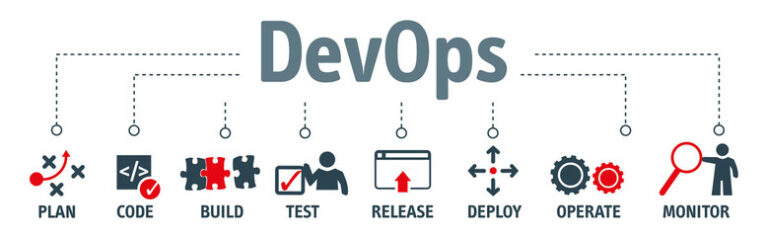
    DevOps is a set of practices designed to automate and streamline processes between software development and IT operations teams. Its primary goal is to build, test, and release software more rapidly and reliably. The term “DevOps” combines “development” and “operations,” highlighting the collaboration and synergy between these traditionally separate departments.

    Key Principles of DevOps

    1. Collaboration
    DevOps fosters close collaboration between development, operations, and other stakeholders. This approach promotes a culture of shared responsibility and common goals, enhancing team alignment and efficiency.

    2. Automation
    Central to DevOps is automation, which involves automating repetitive tasks such as testing, deployment, and infrastructure provisioning. Automation boosts efficiency, reduces human error, and accelerates workflows.

    3. Continuous Integration (CI)
    Continuous Integration (CI) refers to the practice of frequently integrating code changes into a shared repository (often multiple times per day). This is followed by automated builds and tests to identify and resolve issues early in the development cycle.

    4. Continuous Deployment (CD)
    Building on CI, Continuous Deployment (CD) involves automatically deploying code changes to production environments after they pass automated tests. This ensures faster, more frequent releases with minimal manual intervention.

    5. Monitoring and Feedback
    DevOps emphasizes continuous monitoring of application performance and user feedback. This approach allows teams to swiftly detect and address issues, iterate on improvements, and maintain high-quality user experiences.

    Benefits of DevOps

    By adopting DevOps practices, organizations can accelerate their software development and delivery processes. This approach improves collaboration and communication between teams, increases deployment frequency, and drives greater agility and innovation. The result is a more responsive development lifecycle that can adapt to changing market needs.

    DevOps Tools

    DevOps tools are essential for streamlining various stages of the software development lifecycle (SDLC), including planning, coding, building, testing, deploying, operating, and monitoring. Here’s a categorized list of some popular DevOps tools:

    Planning and Collaboration

    • Jira: Project management and issue tracking.
    • Trello: Visual project management.
    • Confluence: Documentation and collaboration.

    Source Code Management

    • Git: Distributed version control system.
    • GitHub: Cloud-based Git repository hosting service.
    • GitLab: Git repository manager with wiki, issue-tracking, and CI/CD pipeline features.
    • Bitbucket: Git repository hosting service.

    Continuous Integration and Continuous Deployment (CI/CD)

    • Jenkins: Open-source automation server for building, testing, and deploying.
    • CircleCI: Continuous integration and delivery platform.
    • Travis CI: CI service for building and testing projects hosted on GitHub.
    • GitLab CI/CD: Integrated CI/CD pipeline within GitLab.
    • Azure DevOps: Cloud service for CI/CD pipelines, repositories, and more.

    Configuration Management

    • Ansible: Automation tool for configuration management, application deployment, and task automation.
    • Puppet: Configuration management tool for automating infrastructure.
    • Chef: Automation platform for managing configurations and system state.
    • SaltStack: Automation and configuration management software.

    Containerization and Orchestration

    • Docker: Platform for developing, shipping, and running applications in containers.
    • Kubernetes: Open-source system for automating deployment, scaling, and management of containerized applications.
    • OpenShift: Kubernetes distribution from Red Hat with additional developer and operational tools.

    Infrastructure as Code (IaC)

    • Terraform: Tool for building, changing, and versioning infrastructure safely and efficiently.
    • CloudFormation: AWS service for modeling and setting up Amazon Web Services resources.
    • Pulumi: Infrastructure as code tool supporting multiple programming languages.

    Monitoring and Logging

    • Prometheus: Open-source monitoring and alerting toolkit.
    • Grafana: Open-source platform for monitoring and observability.
    • ELK Stack (Elasticsearch, Logstash, Kibana): Tools for searching, analyzing, and visualizing log data.
    • Splunk: Platform for searching, monitoring, and analyzing machine-generated big data.
    • Nagios: Monitoring system for computer systems, networks, and infrastructure.

    Security

    • Aqua Security: Security platform for containerized applications.
    • Twistlock (Palo Alto Prisma Cloud): Security for container and cloud-native applications.
    • Snyk: Finds and fixes vulnerabilities in dependencies.
    • HashiCorp Vault: Tool for managing secrets and protecting sensitive data.

    Collaboration and Communication

    • Slack: Messaging platform for team collaboration.
    • Microsoft Teams: Collaboration and communication tool from Microsoft.
    • Mattermost: Open-source messaging platform.

    Testing

    • Selenium: Framework for web application testing.
    • JUnit: Testing framework for Java programming language.
    • Postman: API testing tool.
    • JMeter: Load testing tool for analyzing and measuring the performance of various services.

    What is DevSecOps?

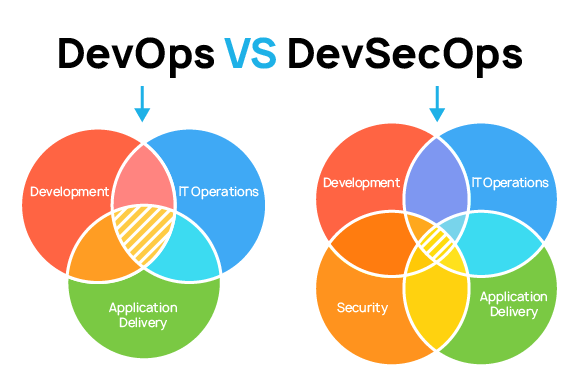
    DevSecOps is a modern approach to application security (AppSec) that emphasizes integrating security measures early and consistently throughout the software development lifecycle (SDLC). This approach prioritizes collaboration among development, operations, and security teams to embed security practices seamlessly into the software delivery process.

    How is DevOps different from DevSecOps?

    Understanding DevOps and DevSecOps

    DevOps (Development and Operations)

    DevOps is a methodology aimed at enhancing collaboration between software development and IT operations teams. Its core objectives include:

    • Automated Software Delivery: Streamline and automate software development, testing, and deployment processes for faster and more reliable releases.

    • Continuous Integration and Delivery (CI/CD): Implement CI/CD pipelines to facilitate frequent and automated integration and delivery of code changes.

    • Infrastructure Automation: Utilize tools and practices that automate infrastructure provisioning and management, increasing efficiency and reducing manual errors.

    DevOps emphasizes improving collaboration, accelerating deployment speed, and ensuring reliability in the software delivery process.


    DevSecOps (Development, Security, and Operations)
    DevSecOps builds upon the DevOps framework by embedding security practices throughout the software development lifecycle. Its focus areas include:

    • Shift-Left Security: Integrate security considerations early in the development process, addressing vulnerabilities from the beginning rather than as an afterthought.

    • Culture of Security: Promote a culture where security is a shared responsibility among developers, testers, and operations teams.

    • Automated Security Testing: Implement automated security controls and continuous monitoring within the CI/CD pipeline to detect and address security issues in real-time.

    DevSecOps enhances the DevOps model by incorporating security into every phase of development, aiming to build robust, secure applications while maintaining the agility and efficiency of DevOps practices.


    In Summary

    While DevOps focuses on improving collaboration between development and operations teams to streamline software delivery, DevSecOps extends this collaboration to include security, ensuring that security considerations are integrated throughout the development lifecycle.

    devSecOps

    Why is DevSecOps important?

    The Importance of DevSecOps in the Software Development Life Cycle (SDLC)

    DevSecOps is essential for embedding security throughout the Software Development Life Cycle (SDLC) from the very beginning. By integrating security early, vulnerabilities can be identified and resolved more easily and cost-effectively before they escalate in production or post-release. Implementing DevSecOps bridges the gaps between development, security, and operations, leading to the swift release of secure software. Here’s why DevSecOps is crucial:

    1. Enhanced Security

    DevSecOps integrates security practices throughout the SDLC, enabling early detection and remediation of security vulnerabilities. This proactive approach significantly reduces the likelihood of security breaches and protects sensitive data from potential threats.

    2. Risk Reduction

    Making security a priority from the start minimizes the risk of security incidents. Addressing security concerns during development helps mitigate potential risks associated with deploying vulnerable software into production environments.

    3. Compliance

    Adhering to stringent regulatory requirements is crucial for many industries. DevSecOps assists organizations in achieving and maintaining compliance with data protection and privacy regulations by embedding security controls and best practices throughout development.

    4. Cost Savings

    Identifying and fixing security issues early in the development cycle is more cost-effective than addressing them post-deployment. DevSecOps helps reduce costs associated with security incidents and regulatory fines by preventing vulnerabilities from reaching production.

    5. Business Continuity

    Security breaches can disrupt operations, harm reputations, and result in financial losses. DevSecOps promotes resilience by creating a secure foundation for applications and infrastructure, reducing the risk of downtime, and ensuring business continuity.

    6. Competitive Advantage

    In today’s security-conscious digital environment, customers value secure products and services. Adopting DevSecOps practices allows organizations to differentiate themselves from competitors by showcasing their commitment to security and building trust with the customer

    Which application security tools are used in DevSecOps?

    Indispensable Application Security Instruments in DevSecOps

    Incorporating an array of application security mechanisms throughout the Software Development Life Cycle (SDLC) is paramount for automating defensive protocols and mitigating vulnerabilities efficiently. Below is a detailed enumeration of pivotal security apparatuses within the DevSecOps paradigm:


    1. Static Application Security Testing (SAST) Instruments

    • SonarQube: Conducts exhaustive scrutiny of source code to unearth security weaknesses and coding inefficiencies, fortifying code hygiene and resilience.

    • Checkmarx: Employs static code analysis to unveil latent security loopholes within the codebase, facilitating early-stage remediation.

    • Fortify: Delivers a dual-pronged approach encompassing static and dynamic evaluations to expose security risks, enriching overall threat visibility.


    2. Dynamic Application Security Testing (DAST) Utilities

    • OWASP ZAP: Emulates malicious incursions on operational applications, uncovering security flaws such as SQL injection and cross-site scripting (XSS) to reinforce web security.

    • Burp Suite: A robust web security scanner adept at diagnosing vulnerabilities in web applications, empowering proactive vulnerability management.

    • Acunetix: Specializes in identifying an extensive spectrum of vulnerabilities, ranging from SQL injection to XSS, thereby augmenting security postures.


    3. Interactive Application Security Testing (IAST) Solutions

    • Contrast Security: Performs live behavioral analysis of applications, pinpointing vulnerabilities during runtime to ensure uninterrupted protection.

    • Veracode: Merges static and dynamic analysis techniques, delivering a holistic overview of application security to facilitate risk governance.

    • Synopsys: Executes interactive assessments to uncover runtime vulnerabilities, fostering perpetual security enhancement.


    4. Software Composition Analysis (SCA) Frameworks

    • Black Duck: Conducts meticulous scanning of open-source constituents to detect security flaws and licensing discrepancies, ensuring regulatory compliance.

    • Snyk: Identifies and remediates security gaps in software dependencies and open-source modules, advocating for fortified development practices.

    • WhiteSource: Automates security evaluations and license adherence for open-source components, diminishing the risk of employing compromised libraries.


    5. Container Security Solutions

    • Docker Security Scanning: Examines container images for vulnerabilities prior to deployment, ensuring robust containerization security.

    • Twistlock: Provides end-to-end security for containerized applications, incorporating runtime anomaly detection and threat mitigation.

    • Aqua Security: Delivers an extensive suite of tools for container image scrutiny and security enforcement, bolstering application integrity.


    6. Infrastructure as Code (IaC) Security Mechanisms

    • Checkov: Analyzes Terraform and CloudFormation templates for misconfigurations, ensuring infrastructural security alignment.

    • TerraScan: Detects compliance violations and security infractions within IaC configurations, advocating best practices adherence.

    • Bridgecrew: Facilitates automated security verifications for IaCand cloud deployments, streamlining security orchestration.


    7. Continuous Integration/Continuous Deployment (CI/CD) Security Augmentations

    • GitLab CI/CD: Embeds security verifications within the CI/CD pipeline, reinforcing the organization’s cybersecurity posture.

    • Jenkins: Supports the integration of security-centric plugins to fortify the CI/CD process, ensuring safer software rollouts.

    • CircleCI: Integrates security assessments into the CI/CD pipeline, leveraging dedicated security plugins to uphold continuous compliance.