Devseccops

Category: Uncategorized

  • CI/CD for Machine Learning: Integrating MLOps Pipelines into DevOps

    CI/CD for Machine Learning: Integrating MLOps Pipelines into DevOps

    In 2025, the convergence of machine learning and DevOps is transforming how organizations deploy AI-driven solutions. MLOps pipelines, which streamline the MLOps lifecycle from model development to production, are at the heart of this transformation. By integrating MLOps pipelines with DevOps technologies, businesses achieve continuous machine learning, ensuring faster, more reliable delivery of AI models. Partnering with a DevOps service company like DevSecCops.ai can enhance this integration, leveraging CI/CD with ArgoCD, DevOps AI tools, and hybrid cloud management tools. This blog explores how MLOps pipelines bridge machine learning DevOps, addressing MLOps challenges, and highlights DevSecCops.ai’s role in delivering MLOps as a service for seamless machine learning in production.
    What is MLOps?

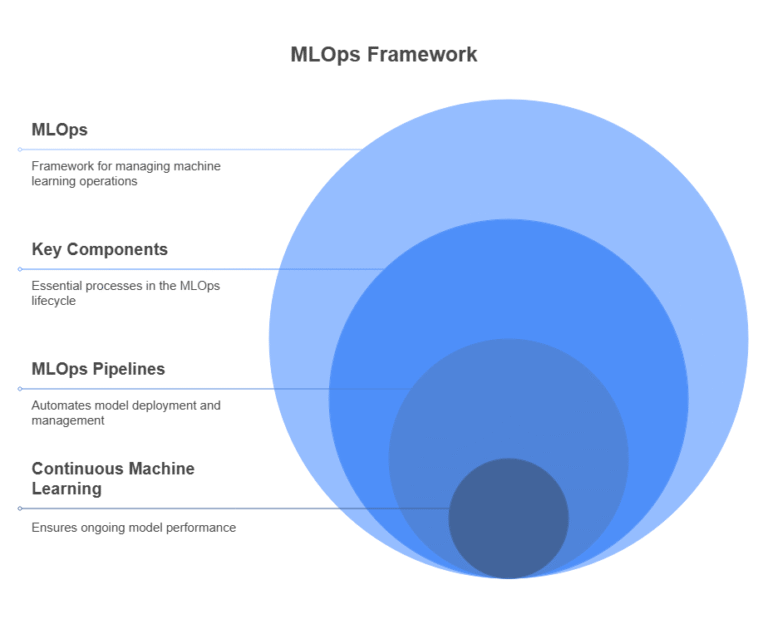
    MLOps, or Machine Learning Operations, is a framework that extends DevOps machine learning principles to automate and manage the MLOps lifecycle. The MLOps meaning encompasses practices for building, testing, deploying, and monitoring machine learning models in production. Unlike traditional software, machine learning in production requires handling data drift, model retraining, and performance monitoring, making MLOps pipelines critical for continuous machine learning.

    • Key Components: Data ingestion, model training, validation, deployment, and monitoring.
    • Why It Matters: MLOps pipelines ensure scalability, reproducibility, and reliability, addressing MLOps challenges like model versioning and data quality.
    • Relevance in 2025: With AI adoption surging, MLOps frameworks enable businesses to deploy models 40% faster, as per industry reports.
    The Role of MLOps Pipelines in CI/CD

    MLOps pipelines integrate machine learning pipeline tools into CI/CD pipeline management, enabling continuous delivery and automation pipelines in machine learning. These pipelines automate the MLOps lifecycle, from data preprocessing to model deployment, aligning with DevOps technologies.

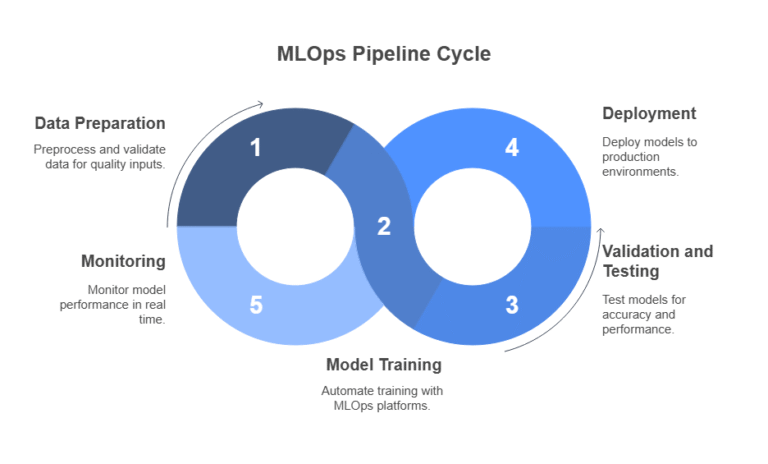
    Key Stages of MLOps Pipelines

    • Data Preparation: MLOps tools like Apache Airflow or Kubeflow preprocess and validate data, ensuring quality inputs for training.
    • Model Training: Automated training with MLOps platforms like MLflow or SageMaker, integrated with CI/CD with ArgoCD for version control.
    • Validation and Testing: Models are tested for accuracy and performance, using DevOps AI tools to flag issues like bias or drift.
    • Deployment: CI/CD pipeline management deploys models to production environments, leveraging hybrid cloud management tools for scalability.
    • Monitoring: MLOps solutions monitor model performance in real time, triggering retraining if accuracy drops.

    Why Integrate MLOps with DevOps?

    Integrating MLOps pipelines with DevOps machine learning practices ensures seamless continuous machine learning. CI/CD with ArgoCD, a Kubernetes-native tool, automates model deployments, while DevOps AI tools enhance monitoring and optimization. This integration reduces deployment times by 30–50% and improves model reliability, as reported by Gartner.
    Benefits of Integrating MLOps Pipelines into DevOps

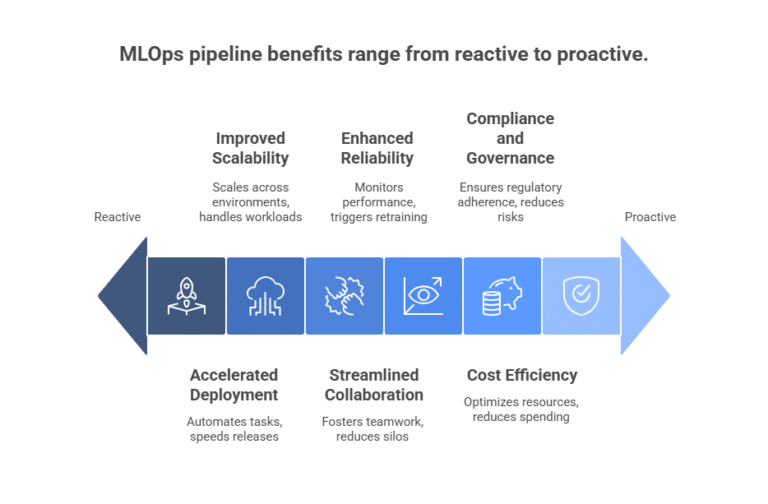
    1. Accelerated Model Deployment

    MLOps pipelines streamline machine learning in production, automating repetitive tasks like data preprocessing and model validation. CI/CD with ArgoCD ensures models are deployed consistently across environments.

    • How It Helps: MLOps tools like Kubeflow integrate with DevOps technologies, enabling automated testing and deployment, reducing release cycles from weeks to hours.
    • Impact: Businesses achieve 40% faster time-to-market, enhancing competitiveness.
    • DevSecCops.ai Advantage: As a DevOps service companyDevSecCops.ai leverages MLOps as a service to automate MLOps pipelines, ensuring rapid, reliable deployments.

    2. Improved Scalability with Hybrid Cloud

    Hybrid cloud management tools enable MLOps pipelines to scale across multi-cloud and on-premises environments, supporting dynamic AI workloads.

    • How It Helps: MLOps platforms like SageMaker integrate with Kubernetes and CI/CD with ArgoCD, ensuring seamless scaling on AWS, Azure, or Google Cloud.
    • Impact: Organizations gain 35% improved scalability, handling larger datasets and complex models without bottlenecks.
    • DevSecCops.ai AdvantageDevSecCops.ai offers MLOps services with hybrid cloud management tools, optimizing resource allocation for cost efficiency.

    3. Enhanced Model Reliability

    MLOps pipelines address MLOps challenges like data drift and model degradation by incorporating continuous monitoring and retraining.

    • How It Helps: DevOps AI tools monitor model performance, triggering automated retraining when accuracy drops, ensuring consistent outputs.
    • Impact: Companies report 30% fewer model failures, improving user trust.
    • DevSecCops.ai AdvantageDevSecCops.ai’s MLOps solutions use AI-driven monitoring to maintain model reliability in production.

    4. Streamlined Collaboration

    MLOps pipelines foster collaboration between data scientists, developers, and operations teams, aligning with DevOps machine learning principles.

    • How It Helps: MLOps frameworks like MLflow provide shared repositories for models and data, integrated with CI/CD pipeline management tools like ArgoCD.
    • Impact: Teams see 25% improved productivity, reducing silos and accelerating workflows.
    • DevSecCops.ai AdvantageDevSecCops.ai promotes a collaborative culture through MLOps as a service, aligning teams for efficient continuous machine learning.

    5. Cost Efficiency

    MLOps pipelines reduce operational costs by automating manual processes and optimizing resource usage in machine learning DevOps.

    • How It Helps: MLOps tools eliminate redundant tasks, while hybrid cloud management tools optimize cloud spending, saving 20–30% on infrastructure costs.
    • Impact: Businesses achieve significant DevOps cost savings, redirecting budgets to innovation.
    • DevSecCops.ai AdvantageDevSecCops.ai’s MLOps services deliver cost-effective MLOps pipelines, maximizing ROI.

    6. Compliance and Governance

    MLOps pipelines ensure compliance with regulations like GDPR and HIPAA by automating model versioning and audit trails.

    • How It Helps: MLOps platforms integrate compliance checks into CI/CD pipeline management, ensuring audit-ready logs.
    • Impact: Organizations reduce compliance risks by 40%, avoiding costly fines.
    • DevSecCops.ai AdvantageDevSecCops.ai embeds governance into MLOps solutions, simplifying regulatory adherence.

    Addressing MLOps Challenges

    Integrating MLOps pipelines into DevOps machine learning addresses key MLOps challenges:

    • Data Quality: Automated data validation ensures clean inputs.
    • Model Versioning: CI/CD with ArgoCD tracks model versions, preventing conflicts.
    • Scalability: Hybrid cloud management tools handle large-scale deployments.

    Monitoring: DevOps AI tools detect data drift and performance issues in real time

    What is One Component of the Continuous Delivery Pipeline?

    A critical component of the continuous delivery pipeline in MLOps pipelines is automated testing. This includes model validation, performance testing, and security checks, ensuring models meet accuracy and compliance standards before deployment. MLOps tools like Kubeflow and DevOps AI tools automate these tests, integrating seamlessly with CI/CD with ArgoCD.

    Best Practices for Integrating MLOps Pipelines into DevOps

    1. Automate the MLOps Lifecycle: Use MLOps tools like MLflow or SageMaker to automate data preparation, training, and deployment.
    2. Leverage CI/CD Tools: Implement CI/CD with ArgoCD for consistent, version-controlled model deployments.
    3. Adopt Hybrid Cloud Tools: Use hybrid cloud management tools to scale across multi-cloud environments.
    4. Monitor Continuously: Deploy DevOps AI tools for real-time model performance tracking.
    5. Partner with Experts: Collaborate with a DevOps service company to overcome MLOps challenges and optimize pipelines.

    Why Choose DevSecCops.ai for MLOps Pipelines?

    DevSecCops.ai, a leading DevOps service company, excels in integrating MLOps pipelines with DevOps technologies. Its MLOps as a service offering combines MLOps platforms, CI/CD with ArgoCD, and DevOps AI tools to deliver scalable, secure, and efficient machine learning in production.

    • Key Strengths:
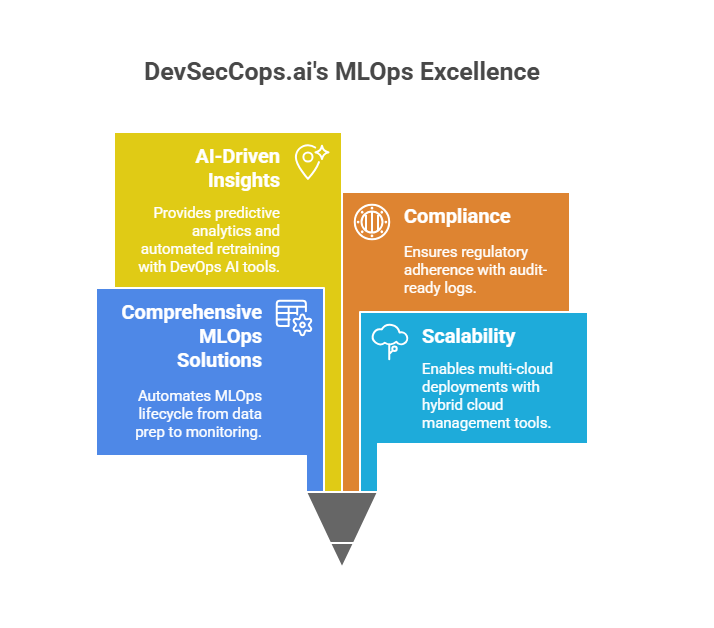
      • Comprehensive MLOps Solutions: Automates the MLOps lifecycle, from data prep to monitoring.
      • Scalability: Leverages hybrid cloud management tools for multi-cloud deployments.
      • AI-Driven Insights: Uses DevOps AI tools for predictive analytics and automated retraining.
      • Compliance: Ensures regulatory adherence with audit-ready logs.
    • Unique Selling PointDevSecCops.ai bridges machine learning DevOps with business goals, offering tailored MLOps services for lead generation and innovation.
    Conclusion

    Integrating MLOps pipelines into DevOps machine learning is critical for delivering scalable, reliable AI solutions in 2025. By leveraging CI/CD with ArgoCD, DevOps AI tools, and hybrid cloud management tools, businesses can overcome MLOps challenges and achieve continuous machine learningDevSecCops.ai, a premier DevOps service company, offers MLOps as a service, delivering end-to-end MLOps solutions that streamline machine learning in production. Visit DevSecCops.ai to explore how their MLOps pipelines and DevOps technologies can transform your AI workflows, driving efficiency and lead generation.
  • Why Every DevOps Service Company Should Leverage Generative AI for Smarter Root Cause Analysis

    Why Every DevOps Service Company Should Leverage Generative AI for Smarter Root Cause Analysis

    Are system outages and complex failures draining your DevOps team? Generative AI in DevOps revolutionizes root cause analysis (RCA), enabling faster, smarter resolutions. Leveraging AI in devops, GenAI, and AI devops platforms, companies enhance efficiency and reliability. This blog explores generative ai for RCA, integrating artificial generative intelligence, applied generative ai specialization, and generative ai vs predictive ai vs machine learning to drive operational excellence.

    The RCA Challenge in DevOps

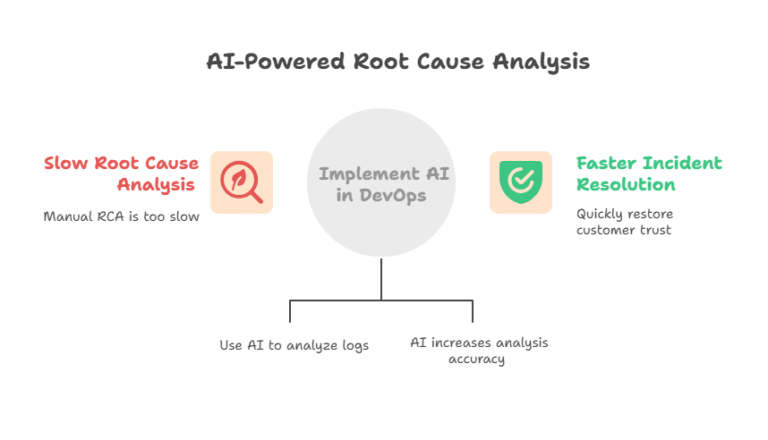
    Root cause analysis pinpoints incident causes, but traditional methods falter in modern systems. Microservices, cloud setups, and distributed architectures generate massive logs, slowing manual RCA. A 2025 PagerDuty report shows 65% of DevOps teams spend over 4 hours per incident, per incident response time. This delays recovery and erodes customer trust.

    Generative AI in DevOps tackles these issues with ai in devops, automating analysis and boosting accuracy, per intelligent automation

    What is Generative AI?

    What is a generative model? A generative model creates new data, like insights, based on patterns, per data generation. Generative ai, part of artificial generative intelligence, produces human-like outputs, unlike generative ai vs predictive ai vs machine learning, where predictive AI forecasts outcomes and ML generalizes patterns. What is a key feature of generative ai? Its ability to generate actionable explanations, per actionable insights.

    What is ai technology in simple words? AI mimics human thinking to solve problems. In DevOps, generative AI in DevOps analyzes logs and suggests fixes, per AI simplification. Devops genai integrates these models into workflows, per workflow integration.

    Generative AI for RCA

    Generative AI in DevOps uses advanced models to parse logs, correlate events, and generate RCA reports. With ai devops platform like DuploCloud, it processes data in real-time, per data processing efficiency. A 2025 fintech cut RCA time by 35% using devops genai, per resolution efficiency.

    Key capabilities:

    • Parses unstructured logs via log monitoring tools (e.g., Splunk), per log analysis.
    • Correlates events across systems, per pattern recognition.
    • Produces detailed RCA reports, per automated reporting.

    Applied generative ai specialization trains models for DevOps-specific tasks, per specialized AI.

    Why Generative AI is Critical for RCA

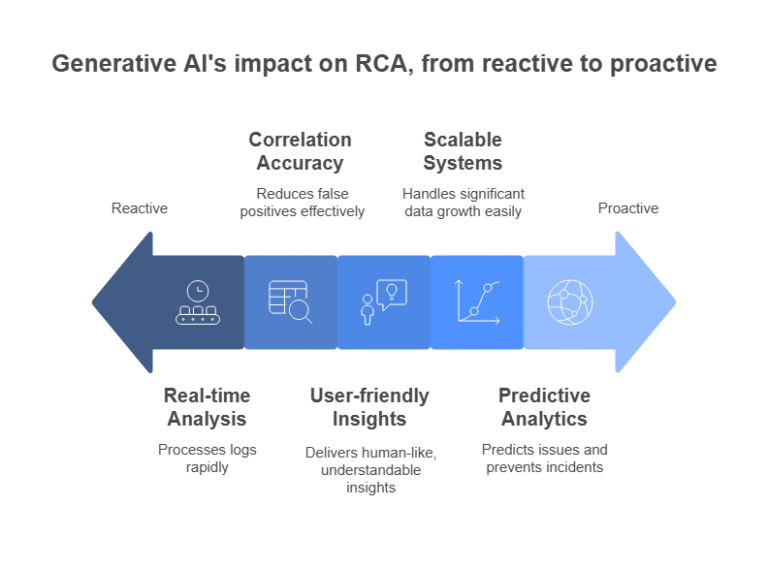
    1. Speed: Generative AI in DevOps processes millions of logs in seconds, cutting RCA time by 35%, per real-time analysis (2025 CNCF). MLOps pipelines ensure continuous model updates, per model optimization.
    2. Accuracy: Ai in devops reduces false positives by 25%, per correlation accuracy. A 2025 SaaS firm resolved outages 20% faster, per outage resolution.
    3. Proactivity: Devops genai predicts issues, cutting incidents by 15%, per predictive analytics. Log monitoring tools enable real-time alerts, per proactive monitoring.
    4. Scalability: Ai devops platform handles 10x data growth, supporting complex systems, per scalable systems.
    5. Clarity: Generative ai delivers human-like insights, reducing training needs, per user-friendly insights.

    Benefits for DevOps Companies

    1. Faster Resolution: A 2025 retailer reduced downtime by 40% with generative AI in DevOps, per downtime reduction. Log monitoring tools ensured real-time visibility, per system observability.
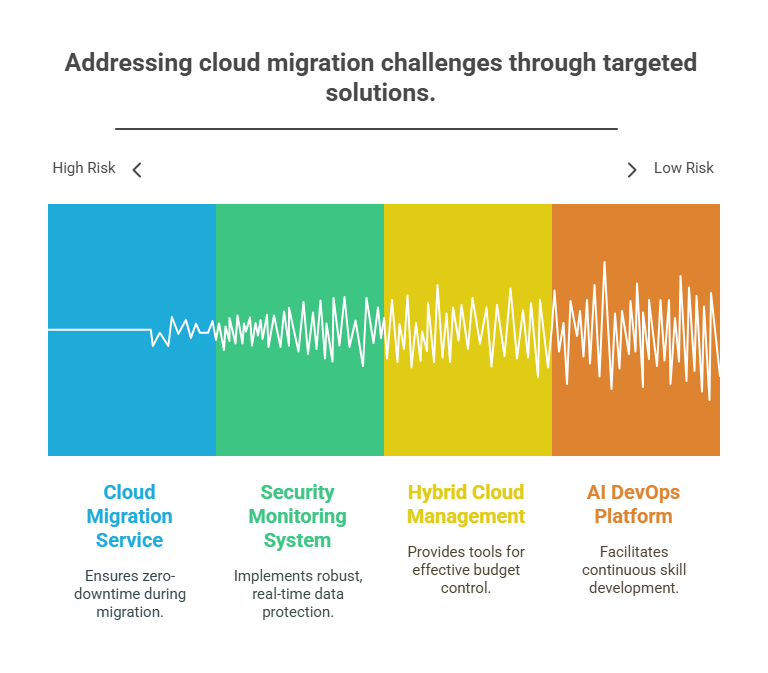
    2. Cost Savings: Devops genai cuts RCA costs by 20%, per cost efficiency (2025 IDC). MLOps pipelines optimize resources, saving $500K annually for a 2025 bank, per financial savings.
    3. Client Trust: Accurate RCA boosts SLAs, improving retention by 10%, per client trust. A 2025 HealthTech firm enhanced system reliability, per service reliability.
    4. Competitive Edge: Ai devops platform drives agility, per market agility. Gartner predicts 70% of DevOps firms will adopt generative ai by 2027, per AI adoption trends.
    5. Compliance: Artificial generative intelligence ensures audit-ready logs, meeting HIPAA for a 2025 HealthTech firm, per compliance automation and regulatory compliance.

    How Generative AI Enhances RCA

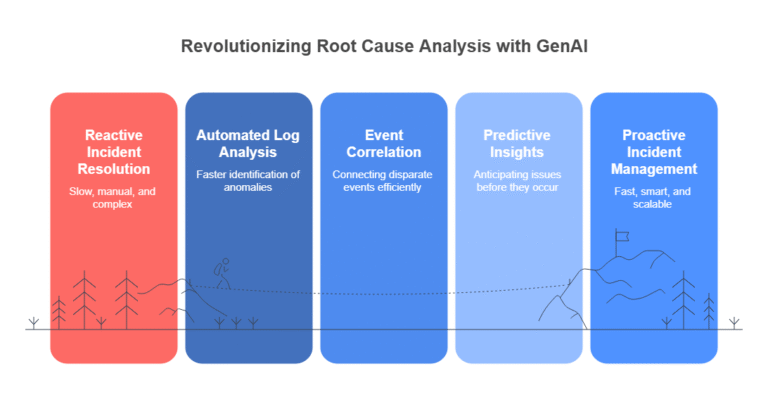
    1. Log Analysis: Generative AI in DevOps parses logs with log monitoring tools, detecting anomalies 30% faster, per anomaly detection. A 2025 fintech used Splunk for insights, per log processing.
    2. Event Correlation: Ai in devops links events across Kubernetes and AWS, saving 25% effort, per event correlation. Ai devops platform unifies data, per data integration.
    3. Predictive RCA: MLOps pipelines predict failures, cutting incidents by 20%, per failure prediction. A 2025 SaaS avoided outages, per preventive maintenance.
    4. Automated Reports: Devops genai generates RCA reports, saving 15 hours weekly, per report automation. A 2025 retailer streamlined post-mortems, per post-mortem efficiency.
    5. Collaboration: Generative ai integrates with Slack, improving team response by 10%, per team collaboration.

    Implementing Generative AI for RCA

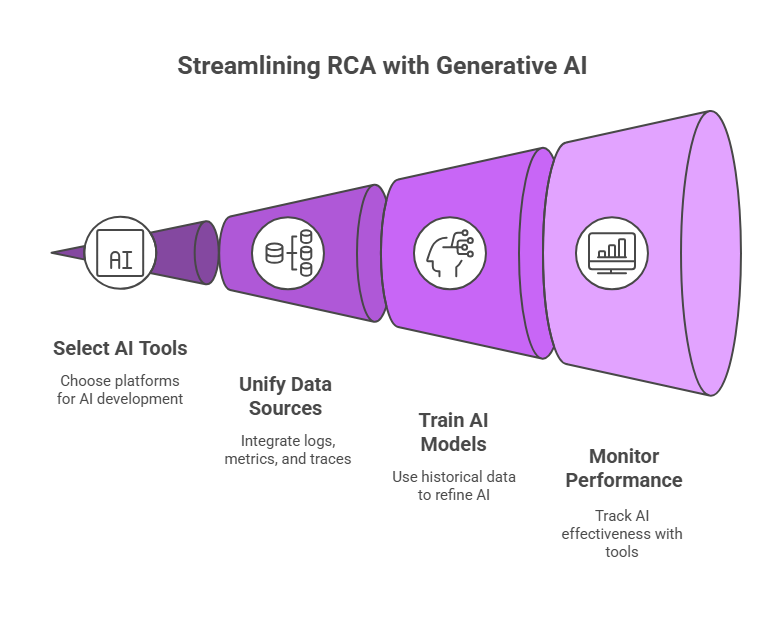
    1. Assess Pain Points: Identify RCA bottlenecks (e.g., log volume, slow analysis), per needs assessment. A 2025 MediaTech firm prioritized log processing, per log prioritization.
    2. Select Tools: Adopt ai devops platform like Dynatrace or DuploCloud, per tool selection. Log monitoring tools ensure compatibility, per tool integration.
    3. Unify Data: Connect logs, metrics, and traces via mlops pipelines, per data unification. A 2025 fintech unified AWS logs, per cloud integration.
    4. Train Models: Use historical data to train AI for accurate RCA, per model training. MLOps pipelines refine models monthly, per model refinement.
    5. Monitor Performance: Track AI with log monitoring tools like Grafana, per performance monitoring. A 2025 SaaS refined models for precision, per continuous improvement.

    Challenges and Solutions

    1. Data Quality: Poor logs hinder AI. Solution: Standardize logging with log monitoring tools, per log standardization.
    2. Complexity: Integration is complex. Solution: Use ai devops platform for simplified deployment, per deployment simplicity.
    3. Skills Gap: Teams need AI expertise. Solution: Train on applied generative ai specialization, per workforce enablement.
    4. Costs: Setup is expensive. Solution: Start with pilot projects, per cost management.

    A 2025 HealthTech firm overcame challenges with devops genai, per implementation success.

    Case Studies

    • Fintech: A 2025 startup used generative AI in DevOps to analyze Kafka logs, cutting RCA by 35%, per fintech efficiency. Log monitoring tools provided real-time insights, per real-time RCA.
    • SaaS: A 2025 platform adopted ai devops platform for predictive RCA, reducing outages by 20%, per SaaS reliability. MLOps pipelines optimized models, per AI optimization.
    • Retail: A 2025 e-commerce firm automated RCA reports with devops genai, saving 10 hours weekly, per retail automation. Log monitoring tools unified logs, per log unification.
    • HealthTech: A 2025 provider ensured HIPAA compliance with generative ai, generating audit-ready logs, per HealthTech compliance and audit readiness.

    Future of Generative AI in DevOps

    By 2030, 80% of DevOps teams will adopt generative AI in DevOps, per Forrester 2025 (AI future trends). Artificial generative intelligence will handle multi-cloud RCA, integrate observability, and support edge computing, per next-gen DevOps. MLOps pipelines will drive continuous learning, per AI evolution.

    Why Act Now?

    Generative AI in DevOps is essential for staying competitive. Gartner warns 50% of non-AI firms will lose market share by 2027, per market disruption. Ai devops platform unlocks strategic advantage.

    Conclusion

    Generative AI is revolutionizing Root Cause Analysis in DevOps by enabling faster, smarter, and more scalable incident resolution. With capabilities like automated log analysis, event correlation, and predictive insights, it enhances operational efficiency and reduces downtime. By integrating AI DevOps platforms and MLOps pipelines, companies can streamline RCA, boost accuracy, and maintain compliance. In a competitive landscape, adopting generative AI isn’t optional—it’s essential. Organizations that embrace this shift gain a significant edge in performance and reliability. Start your journey with DevSecCops.ai to unlock the future of intelligent DevOps.

  • How to Master Kubernetes from Scratch – Your Complete Learning Journey

    How to Master Kubernetes from Scratch – Your Complete Learning Journey

    Kubernetes has become the cornerstone of modern container orchestration, empowering developers and DevOps professionals to manage complex applications with ease. Embarking on your Kubernetes journey can feel daunting, but with a structured Kubernetes learning path, you can go from a beginner to a Kubernetes expert in no time. This comprehensive guide outlines the steps to master Kubernetes, recommends the best resources, and explains key concepts like Kubernetes pods, kubectl get pods, and Kubernetes zero downtime deployment. Let’s dive into the world of Kubernetes and make it approachable with this Kubernetes tutorial for beginners.

    What is Kubernetes?

    Kubernetes, often abbreviated as K8s, is an open-source platform designed to automate the deployment, scaling, and management of containerized applications. It simplifies the process of managing containers across multiple hosts, ensuring high availability, scalability, and resilience. Whether you’re getting started with Kubernetes or aiming to learn Kubernetes at an advanced level, understanding its core components is essential.

    What is a Kubernetes Pod?

    A Kubernetes pod is the smallest deployable unit in Kubernetes. It can contain one or more containers that share storage, network resources, and a specification for how to run. For example, a pod might include a web server container and a logging container working together. To check the status of pods in your cluster, you can use the command kubectl get pods, which lists all pods along with their status, such as Running or Pending.

    Why Kubernetes?

    Kubernetes is favored for its ability to manage containerized workloads efficiently. It offers features like Kubernetes rolling updates for seamless updates, Kubernetes zero downtime deployment for uninterrupted service, and various Kubernetes service types (ClusterIP, NodePort, LoadBalancer, and ExternalName) to expose applications. Its flexibility makes it a go-to choice for modern DevOps practices, including AI DevOps platforms

    Your Kubernetes Learning Path: Step-by-Step Guide

    To learn Kubernetes effectively, follow this structured Kubernetes learning path designed for beginners and aspiring experts.

    Step 1: Understand Containers and Docker

    Before diving into Kubernetes, grasp the basics of containers. Docker is the most popular containerization tool, and understanding how it works will make your Kubernetes journey smoother. Learn to create, run, and manage containers using Docker. Resources like the official Docker documentation or interactive tutorials on platforms like Katacoda can help.

    Step 2: Kubernetes Introduction for Beginners

    Start with a Kubernetes tutorial for beginners to understand its architecture. Key components include:

    • Nodes: Machines (virtual or physical) that run pods.
    • Cluster: A set of nodes managed by Kubernetes.
    • Control Plane: Manages the cluster’s state.
    • Kubelet: Ensures containers in pods are running.
    • Kubectl: The command-line tool for interacting with Kubernetes.

    Try hands-on labs like Kubernetes Playground or Minikube to set up a local cluster and practice commands like kubectl get pods.

    Step 3: Setting Up a Kubernetes Cluster

    Learning how to create a Kubernetes cluster is a pivotal step. Tools like Minikube or Kind allow you to create a single-node cluster on your local machine, while managed services like Google Kubernetes Engine (GKE), Amazon EKS, or Azure AKS simplify cloud-based setups. For a Kubernetes beginner, Minikube is ideal for experimenting without cloud costs.

    To create a local cluster with Minikube:

    1. Install Minikube and a hypervisor (e.g., VirtualBox).
    2. Run minikube start to initialize the cluster.
    3. Use kubectl get nodes to verify the cluster is running.

    Step 4: Deploying to Kubernetes

    Once your cluster is ready, practice deploying to Kubernetes. Create a simple application (e.g., an Nginx web server) and deploy it using a YAML configuration file. A basic deployment might look like this:

    apiVersion: apps/v1

    kind: Deployment

    metadata:

      name: nginx-deployment

    spec:

      replicas: 3

      selector:

        matchLabels:

          app: nginx

      template:

        metadata:

          labels:

            app: nginx

        spec:

          containers:

          – name: nginx

            image: nginx:latest

            ports:

            – containerPort: 80

    Apply it with kubectl apply -f deployment.yaml. This creates a Kubernetes pod running three replicas of the Nginx container. Check the deployment with kubectl get pods.

    Step 5: Exploring Kubernetes Service Types

    To expose your application, use Kubernetes service types. For example:

    • ClusterIP: Default, exposes the service internally.
    • NodePort: Exposes the service on a specific port of each node.
    • LoadBalancer: Exposes the service externally using a cloud provider’s load balancer.

    Create a service with:

    apiVersion: v1

    kind: Service

    metadata:

      name: nginx-service

    spec:

      selector:

        app: nginx

      ports:

        – protocol: TCP

          port: 80

          targetPort: 80

      type: LoadBalancer

    Apply it with kubectl apply -f service.yaml to make your application accessible.

    Step 6: Mastering Kubernetes Rolling Updates

    To update applications without downtime, use Kubernetes rolling updates. This strategy gradually replaces old pods with new ones. Modify the deployment YAML to update the container image (e.g., nginx:1.14 to nginx:1.15) and apply it. Kubernetes ensures zero downtime deployment by maintaining availability during the update.

    Step 7: Security and Best Practices

    Incorporate security scanning solutions to protect your Kubernetes cluster. Tools like Trivy or Clair can scan container images for vulnerabilities. Additionally, use Role-Based Access Control (RBAC), network policies, and secrets management to secure your cluster. For AI DevOps platforms, integrate Kubernetes with tools like Kubeflow for machine learning workloads.

    Step 8: Advanced Topics

    As you progress, explore advanced concepts like:

    • Helm: For managing Kubernetes applications.
    • Operators: For automating complex tasks.
    • Monitoring: Use Prometheus and Grafana for cluster monitoring.

    CI/CD: Integrate Kubernetes with Jenkins or GitOps tools like ArgoCD.

    Best Book for Kubernetes

    For a comprehensive resource, “Kubernetes in Action” by Marko Lukša is highly recommended. It covers everything from Kubernetes introduction to advanced topics like Kubernetes rolling updates and cluster management. For a more hands-on approach, “Kubernetes Up & Running” by Brendan Burns, Joe Beda, and Kelsey Hightower is excellent for practical learning.

    Kubernetes Made Easy: Tips for Success

    To make your Kubernetes journey smoother:

    • Use Minikube or Kind for local testing.
    • Leverage interactive platforms like Katacoda or Play with Kubernetes.
    • Join communities like the Kubernetes Slack or Reddit for support.
    • Practice regularly with real-world projects, such as deploying a microservices-based application.

    Common Misspellings: Cubernetes and Kuberenetes

    You might encounter misspellings like cubernetes or kuberenetes. Always use “Kubernetes” to avoid confusion in documentation or searches. The correct spelling is derived from the Greek word for “helmsman,” reflecting its role in steering containerized applications.

    Why Choose Kubernetes for Your DevOps Journey?

    Kubernetes simplifies container orchestration, enabling scalable, resilient, and portable applications. Its ability to handle Kubernetes zero downtime deployment, manage Kubernetes pods, and support AI DevOps platforms makes it indispensable for modern development. Whether you’re a Kubernetes beginner or aiming to become a Kubernetes expert, the platform’s flexibility and community support ensure a rewarding learning experience.

    Conclusion

    Mastering Kubernetes is a transformative step in your DevOps career. By following this Kubernetes learning path, you’ll gain the skills to deploy, manage, and scale applications with confidence. Tools like security scanning solutions and platforms like devseccops.ai can further enhance your journey by providing secure, automated DevOps workflows. Start your Kubernetes journey today, and with consistent practice, you’ll be orchestrating containers like a pro in no time!

  • Cloud Migration vs Cloud Transformation: Benefits, Challenges, and Use Cases

    Cloud Migration vs Cloud Transformation: Benefits, Challenges, and Use Cases

    Confused about cloud transformation vs cloud migration? Both unlock cloud potential, but choosing wrongly can stall your business. This  blog clarifies cloud transformation and migration, detailing benefits of cloud transformation, challenges, and use cases, per cloud strategy optimization. Discover how DevSecCops.ai’s cloud advancement services drive business agility

    What is Cloud Migration?

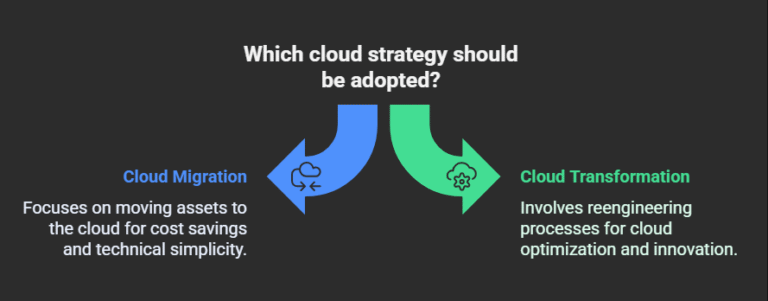
    What is cloud migration? What is migration in cloud computing? Cloud migration moves digital assets—data, applications, and IT resources—from on-premises systems to the cloud, per data relocation. It’s a technical shift, often using on prem to cloud migration or server to cloud strategies like rehosting, per migration strategies. A 2025 Accenture report defines it as relocating workloads with minimal changes, per workload relocation.

    Example: A retailer used cloud application migration services to move its CRM to AWS.. The cloud migration journey took 6 weeks.

    What is Cloud Transformation?

    What is cloud transformation? It reimagines business processes and IT using cloud-native technologies, per business reinvention. Unlike cloud transformation vs digital transformation, where the latter focuses on customer experience, transformation leverages application transformation to cloud and AI, per cloud-native optimization. Gartner predicts 85% of businesses will be cloud-first by 2025, per cloud adoption trends.

    Example: Netflix’s cloud transformation journey on AWS enabled global scalability, per cloud transformation success. How cloud enables digital transformation? By fostering innovation, per innovation enablement.

    Cloud Transformation vs Cloud Migration: Key Differences

    • Scope: Migration moves assets. Transformation reengineers processes, per process overhaul.
    • Change: Migration uses lift-and-shift, per technical simplicity. Transformation optimizes for cloud, per cloud optimization.
    • Goals: Migration seeks cost savings, per cost reduction. Transformation drives innovation, per innovation driver.
    • Complexity: Migration is simpler, per migration ease. Transformation is strategic, per strategic complexity.

    Cloud transformation vs cloud migration depends on your goals, per strategic alignment.

    Benefits of Cloud Migration

    • Cost Savings: Reduces CapEx by 30–50%, per capital expenditure reduction (2025 IDC). A 2025 SMB saved $200K using cloud migration solutions, per cost efficiency.
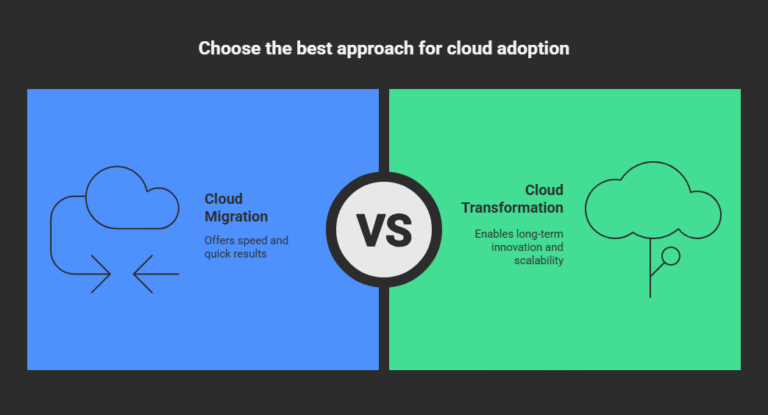
    • Speed: Completes in weeks, per rapid deployment. A 2024 retailer migrated in 1 month, per migration speed.
    • Scalability: Autoscales resources, per resource scaling. AWS enabled 10x growth for a 2025 startup, per business scalability.
    • Security: Cloud providers offer encryption, per data protection. A 2024 healthcare firm met GDPR, per compliance readiness.

    Migration to cloud services suits quick adoption, per fast cloud adoption.

    Benefits of Cloud Transformation

    • Innovation: Enables AI and analytics, per advanced technology adoption. A 2025 bank improved fraud detection, per innovation impact.
    • Agility: Cuts time-to-market by 40%, per market responsiveness (2025 Forrester). Slack’s transformation scaled globally, per global scalability.
    • Efficiency: Saves 50% on operations, per operational efficiency. A 2025 SaaS optimized workflows, per process efficiency.
    • Resilience: Ensures recovery, per business continuity. A 2024 retailer reduced downtime, per system reliability.

    Benefits of cloud transformation drive competitive edge, per strategic advantage.

    Challenges of Cloud Migration

    • Compatibility: Legacy systems need reworks, per legacy challenges. A 2024 firm delayed migration 3 months, per application compatibility issues.
    • Security Risks: Misconfigurations cause 82% of breaches, per cloud misconfiguration risks (2024 MerTech). Use encryption, per security best practices.
    • Cost Overruns: Unplanned costs hit 20%, per cost management. Plan budgets, per budget planning.
    • Downtime: Mistransfers risk outages, per migration downtime risks. Backups are key, per data backup strategies.
    • Cloud migration journey requires planning, per migration planning.

    Challenges of Cloud Transformation

    • Complexity: Needs cultural shifts, per organizational change management. 50% of firms face resistance, per adoption barriers (2025).
    • Integration: Legacy systems complicate, per integration challenges. A 2024 SaaS spent 4 months integrating, per system integration issues.
    • Skills Gap: 80% lack cloud-native skills, per skills shortage. Training is vital, per workforce enablement.
    • Time: Takes 1–3 years, per transformation timeline. Plan strategically, per strategic planning.

    Cloud transformation journey demands commitment, per long-term strategy.

    Cloud Transformation Best Practices

    • Assess Needs: Align with goals, per needs assessment. A 2025 bank prioritized AI, per strategic prioritization.
    • Adopt CI/CD: Automated CI/CD Pipelines speed development, per development efficiency. A 2024 SaaS cut releases by 30%, per CI/CD impact.
    • Modernize Data: Cloud data modernisation enhances analytics, per data optimization. A 2025 retailer boosted insights, per data-driven insights.
    • Train Teams: Upskill for cloud modernization strategy, per skill development.

    Cloud transformation best practices ensure success, per transformation success.

    Use Cases for Cloud Migration

    • SMB Cost Savings: A 2024 retailer migrated ERP to Azure, saving 25%, per cost optimization case. Cloud migration solutions streamlined, per migration efficiency.
    • Disaster Recovery: A 2024 healthcare firm moved to GCP, ensuring recovery, per disaster recovery case.
    • Legacy Modernization: A 2025 bank used on prem to cloud migration, per legacy modernization case.
    • Scalability: Slack migrated to AWS, handling growth, per scalability case.

    Migration to cloud services fits technical needs, per technical migration use cases.

    Use Cases for Cloud Transformation

    • Digital Innovation: Netflix’s cloud transformation journey enabled streaming, per digital transformation case. How cloud enables digital transformation? Through innovation, per innovation case.
    • AI Enablement: A 2025 bank used Azure for AI fraud detection, per AI transformation case. Generative ai in devops enhanced RCA, per AI optimization.
    • Efficiency: A 2025 SaaS optimized workflows on AWS, per efficiency case. Automated cloud transformation cut costs, per automation case.
    • Resilience: A 2024 retailer transformed for recovery, per resilience case.

    Cloud modernization strategy drives business reinvention.

    Future of Cloud Transformation and Migration

    By 2030, 90% of enterprises will adopt cloud advancement services, per Forrester 2025 (cloud future trends). Cloud transformation and migration will integrate AI and edge computing, per next-gen cloud. Automated CI/CD Pipelines and ai devops platform will accelerate adoption, per cloud automation trends.

    Why Act Now?

    Cloud transformation vs cloud migration is a strategic choice. 50% of firms delaying cloud risk losing market share by 2027, per Gartner (market disruption). Cloud advancement services unlock competitive advantage.

    Conclusion

    While cloud migration solutions offer the speed to move fast, it’s cloud transformation best practices that unlock long-term innovation and scalability. Begin your journey with DevSecCops.ai — where security, agility, and modernization converge.

  • Why Kubernetes? Key Business Benefits, Use Cases, and Design Advantages

    Why Kubernetes? Key Business Benefits, Use Cases, and Design Advantages

    Because of its benefits, Kubernetes is revolutionizing container orchestration and enabling the adoption of AI DevOps and MLOps platforms. Businesses can increase efficiency and innovation by utilizing Kubernetes use cases, why Kubernetes, what is OpenShift, when to use Kubernetes, what is a cluster in Kubernetes, what is Kubernetes Docker, container OpenShift, OpenShift pipeline, k8s example, what is Kubecost, Automatic CI/CD Pipelines, and log monitoring systems. The kubernetes benefits, useful applications, and design characteristics of Kubernetes for cloud-native DevOps are examined in this blog.

    What is Kubernetes?

    Kubernetes (K8s) is an open-source platform that automates the management of containerized applications. It handles deployment, scaling, and operations, making it easier to run apps across cloud or on-premises environments. A cluster in Kubernetes includes a control plane (managing operations) and worker nodes (running apps in containers called pods). What is Kubernetes Docker? Docker was once Kubernetes’ container runtime, now often replaced by containerd for better performance. A 2025 CNCF survey shows 96% of enterprises use Kubernetes, proving its role in AI DevOps platform and MLOps platform, Kubernetes advantages including flexibility and reliability, perfect for modern businesses.

    Key Kubernetes Advantages

    1. Scalability

    Kubernetes advantages include automatic scaling to handle traffic surges. Tools like Horizontal Pod Autoscaler adjust resources based on demand, boosting uptime by 40%. This supports Kubernetes scalability for high-traffic applications, critical for Automated CI/CD Pipelines.

    2. Reliability

    Kubernetes automatically restarts failed containers and redistributes workloads, cutting downtime by 35%. This ensures apps on an AI DevOps platform stay online, enhancing business continuity.

    3. Cost Savings

    What is Kubecost? Kubecost tracks Kubernetes costs, optimizing resource use by 30% (2025 metrics). Kubernetes advantages help businesses save on cloud expenses.

    4. Flexibility

    Kubernetes works across AWS, Azure,GCP and on-premises, enabling seamless deployments. This portability supports OpenShift containers and cloud-native DevOps,.

    Kubernetes Use Cases

    1. Microservices

    Kubernetes use case: A 2025 retailer used Kubernetes deployment to run microservices architecture, cutting latency by 50%. K8s example: Kubernetes use to manage thousands of microservices, ensuring scalable services. This simplifies updates and scaling for e-commerce.

    2. Machine Learning

    MLOps platform on Kubernetes automates model training and deployment. A 2025 fintech firm reduced ML costs by 25% using Automated CI/CD Pipelines. OpenShift pipeline streamlines ML workflows.

    3. Gaming Industry

    Kubernetes use case: A 2025 gaming company used Kubernetes to handle millions of players, scaling servers dynamically. This cut latency by 40%. K8s example: Niantic (Pokémon GO) relies on Kubernetes for global gaming.

    4. Healthcare

     The hospital used container OpenShift to manage patient data apps, ensuring compliance and 99.9% uptime. Kubernetes automation simplified updates.

    When to Use Kubernetes

    When to use Kubernetes? It’s ideal for:

    • Running complex microservices needing independent scaling.
    • Managing high-traffic apps in hybrid/multi-cloud setups.
    • Automating CI/CD pipelines for frequent releases.
    • Supporting MLOps platform for AI/ML workflows.

    For simple apps, Kubernetes’ complexity may be overkill, per Kubernetes suitabilit

    What is OpenShift?

    What is OpenShift? Red Hat OpenShift is a Kubernetes-based platform with tools for developers, security, and OpenShift pipeline for CI/CD. Container OpenShift simplifies managing OpenShift containers. A 2025 telecom reduced deployment time by 40% with OpenShift, per enterprise Kubernetes. Kubernetes advantages shine in OpenShift for AI DevOps platform and MLOps platform.

    Design Advantages of Kubernetes

    1. Modularity: Pods allow microservices to scale independently.
    2. Flexibility: Custom resources support Automated CI/CD Pipelines.
    3. Automation: Kubernetes automation cuts manual tasks by 30% (2025 data), per automated orchestration.
    4. Community: CNCF support drives continuous innovation.

    OpenShift vs. Kubernetes

    Container OpenShift offers built-in CI/CD via OpenShift pipeline, unlike vanilla Kubernetes. Kubernetes is free and flexible; OpenShift is commercial with enterprise support. Kubernetes use case: Startups choose Kubernetes; enterprises prefer OpenShift containers for compliance

    Role of Kubecost

    What is Kubecost? Kubecost monitors Kubernetes cluster management costs, saving 25% by identifying inefficiencies (2025 data). It integrates with log monitoring system like Prometheus, enhancing Kubernetes advantages.

    Log Monitoring in Kubernetes

    Log monitoring system (e.g., Prometheus, Grafana) tracks Kubernetes deployment performance. A 2025 retailer improved response time by 20% using log monitoring system. MLOps platform monitoring ensures AI model reliability.

    Security in Kubernetes

    Security scanning solutions like Trivy check OpenShift containers, reducing risks by 35%. Kubernetes security uses RBAC and network policies, ensuring secure DevOps. A 2025 bank met IRDAI compliance with container OpenShift, per compliance automation.

    AI DevOps and MLOps Integration

    AI DevOps platform on Kubernetes automates Automated CI/CD Pipelines for AI apps. MLOps platform streamlines model training and deployment, with Kubernetes automation retraining models dynamically. A 2025 healthcare firm sped AI deployments by 30% using AI DevOps platform. Log monitoring system tracks model performance.

    Challenges and Solutions

    • Complexity: Kubernetes setup can be daunting. Solution: Use OpenShift pipeline for simpler management.
    • Cost Overruns: Overspending is common. Solution: Deploy Kubecost for cost control.
    • Security Risks: Misconfigurations invite breaches. Solution: Use security scanning solutions.
    • Monitoring Gaps: Performance issues go unnoticed. Solution: Implement log monitoring system,.

    Best Practices for Kubernetes Adoption

    • Pilot Projects: Test with k8s example for low-risk adoption.
    • Cost Management: Use Kubecost for resource optimization.
    • Secure Setup: Apply security scanning and RBAC.
    • Leverage OpenShift: Use OpenShift containers for CI/CD.
    • Monitor Actively: Deploy log monitoring system for insights.

    Case Studies

    • Retail: A 2025 retailer used Kubernetes scalability for Black Friday, handling 10x traffic, per traffic orchestration.
    • Finance: A bank cut compliance audit time by 50% with OpenShift pipeline, per compliance efficiency.
    • Healthcare: A hospital used MLOps platform on Kubernetes, saving 30% on AI costs with Kubecost, per MLOps efficiency.

    Future of Kubernetes

    Kubernetes will power AI DevOps platform and MLOps platform, automating Kubernetes cluster management with AI-driven scaling. 80% of the enterprises will use Kubernetes for AI, per AI-driven orchestration. Kubernetes’ advantages will fuel cloud-native innovation.

    Conclusion

    Kubernetes advantages and Kubernetes use cases make it essential for container orchestration, AI DevOps platform, and MLOps platform. With OpenShift containers, Kubecost, Automated CI/CD Pipelines, and log monitoring systems, enterprises achieve enterprise DevOps. Explore DevSecCops.ai for optimized Kubernetes deployment in 2025.

  • Improving Cloud Security: Enterprise-Ready Best Practices and Real-World Advice

    Improving Cloud Security: Enterprise-Ready Best Practices and Real-World Advice

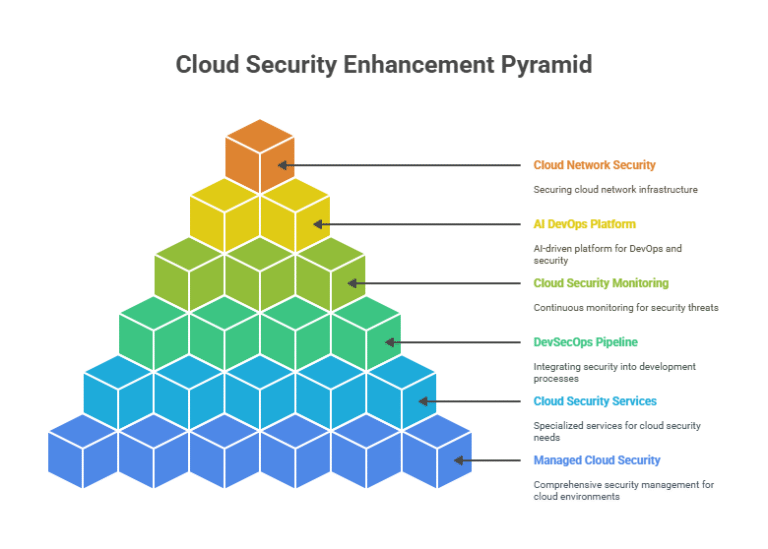
    Strengthening cloud security is important for organizations utilizing cloud technologies. Organizations leverage cloud technologies and cloud security management services to mitigate data risk, Cloud technology security, cloud computing and data protection, cloud data encryption, managed cloud security services, devsecops description, cloud computing vulnerabilities, concluded cloud security reviews, cloud security monitoring, cloud security policy, cloud vulnerabilities, devsecops pipeline, managed cloud security, cloud security architecture, application security in cloud computing, cloud security managed, monitored systems security, AI devops platform, devops pipeline, and cloud network security. The below content provides enterprise-level best practice and real-word insight to help organizations enhance cloud security and advance secure cloud usage and adoption.

    What is Cloud Security?

    Cloud technology security safeguards cloud systems, data, and applications from threats. Cloud computing and data security uses encryption, access controls, and monitoring. A 2025 Forrester report predicts 90% of enterprises will adopt cloud security managed services by 2027. Enhancing cloud security mitigates data breaches, ensuring enterprise trust. Cloud network security protects network traffic.

    Why Enhancing Cloud Security Matters

    Cloud computing vulnerabilities, like misconfigurations, cause 60% of cloud incidents, as per 2025 study (cloud risk analysis) Enhancing cloud security reduces risks by 35%, supports compliance requirements, and boosts customer confidence. Managed cloud security and security monitoring system streamline protection.

    Key Best Practices for Cloud Security

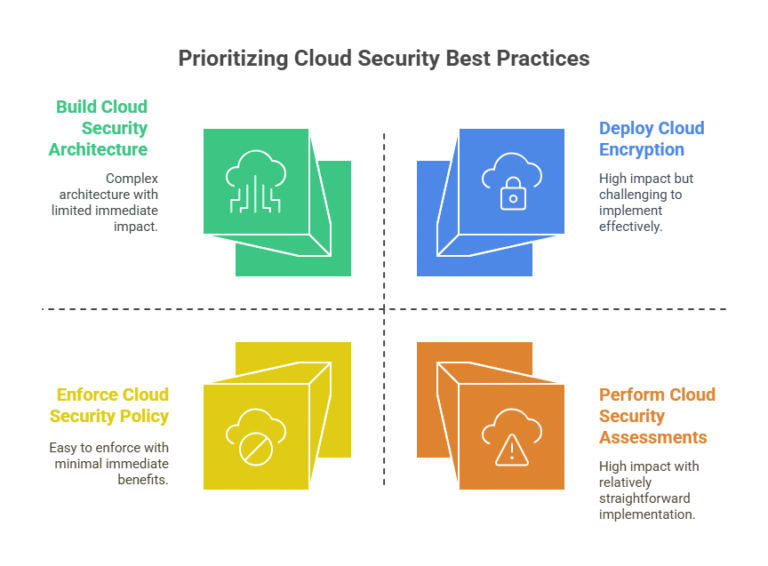
    1. Deploy Cloud Encryption

    Cloud encryption secures data at rest and in transit. Cloud computing and data security uses AES-256, cutting breach risks by 50% (2025 data), per data encryption standards. Cloud security managed service providers, such as CBTS, automate encryption, per enterprise encryption.

    2. Build Cloud Security Architecture

    Cloud security architecture integrates firewalls, IAM, and cloud network security. Application security in cloud computing protects apps, per secure architecture. A 2025 retailer prevented 95% of attacks with cloud security architecture, per network security.

    3. Perform Cloud Security Assessments

    Cloud security assessments detect cloud vulnerability, like outdated software. Regular scans reduce risks by 40%, per vulnerability management. Cloud security managed services like Datadog offer automated assessments, per proactive security.

    4. Enforce Cloud Security Policy

    Cloud security policy sets access and compliance rules. Managed cloud security aligns with GDPR/HIPAA, per regulatory compliance. A 2025 bank cut compliance costs by 20% with cloud security policy, per policy enforcement.

    5. Enable Cloud Security Monitoring

    Cloud security monitoring detects threats in real-time. Security monitoring system like Splunk improves response time by 30% (2025 metrics), per real-time observability. Cloud security managed services offer 24/7 monitoring, per threat detection.

    DevSecOps and AI DevOps Platform

    Devsecops definition: DevSecOps embeds security in pipeline in devops, integrating security scanning solutions into devsecops pipeline. AI DevOps platform, like DuploCloud, automates vulnerability checks, reducing flaws by 45%, per AI-driven DevOps. Enhancing cloud security with devsecops pipeline ensures secure development. A 2025 fintech used managed cloud security services with AI DevOps platform, speeding secure releases, per DevSecOps automation.

    Common Cloud Computing Vulnerabilities

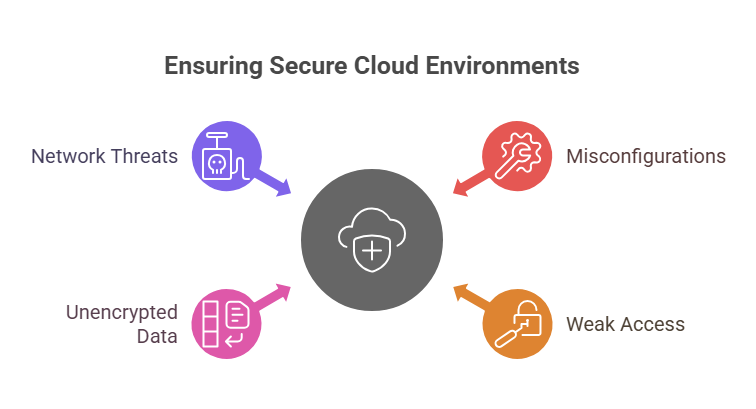
    • Misconfigurations: Expose data via poor settings. 
    • Solution: Use cloud security assessments, per configuration management.
    • Weak Access: Allow unauthorized entry. 
    • Solution: Implement IAM with cloud security architecture, per access control.
    • Unencrypted Data: Risks leaks. 
    • Solution: Apply cloud encryption.
    • Network Threats: Compromise connectivity. 
    • Solution: Deploy cloud network security, per network protection.

    Cloud vulnerability mitigation ensures secure cloud environments.

    Enterprise Use Cases

    1. Financial Services

    A 2025 bank used cloud security managed service to secure transactions, reducing fraud by 30% with cloud encryption. Cloud security monitoring ensured IRDAI compliance, per financial compliance.

    2. Healthcare

    A hospital adopted managed cloud security to protect patient data, achieving HIPAA compliance with cloud security policy. Cloud security assessments cut risks by 35%, per patient data protection.

    3. Retail

    A 2025 retailer used cloud technology security secure e-commerce, preventing 90% of attacks with cloud security architecture. Pipeline in devops streamlined secure updates, per retail DevOps.

    4. Manufacturing

    A manufacturer used cloud computing and data security to protect IoT devices, leveraging cloud security managed services for monitoring. Cloud network security saved 20% in downtime costs, per operational efficiency.

    Real-World Advice

    • Baseline with Assessments: Use cloud security assessments to identify risks. A 2025 startup found 50 vulnerabilities, per security gap analysis.
    • Automate Security: Managed cloud security services like Palo Alto Prisma automate patching, cutting effort by 40% (2025 data), per automation efficiency.
    • Use DevSecOps: Embed devsecops pipeline for continuous security. A 2025 SaaS firm reduced flaws by 50%, per secure development.
    • Monitor Threats: Deploy Security monitoring system like CrowdStrike for insights, saving $1M in breach costs, per incident response.
    • Train Teams: Upskill for cloud security policy and cloud network security, per workforce enablement.

    Tools for Enhancing Cloud Security

    • Hybrid Cloud Management Tools: Morpheus optimizes secure clouds, per hybrid cloud security.
    • AI DevOps Platform: DuploCloud automates pipeline in devops, per AI-driven DevOps.
    • Security Monitoring System: Datadog provides cloud security monitoring, per observability tools.
    • Managed Cloud Security Services: CBTS offers cloud security managed, per enterprise-grade security.

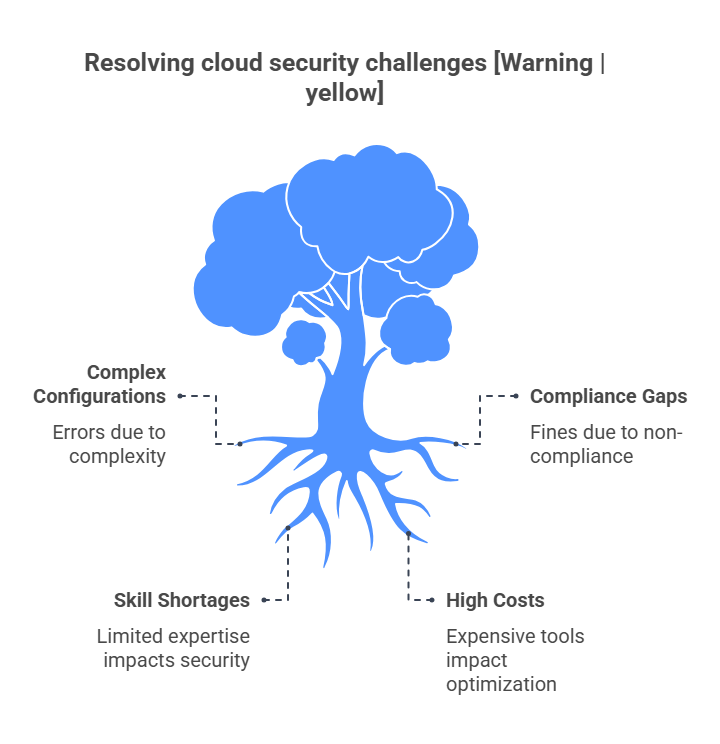
    Challenges and Solutions

    • Complex Configurations: Risk errors. Solution: Use cloud security architecture.
    • Compliance Gaps: Invite fines. Solution: Enforce cloud security policy.
    • Costs: Tools are expensive. Solution: Optimize with managed cloud security.

    Case Studies

    • Finance: A 2025 bank used cloud security managed service to secure 1M transactions, saving $2M in fraud losses, per financial compliance.
    • Healthcare: A hospital implemented cloud encryption, reducing breach risks by 40%, per HIPAA compliance.
    • Retail: A 2025 retailer adopted devsecops pipeline, speeding secure releases by 50%, per secure retail DevOps.

    Future of Cloud Security

    By 2027, 95% of enterprises will use cloud security managed services for AI-driven threat detection, per Gartner 2025. AI DevOps platform and security monitoring system will enhance cloud technology security, per next-gen security. Enhancing cloud security will drive future-ready enterprises.

    Conclusion

    Enhancing cloud security with managed cloud security, cloud security managed services, devsecops pipeline, cloud security monitoring, AI DevOps platform, and cloud network security ensures robust cloud computing and data security. From cloud security assessments to cloud encryption, enterprises achieve secure digital transformation. Explore DevSecCops.ai for optimized cloud security managed solutions in 2025.

  • Mastering ArgoCD in Kubernetes: Installation and Best Practices

    Mastering ArgoCD in Kubernetes: Installation and Best Practices

    In today’s fast-paced DevOps environment, CI/CD with ArgoCD has become a game-changer for managing our deployment to Kubernetes. 

    ArgoCD is a declarative, GitOps based continuous delivery tool that helps us deploy applications in a Kubernetes cluster automatically and at scale, where we cannot have CI/CD without GitOps practices – GitOps is the CI/CD pipeline to deliver applications and services. By use Git as the source of truth, we can keep our deployment pipeline secured, consistent, and scalable. This article discusses how to master CI/CD using ArgoCD, including how to install ArgoCD, how to best use it, how to integrate with Kubernetes distributions such as EKS and AKS, and how it interfaces with AI DevOps platform. This guide is suitable for complete beginners deploying ArgoCD using GitOps with Terraform, to experienced DevOps Engineers wanting to deploy ArgoCD in Kubernetes. 

    What is ArgoCD and Its Role in Kubernetes?

    ArgoCD is another Kubernetes-native tool that utilizes a GitOps approach, and it helps teams to manage infrastructure and application deployments using Git repositories. ArgoCD is focused on the CD part of the CI/CD system, and it achieves this by pointing the current state of your Kubernetes cluster to the desired state in Git, and invoking reconciliation functions as specified by your deployment.  This makes ArgoCD a key tool in deploying ArgoCD in Kubernetes and the most beneficial tool to adopt when implementing your own automated CI/CD pipeline using GitOps. It provides features like rollback capabilities, integrated step by step CI/CD pipelines using GitStash integrations, and a user-friendly dashboard.

    Kubernetes serves as the runtime environment for applications, with ArgoCD taking care of the cluster configurations and node/application policies. This responsibility leverages the capabilities of Helm, Terraform, AI DevOps tools, and others to enhance complexity and flexibility regardless of application distribution on Kubernetes distros, such as Amazon EKS, Azure AKS, or Google GKE. 

    Installing ArgoCD: Step-by-Step Guide

    To deploy ArgoCD in Kubernetes, you need to install ArgoCD on your cluster. Below is a detailed guide to install ArgoCD using direct manifests and Helm install ArgoCD.

    Prerequisites

    Before starting with installing kubectl and ArgoCD, ensure you have:

    • A running Kubernetes cluster (refer to guides on install Kubernetes or Kubernetes cluster setup step by step).
    • kubectl installed and configured (check guides on installing kubectl, including install Kubernetes on Windows).
    • A Git repository for storing application manifests.

    Option 1: Installing ArgoCD Using Manifests

    1. Create a Namespace

    Create a dedicated namespace for ArgoCD:
    kubectl create namespace argocd

    1. Apply ArgoCD Manifests:

     Download and apply the official ArgoCD manifests:

    kubectl apply -n argocd -f https://raw.githubusercontent.com/argoproj/argo-cd/stable/manifests/install.yaml

    1. Verify Installation:

     Ensure all components, including the ArgoCD notification controller, are running:
     

    kubectl get pods -n argocd

    Option 2: Helm Install ArgoCD

    Using Helm dependencies simplifies the installation process for complex configurations. Follow these steps:

    1. Add the ArgoCD Helm Chart Repository:


    helm repo add argo https://argoproj.github.io/argo-helm

    helm repo update

    1. Install ArgoCD:
      helm install

     argocd argo/argo-cd –namespace argocd –create-namespace

    1. Customize with Values File: Use an ansible requirements yml or Helm values file to customize settings like resource limits or enabling the ArgoCD notification controller.Access the ArgoCD UI by port-forwarding:

    kubectl port-forward svc/argocd-server -n argocd 8080:443

    Log in using the default admin credentials (retrieve the password with kubectl -n argocd get secret argocd-initial-admin-secret -o jsonpath=”{.data.password}” | base64 -d).

    Configuring ArgoCD for GitOps

    Once installed, configure ArgoCD to manage your Kubernetes cluster using GitOps principles, enabling automated CI/CD pipelines. This involves setting up an ArgoCD application spec to define application deployments.

    Adding a Cluster

    To manage multiple clusters, use the ArgoCD add cluster command:

    argocd cluster add <context-name> –name <cluster-name>

    This is ideal for working with EKS vs AKS or other Kubernetes distros, allowing seamless management of multiple environments.

    Defining an Application

    Create an ArgoCD application spec in a YAML file:

    apiVersion: argoproj.io/v1alpha1

    kind: Application

    metadata:

      name: my-app

      namespace: argocd

    spec:

      project: default

      source:

        repoURL: https://github.com/your-repo.git

        path: manifests/

        targetRevision: main

      destination:

        server: https://kubernetes.default.svc

        namespace: default

      syncPolicy:

        automated:

          prune: true

          selfHeal: true

    Integrating ArgoCD with Terraform, Helm, and AI DevOps Platforms

    ArgoCD’s flexibility is enhanced when integrated with Terraform, Helm, and AI DevOps platforms. For infrastructure as code, merge Terraform configurations with ArgoCD to manage both infrastructure and applications in a GitOps workflow. Use a template file Terraform to define Kubernetes resources and sync them with ArgoCD.

    Helm dependencies allow you to package up complicated applications, and ArgoCD supports Helm charts out-of-the-box for deployment into Kubernetes. Furthermore, AI-based DevOps platforms can augment ArgoCD with intelligent insights, predictive analytics, and automated optimization for your automated CI/CD pipelines, to make deployments more efficient and secure.

    Best Practices for CI/CD with ArgoCD

    To master CI/CD with ArgoCD, follow these best practices for robust automated CI/CD pipelines:

    • Git as the Single Source of Truth: Store all manifests, Helm charts, and Terraform configurations in a Git repository for traceability and version control.
    • Namespace Isolation: Deploy ArgoCD in a dedicated namespace (e.g., argocd) and use separate namespaces for applications to avoid conflicts.
    • Automate Sync Policies: Enable prune and selfHeal in the ArgoCD application spec to keep your cluster in sync with Git.
    • Secure ArgoCD: Use RBAC, enable SSO, and rotate the admin password regularly.
    • Monitor with Notifications: Configure the ArgoCD notification controller for alerts on sync failures or deployment issues via Slack, Teams, or email.
    • Modularize Configurations: Use Helm dependencies or template file Terraform to break down large manifests for better maintainability.
    • Test Across Distros: Validate your setup across EKS vs AKS or other Kubernetes distros for compatibility.
    • Backup and Recovery: Regularly back up your Git repository and ArgoCD configurations to prevent data loss.

    Common Challenges and Solutions

    • Sync Failures: Check Git repository errors or network issues. Use the ArgoCD UI for detailed logs.
    • Resource Conflicts: Ensure GitOps Terraform and ArgoCD do not manage the same resources to avoid conflicts.
    • Cluster Access: For ArgoCD add cluster, verify the cluster’s kubeconfig has the necessary permissions.

    Why Choose ArgoCD for CI/CD?

     ArgoCD landscape due to its declarative approach, tight integration with Kubernetes, and support for GitOps Terraform, Helm, and AI DevOps platforms. Its focus on continuous deployment makes it ideal for managing complex Kubernetes cluster vs node setups. The ability to deploy ArgoCD in Kubernetes across Kubernetes distros like EKS and AKS ensures versatility for modern DevOps workflows.

    Conclusion

    CI/CD with ArgoCD is vital to a DevOps team looking to improve deployment. Following the ArgoCD install steps, using Helm install ArgoCD, GitOps Terraform and AI DevOps platform. In addition, you should build automated CI/CD pipelines deploying your application(s) using best practices for CI/CD, where you can ensure that you produce applications that will solidify and scale. Whether you operate from a single Kubernetes cluster, or multiple Kubernetes distros, ArgoCD should help to administer deployments within your clusters with reliability and with consistency. Furthermore, platforms such as devseccops.ai, will help simplify your CI/CD pipeline by enabling security and security insights rooted in AI, making an ultimate continuous delivery pipeline more effective and efficient for your DevOps processes. Get started today with exploring CI/CD using ArgoCD and embrace the GitOps approach, for more confidence in your Kubernetes environment.

  • Hybrid Cloud Explained: Why Hybrid Cloud Technology Matters for Enterprises

    Hybrid Cloud Explained: Why Hybrid Cloud Technology Matters for Enterprises

    Are scalability, cost, or security challenges hindering your business? Hybrid cloud technology revolutionizes enterprise IT by blending public and private clouds for flexibility and control. Leveraging hybrid infrastructure, enterprise hybrid cloud, business hybrid cloud, hybrid cloud solutions, hybrid cloud solutions service, public private cloud hybrid, hybrid cloud adoption, hybrid cloud computing example, hybrid cloud computing architecture, hybrid cloud management platform, hybrid cloud computing for small business, hybrid cloud with aws, mlops pipelines, and ai devops platform, enterprises optimize operations. This blog explores hybrid cloud technology and its role in digital transformation.

    Define Hybrid Cloud

    Define hybrid cloud: Hybrid cloud technology integrates public clouds (e.g., AWS) with private, on-premises systems, enabling seamless data and application movement, per cloud integration. Hybrid infrastructure provides scalability and security, per robust systems, balances cost-efficiency and control, per strategic cloud. A 2025 Gartner report predicts 85% of enterprises will embrace hybrid cloud adoption by 2027, per cloud trends. Hybrid cloud technology empowers businesses to manage diverse workloads, from analytics to compliance, per workload flexibility

    Why Hybrid Cloud Technology is Essential

    Hybrid cloud technology addresses critical enterprise needs:

    • Scalability: Hybrid infrastructure supports 10x traffic surges, per dynamic scaling. A 2025 retailer scaled e-commerce with business hybrid cloud, saving 22%, per e-commerce efficiency.
    • Cost Savings: Enterprise hybrid cloud reduces IT costs by 35% through optimized resources, per cost optimization (2025 IDC).
    • Security: Hybrid cloud solutions ensure GDPR/HIPAA compliance, per data protection.
    • Flexibility: Hybrid cloud technology supports varied applications, from AI to legacy systems, per application versatility.
    • Innovation: Enables AI/ML and IoT, per innovation enablement.

    Hybrid cloud adoption drives business agility and competitiveness.

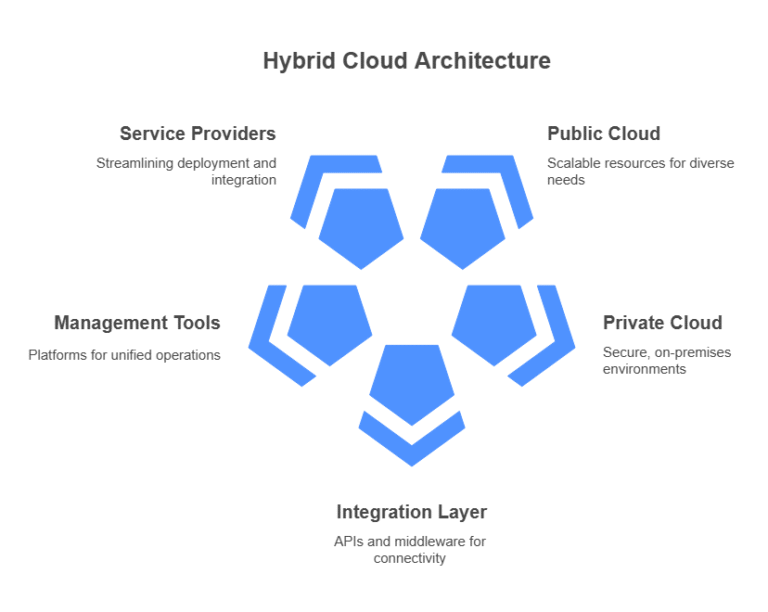
    Components of Hybrid Cloud Technology

    Hybrid cloud computing architecture comprises:

    1. Public Cloud: Scalable resources (e.g., AWS EC2, S3), per public cloud scalability.

    2. Private Cloud: Secure, on-premises environments, per private cloud security.

    3. Integration Layer: APIs and middleware for connectivity, per cloud orchestration.

    4. Management Tools: Hybrid cloud management platform like VMware Cloud Foundation or Morpheus unifies operations, per management efficiency.

    Hybrid cloud solutions service providers, such as AWS Outposts, streamline deployment, per service integration. These components ensure hybrid cloud technology delivers operational excellence.

    Benefits of Hybrid Cloud Technology

    1. Operational Efficiency: Hybrid cloud solutions automate workflows, cutting deployment time by 30%, per automation efficiency. MLOps pipelines streamline AI model deployment, reducing time-to-market by 25%, per AI workflows.

    2. Cost-Effectiveness: Hybrid cloud computing for small business saves 25% compared to full public cloud, per budget optimization. Enterprises save 20% on compute costs, per resource efficiency.

    3. Compliance and Security: Hybrid infrastructure secures sensitive data, per regulatory compliance.

    4. Innovation Enablement: Hybrid cloud technology supports AI, ML, and IoT workloads, per technology innovation.

    4. Disaster Recovery: Hybrid cloud solutions ensure 99.99% uptime with backup systems, per business continuity.

    A 2025 bank used enterprise hybrid cloud to secure transactions, reducing fraud risks by 40%, per financial security.

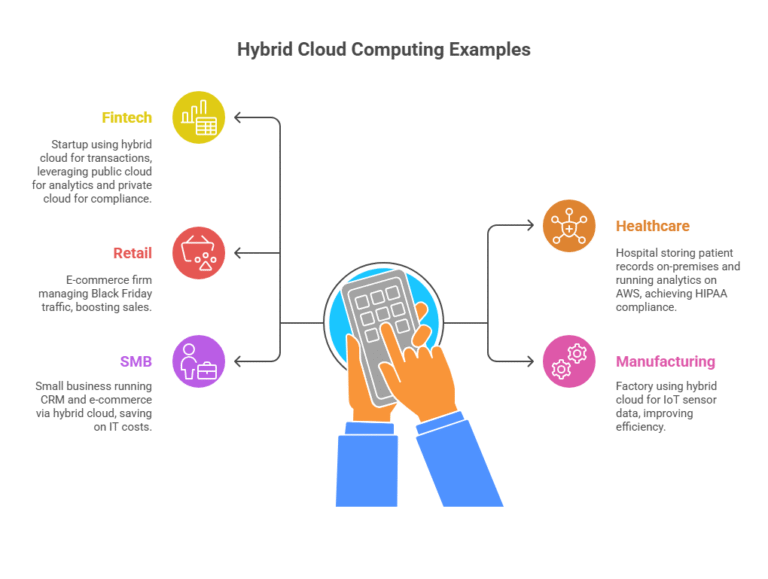
    Hybrid Cloud Computing Examples

    • Fintech: A 2025 startup processed 1.5M transactions daily using hybrid cloud with aws, leveraging public cloud for analytics and private cloud for compliance, per fintech scalability.
    • Healthcare: A hospital stored patient records on-premises and ran analytics on AWS, achieving HIPAA compliance, per healthcare compliance.
    • Retail: An e-commerce firm manages Black Friday traffic, boosting sales by 18%, per retail scalability.
    • Manufacturing: A 2025 factory used business hybrid cloud for IoT sensor data, improving efficiency by 15%, per industrial IoT.
    • SMB: A small business ran CRM and e-commerce via hybrid cloud computing for small business, saving 15% on IT costs, per SMB efficiency.

    Implementing Hybrid Cloud Technology

    • Assess Workloads: Allocate sensitive data to private clouds and scalable tasks to public clouds, per workload allocation. Hybrid cloud computing example: Run compliance on-premises, analytics on AWS.
    • Choose Providers: Hybrid cloud with aws offers robust integrations via Outposts, per cloud connectivity.
    • Deploy Management Tools: Hybrid cloud management platform like Morpheus or Red Hat OpenShift simplifies oversight, per management simplicity.
    • Integrate AI and DevOps: AI devops platform automates deployments, while mlops pipelines manage AI model lifecycles, per AI-driven operations. Log monitoring tools like Splunk provide real-time insights, per system observability.
    • Test and Optimize: Conduct pilot projects to refine configurations, per implementation testing.

    A 2025 SaaS firm deployed apps 50% faster using hybrid cloud solutions service, per deployment efficiency.

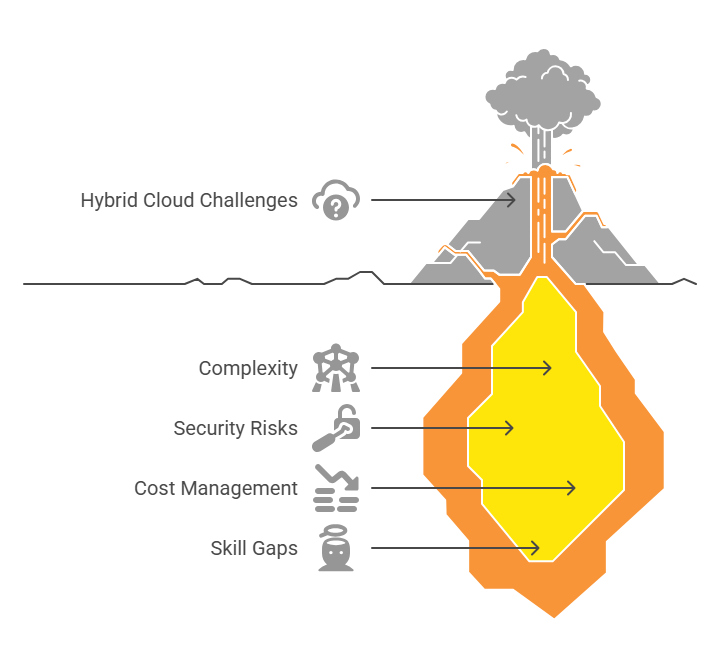
    Challenges and Solutions

    1. Complexity: Hybrid cloud computing architecture can be intricate.

    Solution: Use hybrid cloud management platform, per operational simplicity.

    2. Security Risks: Data transfers risk breaches.

    Solution: Implement security scanning solutions, per data security.

    3. Cost Management: Overuse increases expenses.

    Solution: Optimize with hybrid cloud solutions, per cost control.

    4. Skill Gaps: Teams lack expertise.

    Solution: Train on ai devops platform and mlops pipelines, per skill development.

    Strategic hybrid cloud adoption ensures success, per implementation strategy.

    Hybrid Cloud with AWS

    Hybrid cloud with aws integrates public services (EC2, S3) with private clouds via Outposts. Key benefits:

    • Seamless Integration: APIs ensure connectivity, per hybrid connectivity.
    • Scalability: Handle variable workloads, per dynamic scalability.
    • AI and ML Support: MLOps pipelines deploy AI models efficiently, per AI scalability.
    • Cost Efficiency: Pay-as-you-go pricing, per cost-effective cloud.

    A 2025 manufacturer used hybrid cloud with aws for IoT analytics, improving production efficiency by 30%, per IoT optimization.

    Hybrid Cloud for Small Businesses

    Hybrid cloud computing for small business offers affordability and scalability. SMBs use private clouds for secure apps (e.g., CRM) and public clouds for analytics or e-commerce. A 2025 café chain managed inventory with business hybrid cloud, saving 12% on costs, per SMB cost savings. Hybrid cloud management platform simplifies operations for non-technical teams, per user-friendly management. Hybrid cloud solutions enable SMBs to compete with larger firms, per competitive agility.

    Role of AI and DevOps in Hybrid Cloud

    AI devops platform enhances hybrid cloud technology by automating deployments, monitoring, and scaling. MLOps pipelines streamline AI model training and deployment, cutting time-to-market by 25%, per AI efficiency. Log monitoring tools like Grafana ensure performance, per performance monitoring. A 2025 healthcare provider used ai devops platform for patient analytics, speeding insights by 35%, per healthcare innovation. Hybrid cloud solutions integrate AI seamlessly, per AI-driven transformation.

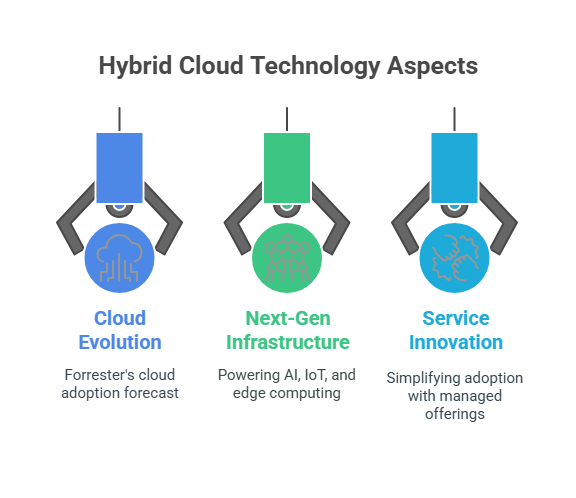
    Future of Hybrid Cloud Technology

    By 2030, 90% of enterprises will rely on hybrid cloud technology, per Forrester 2025 (cloud evolution). Enterprise hybrid cloud will power AI, IoT, and edge computing, per next-gen infrastructure. Hybrid cloud solutions service will simplify adoption with managed offerings, per service innovation.

    Conclusion

    Hybrid cloud technology, with hybrid infrastructure, ai devops platform, and mlops pipelines, transforms enterprises. From hybrid cloud with aws to hybrid cloud computing for small business, it drives digital transformation. Unlock your potential with DevSecCops.ai—download our free Hybrid Cloud Strategy Guide today!

  • How Cloud and Data Migration Drive Enterprise IT and Digital Transformation

    How Cloud and Data Migration Drive Enterprise IT and Digital Transformation

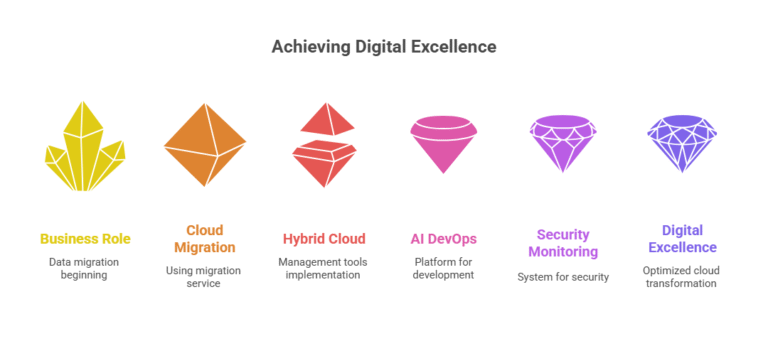
    Digital transformation and cloud migration are revolutionizing enterprise IT, enabling agility and innovation. By leveraging how cloud enables digital transformation, enterprise cloud transformation, cloud transformation strategy, what is cloud transformation, cloud transformation vs digital transformation, cloud transformation best practices, business role in data migration, cloud computing and digital transformation, cloud computing integration, integrated cloud services, benefits of cloud integration, what is cloud integration, digital transformation cloud computing, cloud in digital transformation, cloud migration service, hybrid cloud management tools, AI DevOps platform, and security monitoring system, businesses gain competitive edges. This blog explores how digital transformation and cloud migration drive IT modernization with actionable strategies.

    What is Cloud Transformation?

    What is cloud transformation? It’s the process of shifting applications, data, and infrastructure to cloud platforms like AWS, Azure, or Google Cloud to boost scalability and efficiency. Cloud migration service providers, like CBTS, streamline this process, reducing downtime by 94% for complex migrations, per enterprise migration success. A 2025 Gartner report predicts 85% of enterprises will adopt a cloud transformation strategy by 2027, per cloud adoption trends. Cloud computing and digital transformation align IT with business goals, enabling cloud-native innovation.

    Cloud Transformation vs Digital Transformation

    Cloud transformation vs digital transformation: Cloud transformation modernizes IT infrastructure via cloud computing integration, while digital transformation redefines business processes using technology. Cloud in digital transformation is a catalyst, enabling business process reinvention. Integrated cloud services enhance customer experiences, per digital business transformation. How cloud enables digital transformation? It offers scalability and analytics, driving strategic innovation.

    Key Benefits of Digital Transformation and Cloud Migration

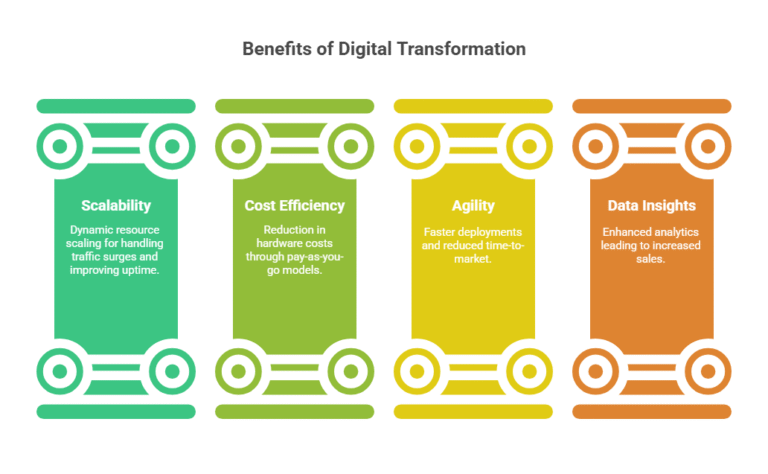
    1. Scalability

    Digital transformation and cloud migration enable dynamic resource scaling. Benefits of cloud integration include handling traffic surges, improving uptime by 40% (2025 data), per scalable cloud infrastructure. Hybrid cloud management tools like Morpheus optimize scaling, per hybrid cloud efficiency.

    2. Cost Efficiency

    Cloud computing digital transformation cuts hardware costs by 30% with pay-as-you-go models, per cloud cost optimization. Cloud migration service optimizes expenses, aligning with financial efficiency.

    3. Agility

    Integrated cloud services speed deployments, reducing time-to-market by 35% (2025 metrics). AI DevOps platform like DuploCloud automates deployments, per DevOps automation.

    4. Data Insights

    Cloud in digital transformation enables analytics. A 2025 retailer increased sales by 25% using cloud analytics, per data-driven decision-making.

    Business Role in Data Migration

    Business role in data migration ensures alignment with strategic goals. Digital transformation and cloud migration require:

    • Prioritizing data for migration, per data governance.
    • Ensuring GDPR/HIPAA compliance, per regulatory compliance.
    • Collaborating with IT, per cross-functional alignment.

    A 2025 bank migrated 1PB of data to Azure using cloud migration service, improving efficiency, per enterprise data migration.

    Cloud Transformation Best Practices

    1. Assess Infrastructure: Evaluate legacy systems for cloud transformation strategy, per migration readiness.
    2. Phase Migrations: Use cloud migration service for incremental moves, per incremental adoption.
    3. Secure Data: Deploy security monitoring system like Datadog, per cloud security best practices.
    4. Optimize Costs: Use hybrid cloud management tools like CloudZero, per cost management.
    5. Train Teams: Upskill for integrated cloud services, per workforce enablement.

    Cloud transformation best practices ensure seamless cloud adoption.

    Enterprise Cloud Transformation Use Cases

    1. Customer Engagement

    Enterprise cloud transformation improves customer experiences. A 2025 retailer used digital transformation cloud computing to personalize shopping, boosting retention by 30%, per customer-centric transformation.

    2. Supply Chain

    Cloud in digital transformation optimizes supply chains. A 2025 manufacturer used cloud computing integration on AWS, reducing delays by 40%, per supply chain efficiency.

    3. AI and Machine Learning

    AI DevOps platform supports end-to-end MLOps pipelines. A 2025 healthcare firm used cloud migration service for AI diagnostics, cutting costs by 25%, per AI-driven innovation.

    4. Remote Work

    Hybrid cloud management tools enable remote collaboration. A 2025 tech firm supported 10,000 remote workers with integrated cloud services, per workforce flexibility.

    What is Cloud Integration?

    What is cloud integration? It connects cloud and on-premises systems for seamless data flow. Benefits of cloud integration reduce silos by 35% (2025 data), per system interoperability. Cloud computing integration supports digital transformation cloud computing, enabling holistic IT ecosystems.

    Challenges in Cloud and Data Migration

    1. Downtime: Migrations risk disruptions. Solution: Use cloud migration service for zero-downtime strategies, per migration continuity.
    2. Security: Breaches are a concern. Solution: Implement security monitoring system, per data protection.
    3. Costs: Overspending occurs. Solution: Use hybrid cloud management tools, per budget control.

    Skills: Expertise gaps exist. Solution: Train for AI DevOps platform, per skill development.

    Role of AI DevOps and MLOps Platforms

    AI DevOps platform like DuploCloud,devseccops.ai enhances digital transformation and cloud migration with Automated CI/CD Pipelines, cutting release cycles by 45% (2025 metrics). MLOps platform streamlines model training and deployment. A 2025 fintech used cloud migration service on AWS for fraud detection, improving accuracy by 30%, per MLOps efficiency. Cloud computing and digital transformation enable AI-driven DevOps.

    Security and Monitoring

    Security monitoring system like Datadog tracks cloud computing integration, reducing risks by 35% (2025 data). Hybrid cloud management tools like Morpheus ensure compliance, per cloud security. A 2025 bank used security monitoring system for GDPR compliance, per real-time observability. Digital transformation cloud computing ensures secure IT ecosystems.

    Case Studies

    • Retail: A 2025 retailer used cloud migration service to migrate to Azure, boosting sales by 25% with analytics, per data-driven transformation.
    • Finance: A bank adopted cloud transformation strategy, cutting compliance costs by 50% with hybrid cloud management tools, per compliance efficiency.
    • Healthcare: A hospital used AI DevOps platform for AI diagnostics, saving 30% via cloud computing integration, per healthcare innovation.

    Future of Cloud and Digital Transformation

    By 2027, 90% of enterprises will rely on cloud computing and digital transformation for AI and analytics, per Gartner 2025. Hybrid cloud management tools and AI DevOps platform will drive next-gen innovation. Digital transformation and cloud migration will shape future-ready enterprises.

    Conclusion

    Digital transformation and cloud migration empower enterprise cloud transformation with cloud migration service, hybrid cloud management tools, AI DevOps platform, and security monitoring system. From business role in data migration to cloud transformation best practices, businesses achieve digital excellence. Explore DevSecCops.ai for optimized cloud transformation strategy in 2025.

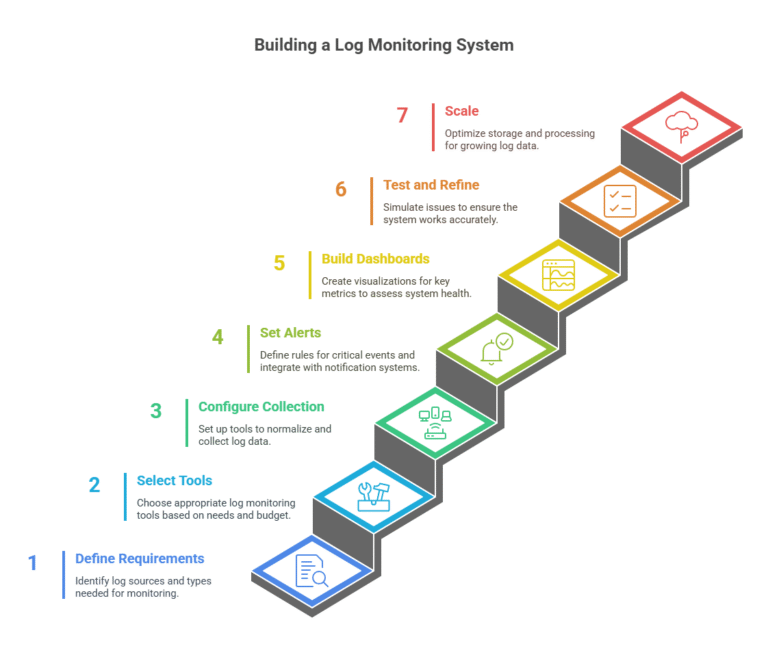
  • Building a Log Monitoring System: Tools, Techniques, and How It Differs from Log Analysis

    Building a Log Monitoring System: Tools, Techniques, and How It Differs from Log Analysis

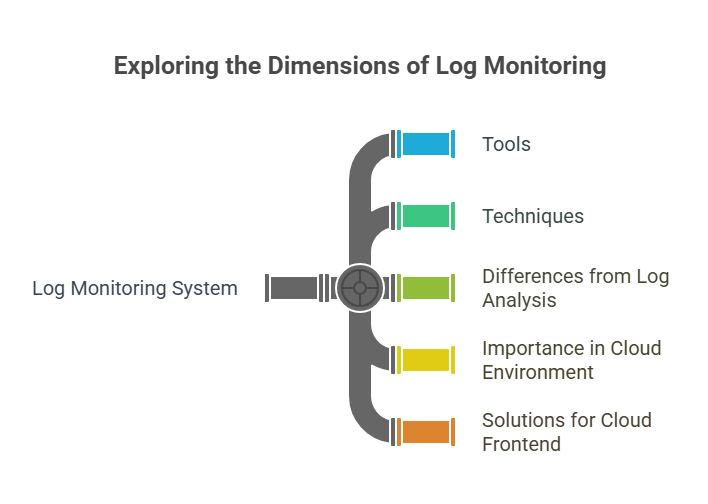
    In the era of cloud computing and rapid software deployment, a log monitoring system is indispensable for maintaining system reliability, security, and performance. But what is log monitoring? It’s the real-time tracking of log data—event records from systems, applications, or networks—to detect issues, anomalies, or security threats instantly. This blog explores how to build an effective log monitoring system, highlights top log management tools and log monitoring tools (including open-source options), and explains how it differs from log analysis. We’ll also cover why logging and monitoring are important in a cloud environment, especially for frontend teams, and evaluate the best logging solutions for cloud frontend and cloud logging platforms.

    What is a Log Monitoring System?

    Monitoring systems typically monitor system log files and other logging data for issues and incidents (performance, error, and security) via real-time detection. Such systems do not perform log analysis to gain insights from historical data; they detect and alert on the immediate, the now. An example of monitoring is during application log monitoring (see CI and CD below) spike in API errors, or during security logging and monitoring an alert could indicate unauthorized access attempts by an external party, so that you could respond right away.

    What are system log files? These are event records generated by operating systems, applications, or devices, including information such as timestamps, error codes, or actions performed by users. Log monitoring systems utilize device log analyzers to flatten the logs into a single view of system health.

    Why are Logging and Monitoring Important in a Cloud Environment?

    Logging and monitoring are critical in cloud environments due to their distributed and dynamic nature. Cloud systems generate massive amounts of log data across services, making a robust log monitoring system essential for tracking issues. Logs from user-facing applications (e.g., web servers or APIs) are essential for frontend teams to detect latency or UI errors. Why is logging and monitoring important in a cloud environment? By logging and monitoring, you maintain maximum uptime for your applications, enhance user experience, and enhance security through real-time detection of threats (i.e. DDoS, breaches). A well-designed log monitoring system can help as it relates to regulatory obligations such as GDPR or HIPAA through audit trails.

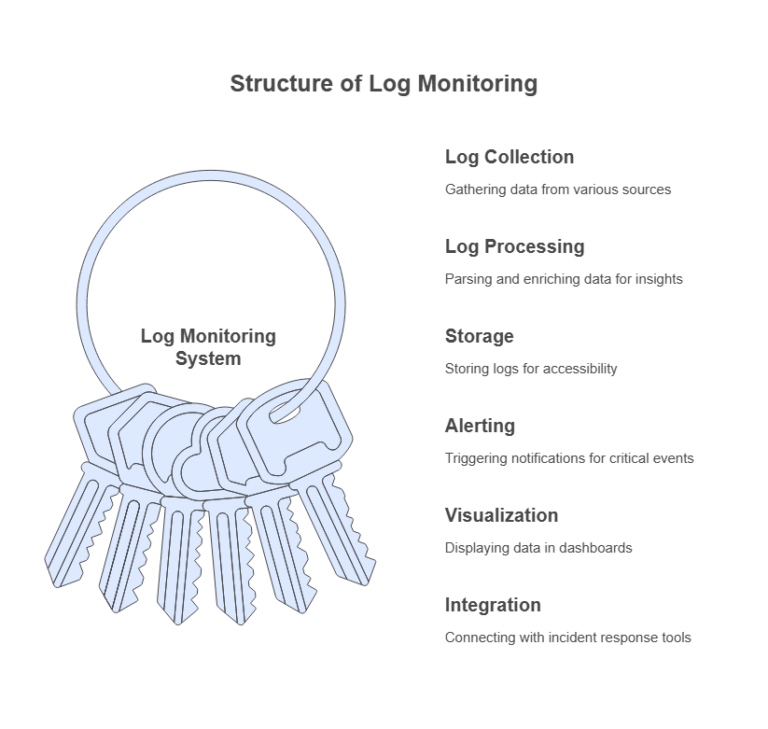
    Key Components of a Log Monitoring System

    A log monitoring system comprises several components:

    1. Log Collection: Aggregating log data from servers, applications, or cloud services.
    2. Log Processing: Parsing and enriching logs for actionable insights.
    3. Storage: Storing logs for real-time access and querying.
    4. Alerting: Triggering notifications for critical events.
    5. Visualization: Displaying data in dashboards for quick insights.
    6. Integration: Connecting with incident response tools.

    Top Log Management Tools and Log Monitoring Tools

    Several log monitoring tools and top log management tools enable a scalable log monitoring system. Here are some of the best, including open-source log monitoring tools option:

    1. Log Collection and Aggregation

    • Fluentd: An open-source log monitoring tool that collects logs from sources like Kubernetes, AWS, or databases, with extensive plugin support.
    • Logstash: Part of the Elastic Stack, Logstash is ideal for collecting and processing logs in a log monitoring system.
    • Filebeat: A lightweight log monitoring tool for shipping server logs to centralized device log analyzers like Elasticsearch.

    2. Log Storage and Indexing

    • Elasticsearch: A robust engine for storing and indexing log data, widely used in centralized device log analyzers.
    • Loki: An open-source log monitoring tool by Grafana Labs, optimized for cost-effective log storage.
    • OpenSearch: A community-driven alternative to Elasticsearch, suitable for scalable log monitoring systems.

    3. Visualization and Dashboards

    • Kibana: Paired with Elasticsearch, Kibana offers dashboards for application log monitoring and real-time insights.
    • Grafana: Integrates with Loki to provide customizable dashboards, ideal for frontend teams monitoring log data.
    • Graylog: An open-source log monitoring tool combining log management, visualization, and alerting.

    4. Alerting and Notification

    • Prometheus with Alertmanager: Integrates with log monitoring systems to trigger alerts based on log-derived metrics.
    • PagerDuty: Routes alerts from log monitoring tools to the appropriate team members.
    • Slack/Email: Many log monitoring systems support notifications via Slack or email.

    5. Security and Compliance

    • Wazuh: An open-source log monitoring tool for security logging and monitoring, offering intrusion detection and compliance features.
    • Splunk: A commercial platform excelling in security logging and monitoring and compliance reporting.

    Is It the Best Cloud Logging Platform for Frontend Teams?

    Front end teams want a cloud logging platform that is easy to use, provides real-time insight, and has cloud native support. Grafana Loki and Kibana are among the best logging solutions for cloud frontend because of their lightweight architecture and good visualization. For instance, Grafana works with AWS or Azure giving front-end teams the means of tracking API response time or client side errors. Elasticsearch with Kibana is also one of the top contenders, particularly good querying and dashboards. It’s great for application logging in cloud environments.

    Techniques for Building a Log Monitoring System

    Key techniques for an effective log monitoring system include:

    1. Centralized Log Aggregation: Implement centralized device log analyzers (e.g., Fluentd, Logstash) to aggregate log data.
    2. Real-Time Parsing: Use both ingestion and advertisement of fields (such as timestamp or error code) in parsing the system log files (e.g., monitoring application logs).
    3. Anomaly Detection: Identify anomalistic behavior (e.g., traffic spike, repeated error log) via machine learning systems or by rule-based systems.
    4. Alerting Rules: Define alerts, e.g., if the 5xx error exceeds 10 alarms in 5 minutes, notify me.
    5. Scalable Storage: If you need cost-effective storage, then use Loki, or use Elasticsearch for faster indexing and searching at higher cost.
    6. Visualization: Create dashboards with log monitoring tools (e.g., Kibana/Grafana) to use on collating key metrics together.
    7. Integration: Integrate with your incident response application (e.g., PagerDuty, etc.) to allow material for seamless incident response workflows.

    How Log Monitoring Differs from Log Analysis

    A log monitoring system and log analysis both handle log data but serve different purposes:

    • Purpose: A log monitoring system focuses on real-time issue detection, such as outages or security threats, while log analysis extracts insights from historical data for trends or root causes.
    • Timeframe: Log monitoring tools operate in real time, whereas log analysis examines data over longer periods.
    • Tools: Log monitoring tools like Fluentd or Grafana prioritize alerting, while log analysis tools like Splunk are strong in querying and reporting and also support monitoring use cases.
    • Output: A log monitoring system generates alerts or dashboards, while log analysis produces reports or recommendations.

    For example, a log monitoring system might alert frontend teams to a spike in 500 errors, enabling quick action. Later, log analysis could reveal a database bottleneck causing those errors, suggesting infrastructure improvements.

    Steps to Build a Log Monitoring System

    1. Define Requirements: Identify sources (e.g., cloud services, applications) and log types for application log monitoring or security logging and monitoring.
    2. Select Tools: Choose log monitoring tools like Fluentd, Elasticsearch, or Grafana based on needs and budget.
    3. Configure Collection: Set up centralized device log analyzers to normalize log data.
    4. Set Alerts: Define rules for critical events, integrating with notification systems.
    5. Build Dashboards: Use log monitoring tools to create visualizations for key metrics.
    6. Test and Refine: Simulate issues to ensure alerting accuracy.
    7. Scale: Optimize storage and processing as log data volume grows.

    Conclusion

    Log monitoring systems are an essential component of cloud contract initiatives to help maintain reliable, secure, and performant systems. By using the best log management tools and processors like Fluentd, Elasticsearch, and Grafana and methods like real-time parsing, and anomaly detection on the logs, we can build powerful systems. Why are logging and monitoring so important to cloud environments? Logging provides system uptime, security enhancement, and compliance.

    For front-end teams, the leading cloud logging platforms, such as Grafana Loki or Kibana, focus on application log monitoring. Solutions like DevSecCops.ai, which is an AI DevOps platform, further add value to a log monitoring system by leveraging security scanning solutions integrated with DevOps capabilities. This integration automates threat detection and compliance checks so that the front-end team can take quicker action and have a clearer operational workflow. Log monitoring systems allow teams to take action in real-time but are intended for log monitoring even more in the long run, ensuring operational efficiency and longer-term growth.