Devseccops

Category: Uncategorized

  • Linux /proc Directory Explained: Accessing Process and System Information for DevOps and MLOps 

    Linux /proc Directory Explained: Accessing Process and System Information for DevOps and MLOps

    Linux /proc directory explained, access process and system information for DevOps and MLOps

    The /proc directory in Linux known as the proc file system or procfs, is a virtual file system. The /proc file system is used in real-time process and system information monitoring. The /proc file system is foundational system monitoring and automation in DevOps use cases. 

    Modern infrastructure teams integrate with DevOps technologies, AI DevOps platforms, MLOps pipelines, log monitoring systems, and security monitoring systems to provide automation of operations.

    This article explores the structure of the proc file system in Linux, its key use cases, and how DevOps and MLOps professionals can harness it for performance, observability, and security. 

    What Is the /proc Directory in Linux?

    The /proc directory is a pseudo-file system that resides in memory, not on disk. It dynamically presents runtime system data such as CPU details, memory usage, and per-process information. For example:

    • /proc/cpuinfo: CPU architecture and core details
    • /proc/meminfo: Memory usage statistics
    • /proc/[pid]: Process-specific information
    • /proc/stat: System-wide statistics

    Since /proc is a virtual interface, its contents reflect the current state of the system in real time. This makes it ideal for monitoring, diagnostics, and automation.

    Why /proc Matters for DevOps

    DevOps tools frequently query data from /proc to monitor performance, trigger alerts, and optimize CI/CD pipelines. For instance:

    • Tools for monitoring like Amazon CloudWatch are capable of collecting metrics from /proc/stat or /proc/meminfo to measure CPU and memory usage.
    • Automation tools like Jenkins or ArgoCD can execute scripts that read the values in /proc and respond asynchronously to changes in the system.
    • AI DevOps platforms can analyze historical /proc data trends to detect bottlenecks, improving system stability and deployment reliability.

    According to internal case studies, DevOps teams that incorporated /proc data into their pipelines saw up to 40% faster incident response times and improved pipeline efficiency. 
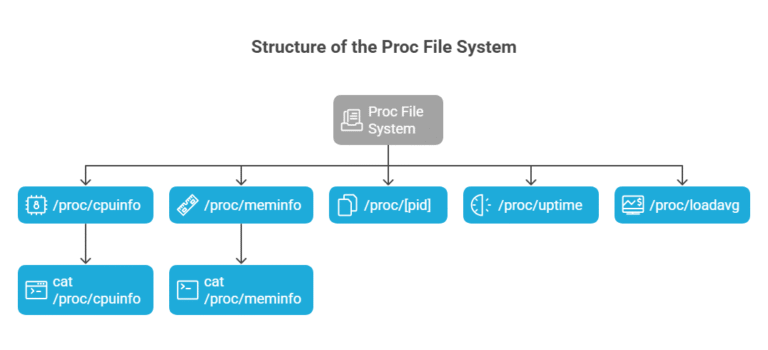
    Structure of the Proc File System

    The proc file system organizes runtime information into files and subdirectories. Some commonly used files include:

    • /proc/cpuinfo: Reports CPU architecture, model, and cores
    • /proc/meminfo: Displays memory usage and availability
    • /proc/[pid]: Contains process-specific info like memory maps (/proc/[pid]/maps)
    • /proc/uptime: Shows how long the system has been running
    • /proc/loadavg: Displays system load averages

    Accessing these files is as simple as running commands like:

    Bash

    cat /proc/cpuinfo  

    cat /proc/meminfo

    Automating Monitoring with /proc Data

    Automation allows DevOps engineers to write scripts to extract information from /proc, add to a Git repo, and automatically deployed using Jenkins or ArgoCD.

    As an example, the event could be a script that checks /proc/meminfo, which triggers alerts for memory usage when a certain point is passed. Additionally, this reduces human oversight and builds event-driven CI/CD in practice.

    Enhancing Observability with AI DevOps Platforms

    Modern DevOps platforms with AI capabilities can process /proc data to detect anomalies and predict failures. For example:

    • AWS CloudWatch Insights can use /proc/stat data to forecast CPU saturation.
    • AI platforms can generate recommended scripts to query and monitor key system files.

    Teams using AI-enhanced DevOps tools reported improved system uptime and more reliable deployment pipelines, especially in hybrid cloud environments.
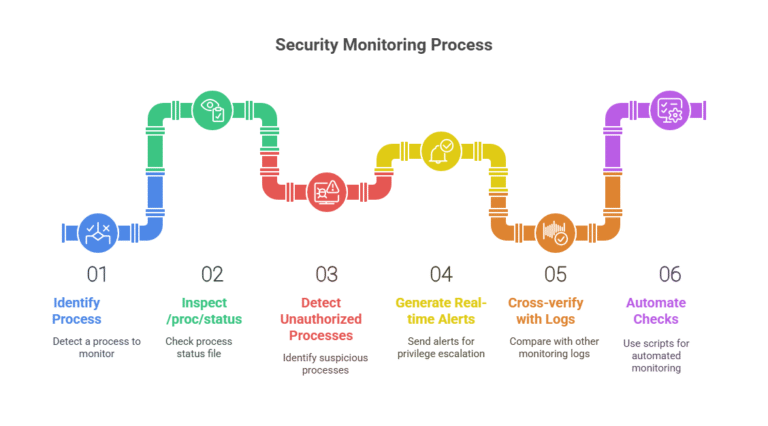
    Security Monitoring with /proc

    Security tools like Sysdig and Falco inspect /proc/[pid]/status and other files to monitor process behavior. This enables:

    • Detection of unauthorized or suspicious processes
    • Real-time alerts for privilege escalation
    • Cross-verification with logs from other monitoring tools

    Security scripts stored in Git repositories can automate these checks, reinforcing secure DevOps practices aligned with DevSecOps methodologies.

    Using /proc in MLOps Pipelines

    MLOps platforms like Amazon SageMaker benefit from /proc data to allocate compute resources intelligently. Examples include:

    • Using /proc/cpuinfo to match models with optimal hardware
    • Scaling training jobs dynamically based on /proc/loadavg

    Scripts automating these checks can be stored in Git repositories and executed during model training jobs, enhancing performance and cost-efficiency.pi

    Managing Git Repositories for Monitoring Scripts

    To enable automated deployments of monitoring scripts:

    Initialize a bare Git repository:

    bash
    git init –bare monitoring-scripts.git

    1.  

    Push scripts from a working repo:

    bash
    git remote add origin /path/to/monitoring-scripts.git

    git push origin main

    1. Integrate with ArgoCD or Jenkins to deploy the scripts on monitoring or production clusters.

    This ensures version control, traceability, and consistency in your DevOps workflows.

    /proc in Hybrid Cloud and AWS

    In hybrid environments, /proc helps ensure compatibility between on-premises systems and AWS instances. During cloud migration:

    • Data from /proc/meminfo or /proc/cpuinfo helps benchmark resource requirements.
    • Monitoring scripts using /proc ensure consistency between environments.
    • Tools like CloudWatch and Security Hub can ingest and visualize this data.

    Firms leveraging this method during cloud migration have reported smoother transitions and improved post-migration observability.

    Getting Started: DevOps for Beginners

    If you’re new to DevOps, start with basic /proc commands:

    Bash

    cat /proc/cpuinfo      # View CPU details  

    cat /proc/meminfo      # Check memory usage  

    cat /proc/uptime       # See system uptime  

    You can automate these into shell scripts and manage them with Git. Use beginner-friendly platforms to schedule and monitor these scripts for hands-on learning.

    Best Practices for Using /proc in DevOps

    • Automate: Use AI platforms and CI/CD tools to automate /proc data collection and response.
    • Secure: Monitor /proc for unusual process behavior to detect threats.
    • Optimize: Feed /proc data into observability and MLOps platforms for better performance.
    • Version Control: Store all scripts in Git for traceability.
    • Integrate: Use tools like Jenkins and ArgoCD to deploy and manage /proc-based monitoring.

    Conclusion

    The Linux /proc directory is a powerful virtual file system that underpins observability, automation, and security in DevOps and MLOps workflows. By combining /proc data with modern tools like AI DevOps platforms, log monitoring systems, and CI/CD automation, teams can achieve scalable, efficient, and secure operations.

    Whether you’re a beginner or a seasoned engineer, mastering /proc can greatly enhance your infrastructure insight and control.

    Learn more at DevSecCops.ai—your partner in automated, AI-driven DevOps and platform engineering.

  • Mastering Git Bare Repositories for End-to-End DevOps Automation 

    Mastering Git Bare Repositories for End-to-End DevOps Automation

    Implementing a Git bare repository along with End-to-End DevOps Automation is a requirement for efficient version control and CI/CD workloads in the contemporary DevOps landscape. Organizations can deliver software faster, more securely, and at scale using ArgoCD, Jenkins, AI DevOps platform, DevOps GenAI, log monitoring solution, security scanning tools, hybrid cloud, cloud migration, and MLOps platform. This blog is about the role of Git bare repository in delivering End-to-End DevOps Automation, including setup, integration, and best practices. We are focusing on semantic keywords such as git bare repo, bare repo git, git bare, create remote repo git, bare repository, create a remote git repository, and how to use bare.

    What is a Git Bare Repository?

    A Git bare repository is a specialized Git repository initialized with git init –bare, designed for remote collaboration without a working tree. Unlike standard repositories, a bare repo Git contains only version control data, supporting push, pull, fetch, and clone operations but not direct commits. This makes it ideal for hosting a bare repository on servers, as used by platforms like GitHub. For teams seeking to create a remote Git repository, a Git bare repo provides a lightweight, centralized hub. Semantic terms like git bare and bare repository emphasize its role in distributed workflows, critical for End-to-End DevOps Automation.

    Importance in End-to-End DevOps Automation

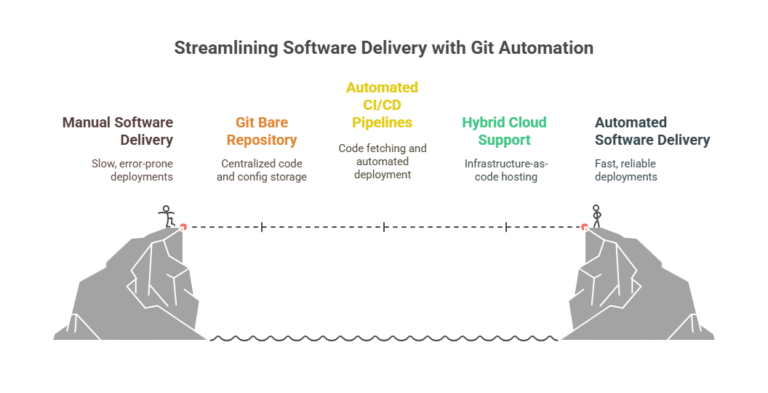
    End-to-End DevOps Automation automates the entire software delivery pipeline, from development to deployment. A Git bare repository serves as the source of truth, enabling automated CI/CD pipelines to fetch code and configurations. It supports hybrid cloud deployments and cloud migration by hosting infrastructure-as-code (IaC). A 2025 study found that 62% of enterprises using Git bare repo in automated pipelines reduced release cycles by 40%, showcasing CI/CD automation. Semantic integration of create remote repo git highlights its role in scalable DevOps workflows.

    How to Create a Git Bare Repository

    To create a remote Git repository, engineers initialize a Git bare repository on a server using git init –bare myrepo.git. Clients can clone it with git clone ssh://user@server/path/myrepo.git, add files, and push changes via git push origin main. This process, accessible via SSH over port 22, is cost-effective for DevOps for beginners aiming to create remote repo git without third-party services. DevOps GenAI tools on an AI DevOps platform generate setup scripts, simplifying how to use bare repositories. A 2025 tutorial noted 60% faster onboarding for beginners using such tools.

    ArgoCD and Jenkins Integration

    ArgoCD & Jenkins enhances End-to-End DevOps Automation by connecting Git bare repository to CI/CD pipelines. Jenkins automates builds and tests, while ArgoCD synchronizes Kubernetes using configurations from a Git bare repository, such as Helm charts for AWS EKS. A 2025 case study reported a 45% reduction in deployment time using this setup, driven by CI/CD automation. Security scanning solutions like Snyk validate code pushed to the bare repository, ensuring secure DevOps and compliance with standards like SOC 2, aligning with git bare workflows.

    AI DevOps Platform for Enhanced Automation

    An AI DevOps platform, powered by DevOps GenAI, optimizes Git bare repository usage. Tools like AWS CodeGuru analyze code in a bare repo git for vulnerabilities and suggest optimizations. For DevOps for beginners, DevOps GenAI generates Jenkins or ArgoCD YAML files, reducing complexity in how to use bare setups. A 2025 survey indicated 55% of teams using AI DevOps platform improved pipeline stability, supporting AI-driven DevOps. This integration streamlines End-to-End DevOps Automation, minimizing manual effort.

    Securing Git Bare Repositories

    Security scanning solutions are vital for protecting Git bare repository in production. SonarQube scans code pushed to a bare repo git, identifying vulnerabilities before deployment. A 2025 financial firm prevented 68% of potential breaches by integrating Snyk with git bare pipelines, per industry data. Security scanning automation ensures compliance in hybrid cloud environments, where bare repository stores IaC, reinforcing secure DevOps practices critical for End-to-End DevOps Automation.

    Log Monitoring for Pipeline Insights

    A log monitoring tool like Amazon CloudWatch tracks Git bare repository activities, monitoring Jenkins or ArgoCD pipeline logs. It provides real-time alerts for failures, reducing downtime by 32%, per a 2025 report. DevOps monitoring supports End-to-End DevOps Automation by ensuring visibility into automated CI/CD pipelines, especially during cloud migration. Semantic use of git bare repo in monitoring contexts highlights its role in maintaining reliable workflows.

    Hybrid Cloud and Cloud Migration

    Hybrid cloud leverages Git bare repository for version control, combining on-premises and cloud resources. During cloud migration, IaC stored in a Git bare repo is deployed via ArgoCD and Jenkins to AWS ECS or EKS. A 2025 retail case study reported 50% faster migrations using this approach, driven by cloud scalability. Hybrid cloud compliance is ensured through security scanning solutions, supporting create a remote git repository for secure transitions.

    MLOps Platform for AI Workflows

    The MLOps platform, such as Amazon SageMaker, integrates with Git bare repository to manage machine learning workflows. Model code pushed to a bare repo Git is deployed to SageMaker endpoints via automated CI/CD pipelines. A 2025 logistics firm improved model accuracy by 22% with this setup, per MLOps scalability. The AI DevOps platform automates testing, enhancing End-to-End DevOps Automation for AI projects, with git bare as a central component.

    DevOps for Beginners: Getting Started

    DevOps for beginners can learn how to use bare repositories by initializing a Git bare repository with git init –bare myrepo.git. Clone it via SSH, add files, and push changes. DevOps GenAI simplifies this by generating scripts, reducing setup time by 65%, per a 2025 tutorial. Semantic focus on create remote repo git and bare repository makes End-to-End DevOps Automation accessible, building foundational skills for CI/CD workflows.

    Best Practices for Git Bare Repository Management

    1. Secure Access: Use SSH keys for bare repo git, ensuring secure DevOps.
    2. Automate Pipelines: Integrate ArgoCD or Jenkins for automated CI/CD pipelines tied to Git bare repository.
    3. Monitor Activity: Deploy log monitoring tool for DevOps monitoring of Git bare activities.
    4. Scan Code: Apply security scanning solutions to secure bare repository code.
    5. Leverage AI: Use DevOps GenAI for pipeline optimization, supporting AI-driven DevOps.

    Conclusion

    Git bare repository and End-to-End DevOps Automation enable efficient, secure DevOps workflows. By integrating ArgoCD, Jenkins, AI DevOps platform, security scanning solutions, log monitoring tool, and MLOps platform, teams optimize hybrid cloud and cloud migration. For beginners and experts, bare repo Git is transformative. Explore DevSecCops.ai for advanced tools to enhance your DevOps with DevOps GenAI in 2025.

  • Top 7 Ways DevOps GenAI Can Boost Developer Productivity

    Top 7 Ways DevOps GenAI Can Boost Developer Productivity

    To deliver software faster, produce better code quality and improve collaboration in the software development delivery journey we need to rethink the ways we build and deliver software in the fast-paced digital world of today. While traditional DevOps practices have tackled many issues, as we layer Artificial Intelligence into the whole DevOps process, termed DevOps GenAI, it is another level of excellence. 

    GenAI allows development teams to eliminate mundane tasks, optimize workflow, and make righter decisions on the fly. As a result, development teams get to be more productive, innovate faster, and increase organizational agility. 

    This article will explore the top 7 ways DevOps GenAI can improve developer productivity and how taking advantage of an AI-enabled DevOps approach can future-proof your organization.

    1. Automated Code Generation and Review

    Whether you realize it or not, writing high-quality, accurate, secure code is equal parts art and science. Much of a developer’s time and energy is spent doing repeatable coding tasks and reviewing teammates’ code submissions. 

    DevOps GenAI is a virtual coding assistant that runs on the same sort of technology as devops LLM and in concept, it can do many of the same things with code as LLMs do with text. Auto-generating boilerplate code, optimizing code for performance, finding bugs, and helping with real-time security issues are very useful capabilities. While LLMs focus mostly on natural language processing, they are capable of producing code or scripts that support the methods and processes in DevOps. 

    We must note there are some true  use cases available right now, such as GitHub Copilot, and AWS CodeWhisperer. According to GitHub’s 2023 survey, developers are saving almost a third of their coding time when relying on AI-enabled assistance.

    Real Impact:

    • Faster development cycles
    • Higher quality code
    • Reduced human error
    • Better compliance with secure coding practices

    With Digital Platform AI capabilities, organizations can integrate smart code review gates directly into CI/CD pipelines, catching issues early—before they reach production.

    2. Intelligent Incident Management and Resolution

    Incidents and downtime are inevitable, but the speed at which you detect, triage, and resolve them determines your organization’s resilience.

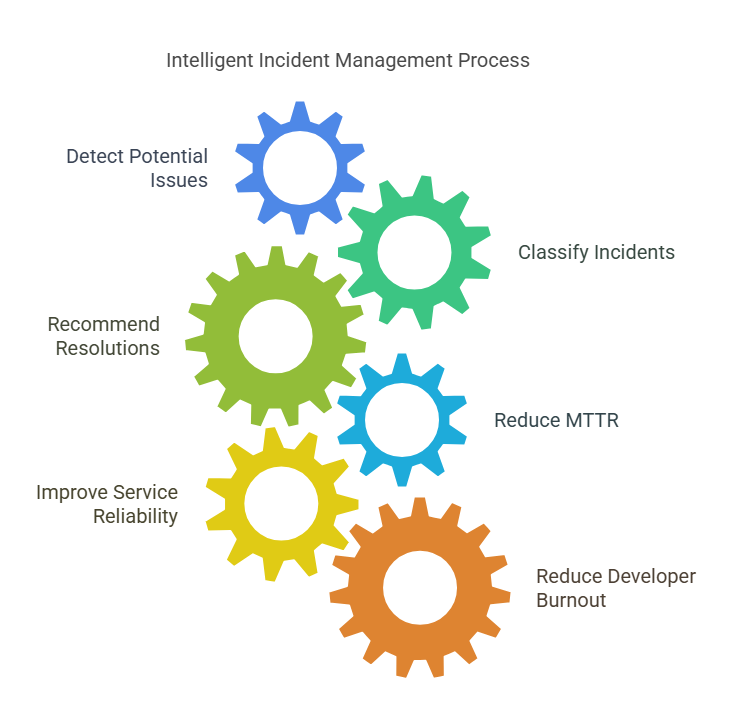
    DevOps GenAI enables teams to shift from reactive incident management to predictive operations. Through pattern recognition, anomaly detection, and real-time monitoring, AI can:

    • Identify potential system issues to reduce the likelihood of failures
    • Auto-classify incidents by severity and root cause
    • Recommend resolution steps or even self-heal known issues

    Platforms like PagerDuty and ServiceNow are incorporating AI DevOps capabilities for smarter alerting and faster incident resolution.

    Real Impact:

    • 50%+ reduction in Mean Time to Recovery (MTTR)
    • Improved service reliability
    • Less developer burnout from constant firefighting

    In an environment where every second of downtime can cost thousands, DevOps GenAI becomes an indispensable asset.

    3. Smart Deployment Pipelines

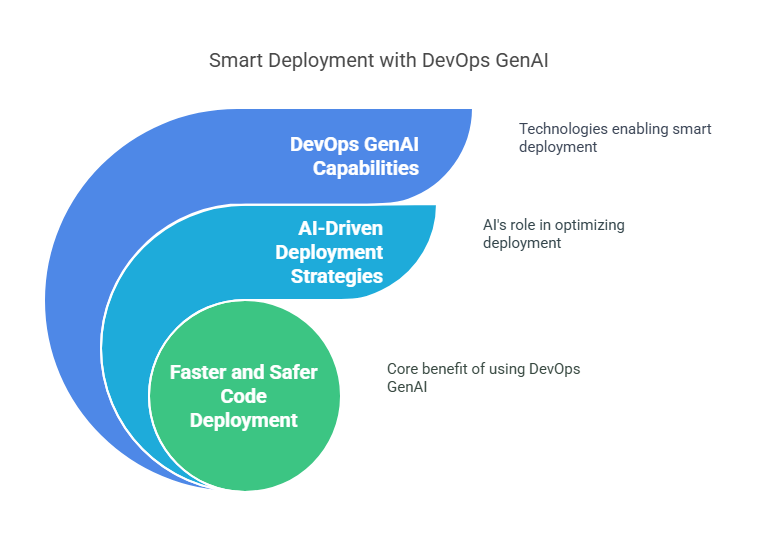
    Manual deployment processes are error-prone and time-consuming. With DevOps GenAI, deployment pipelines become intelligent and adaptive. AI can:

    • Analyze historical deployment data
    • Identify builds most likely to succeed
    • Recommend canary releases or blue-green deployments
    • Auto-trigger rollbacks upon detecting anomalies

    This smart orchestration allows organizations to safely deploy code multiple times a day—a hallmark of elite DevOps teams, as identified in the DORA State of DevOps Report.

    Real Impact:

    • 3x faster release cycles
    • Fewer deployment failures
    • Higher team confidence in shipping code

    An end-to-end DevOps solution with embedded GenAI capabilities makes continuous delivery seamless, even for complex microservices architectures.

    4. Predictive Analytics for Better Planning

    Planning has always been part art, part science. DevOps GenAI transforms it into a data-driven process. Using predictive analytics, AI can forecast:

    • Sprint velocity
    • Story point estimation accuracy
    • Team workloads
    • Potential blockers before they impact timelines

    Managers can move beyond gut feelings to data-backed insights, creating more realistic roadmaps and allocating resources efficiently.

    Real Impact:

    • Higher sprint predictability
    • Better resource utilization
    • Fewer project overruns

    Integrating Digital Platform AI into planning tools like Jira or Azure DevOps empowers organizations to make strategic, proactive decisions rather than reactive course corrections.

    5. Enhanced Collaboration and Knowledge Sharing

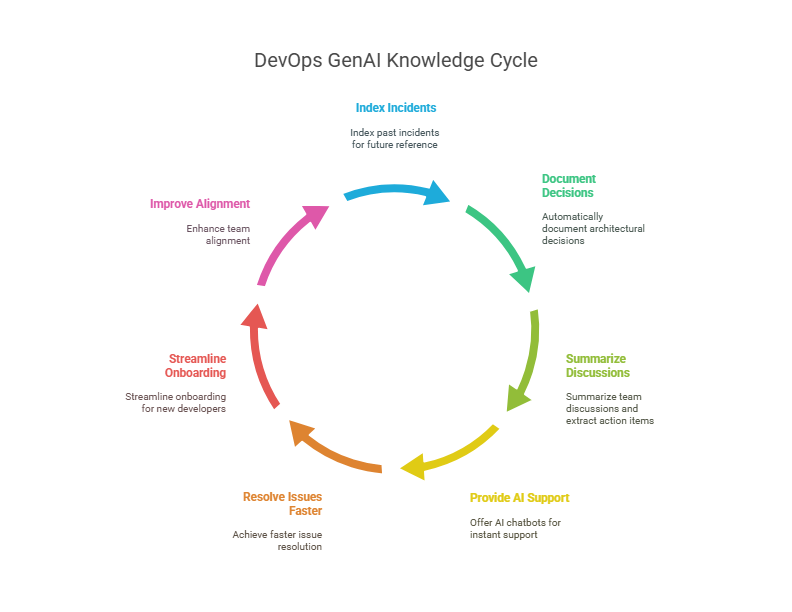
    DevOps thrives on collaboration, but knowledge silos remain a major challenge. DevOps GenAI dismantles these silos by creating intelligent, searchable knowledge bases. Imagine a platform where:

    • Past incidents are indexed and searchable
    • Architectural decisions are automatically documented
    • Team discussions are summarized, and action items are extracted

    AI chatbots can act as first-level support for developers, instantly surfacing SOPs, runbooks, or past resolutions.

    Real Impact:

    • Faster issue resolution
    • Streamlined onboarding for new developers
    • Improved team alignment

    By leveraging AI DevOps platform, organizations ensure that critical knowledge doesn’t leave when employees do.

    6. Continuous Security and Compliance Monitoring

    Security must be integrated into every stage of the DevOps lifecycle. DevOps GenAI brings real-time, intelligent security capabilities into the fold. Here’s how:

    • Auto-detects vulnerabilities in code, dependencies, and configurations
    • Enforces compliance standards like GDPR, HIPAA, and PCI DSS automatically
    • Provides real-time risk scoring for new deployments
    • Suggests remediations or blocks non-compliant builds

    In 2024, Gartner reported that organizations using AI-driven security within DevOps reduced vulnerabilities by 40% compared to those using traditional methods.

    Real Impact:

    • Lower breach risks
    • Faster audit readiness
    • Higher customer trust

    An end-to-end DevOps solution that integrates security as code, powered by AI, keeps your organization ahead of emerging threats.

    7. Personalized Developer Experience

    Developers are unique, each with their own strengths, preferences, and workflows. DevOps GenAI respects this individuality by offering personalized recommendations, such as:

    • Suggesting IDE extensions or themes
    • Recommending training modules based on coding patterns
    • Proposing optimized workflows tailored to individual habits

    This focus on personalization leads to happier, more engaged developers—critical in a world facing a global tech talent shortage.

    Real Impact:

    • Improved developer satisfaction
    • Lower attrition rates
    • Faster skill development

    AI DevOps platforms that create adaptive, intelligent developer experiences will lead the race for top engineering talent.

    Real-World Examples of DevOps GenAI in Action

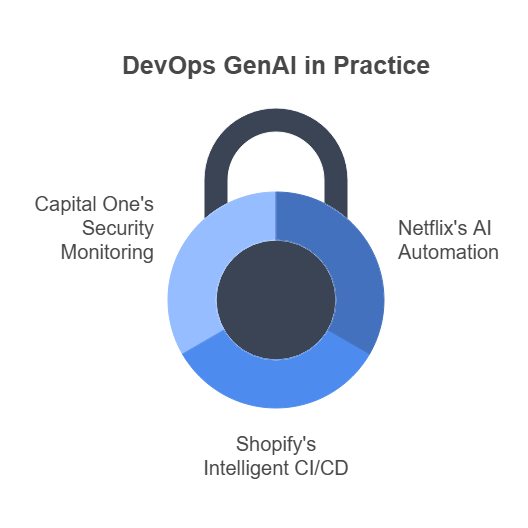
    • Netflix uses AI-driven automation for chaos testing, deployment verification, and system monitoring.
    • Shopify relies on intelligent CI/CD pipelines that learn from build failures to improve deployment success.
    • Capital One employs AI for security monitoring and continuous compliance checks across its cloud infrastructure.

    These organizations demonstrate that DevOps GenAI isn’t theoretical—it’s the future of development happening now.

    Future Trends: What’s Next for DevOps GenAI?

    • Self-healing Systems: Beyond self-diagnosis, systems will start self-repairing without human intervention.
    • Explainable AI in DevOps: Developers will demand transparency in AI decision-making for trust and debugging.
    • Federated Learning for DevOps: Collaborative AI training across organizations without sharing sensitive data.
    • Hyperautomation: Every manual DevOps workflow will become a candidate for AI-led automation.

    Organizations investing early in Digital Platform AI and end-to-end DevOps solutions will lead this next wave.

    Conclusion: Empower Your DevOps Journey with DevSecCops.ai

    If you’re ready to elevate your software development processes with DevOps GenAI, DevSecCops.ai is your ideal partner. We offer AI DevOps platforms that embed automation, intelligence, and security into every layer of your DevOps lifecycle.

    Our end-to-end DevOps solutions help organizations:

    • Accelerate software delivery
    • Improve operational efficiency
    • Strengthen security and compliance
    • Boost developer experience and satisfaction

    Join the growing list of innovators future-proofing their digital transformation with DevSecCops.ai. Embrace DevOps GenAI today and unlock the full potential of your development teams!

  • Understanding DevOps LLM: Benefits, Challenges, and Real-World Use Cases

    Understanding DevOps LLM: Benefits, Challenges, and Real-World Use Cases

    Hey, ever wondered how AI is shaking up the DevOps world? DevOps LLM refers to Large Language Models that serve as intelligent assistants for DevOps teams. These AI powerhouses are automating everything from code writing to security checks, making software delivery faster and smoother. With DevOps GenAI, digital platform AI, cloud migration services, and security monitoring systems in the mix, DevOps LLM is changing the game. Let’s dive into what it does, why it’s awesome, where it gets tricky, and how it’s working in the real world—all in a way that feels like a chat over chai. Ready? 

    What’s This DevOps LLM Thing Anyway?

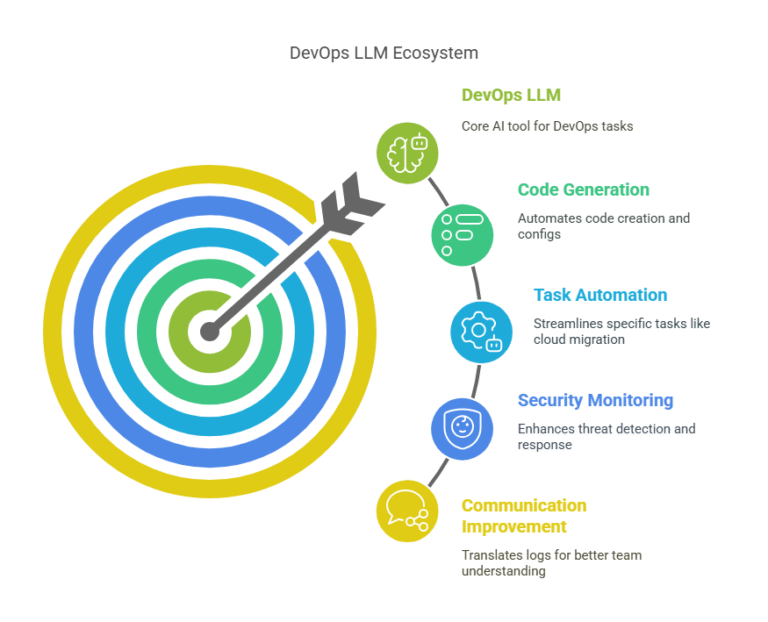
    Picture DevOps LLM as your DevOps team’s new BFF. It’s an AI tool—think GPT-4 or AWS Bedrock—that understands plain English and churns out code, configs, or even pipeline fixes like a pro. Instead of you sweating over a Kubernetes YAML file, you just tell the LLM, “Hey, set up a cluster for me,” and bam! It’s done in minutes. That’s the magic of DevOps LLM.

    It’s not just about coding. LLMs can, for instance, translate technical logs into readable summaries to improve team communication. Need to move your app to the cloud?LLMs streamline specific tasks (e.g., generating Terraform scripts) within a broader human-led process. Worried about hackers? Security monitoring systems use LLMs to spot threats faster than you can say “bug.” Terms like AI-driven DevOps or LLMOps (fancy for LLM operations) show how it’s revolutionizing workflows. Cool, right?

    Why DevOps LLM is a Total Win

    Okay, let’s break down why DevOps LLM is the hero your team needs.

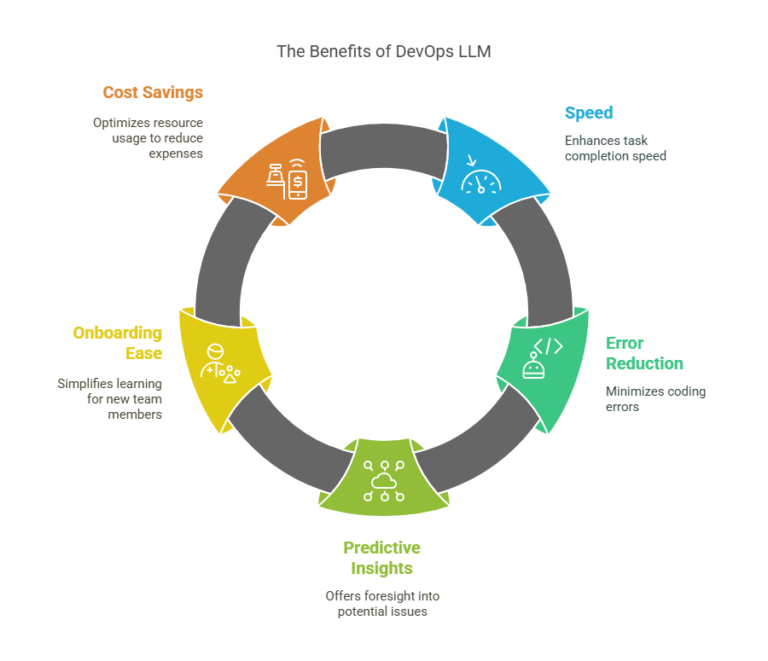
    1. Speed That Feels Like Magic

    Imagine you’re cooking biryani, but instead of chopping onions for hours, a robot does it in seconds. That’s DevOps LLM for tasks like writing Terraform scripts or fixing CI/CD pipelines. A fintech company in 2025 used an LLM to slash ArgoCD rollback time from 30 minutes to 2—talk about fast! For cloud migration services, this speed means you’re up and running on AWS or Azure in no time. Workflow automation and AI-powered pipelines are the buzzwords here.

    2. Fewer Oops Moments

    Writing code for 50 microservices is like juggling flaming torches—one slip, and it’s chaos. DevOps LLM generates 90% of that code perfectly, so you just tweak the rest. For security monitoring systems, it ensures your configs are tight, meeting standards like SOC 2 without headaches. Think of it as a spell-checker for your infrastructure—semantic code generation keeps errors at bay.

    3. It’s Like a Crystal Ball

    LLMs don’t just work; they predict. By digging through old logs, a DevOps LLM can warn you about pipeline crashes or security holes before they happen. A security monitoring system with LLMs might spot a dodgy S3 bucket setup, saving you from a data breach. Predictive DevOps and anomaly detection AI make it feel like you’ve got a sixth sense.

    4. Newbies Welcome!

    Starting in DevOps can feel like learning rocket science. DevOps GenAI tools like LLMs explain complex stuff—like a GitLab pipeline—in plain English, so new hires get up to speed fast. For digital platform AI, this means everyone from coders to managers understands what’s going on. It’s like having a patient tutor 24/7. AI-assisted onboarding is the key here.

    5. Save Those Bucks

    Manual work costs time and money. DevOps LLM automates tasks, so your team focuses on building cool features instead of babysitting servers. In cloud migration services, LLMs set up auto-scaling to cut cloud bills by only using what you need. Cloud cost optimization and AI-driven resource management are your wallet’s new friends.

    Where DevOps LLM Gets Tricky

    Alright, DevOps LLM isn’t all rainbows. Here’s where it can trip you up—and how to dodge those traps.

    1. It’s Not Plug-and-Play

    Hooking up an LLM to your Jenkins or Kubernetes setup is like teaching your grandma to use WhatsApp—possible, but it takes effort. You need solid prompts to get the right output, and that’s tough without AI know-how. Tools like Kubiya.ai help, but it’s still a puzzle. LLM integration challenges and DevOps tool compatibility are real hurdles.

    2. Keep Your Data Safe

    Feed an LLM the wrong data, and it’s like giving your diary to a stranger. Public LLMs like ChatGPT can leak sensitive info, especially for security monitoring systems. Stick to private models like AWS Bedrock to keep things locked down. DevOps data privacy and secure AI workflows are non-negotiable.

    3. Skills Take Time

    A 2025 survey said 86% of DevOps folks double-check LLM outputs because they’re not AI wizards yet. Learning to write good prompts or verify code is a must, especially for cloud migration services where one typo can tank your migration. AI skill development and prompt engineering are where you need to level up.

    4. Big Power, Big Bills

    Running LLMs for real-time tasks—like scanning logs in a security monitoring system—eats up serious computing power. That can spike your cloud costs if you’re not careful. AI scalability issues and DevOps compute costs mean you’ve gotta plan smart.

    5. Playing by the Rules

    LLMs need to follow laws like GDPR. If your DevOps LLM is auditing a cloud setup, it better not churn out biased or non-compliant stuff. Governance is key to avoid ethical messes. AI compliance DevOps and ethical AI usage keep you on the right side of the law.

    DevOps LLM in Action: Real-World Stories

    Let’s see how DevOps LLM is making waves out there.

    1. Supercharging CI/CD Pipelines

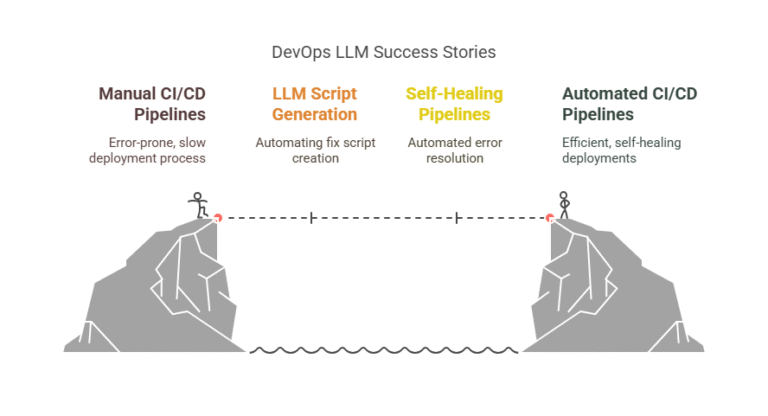
    A fintech company had a messy ArgoCD setup—failed deployments were their daily drama. They brought in DevOps LLM to auto-generate fix scripts, cutting setup time by 70%. With DevOps GenAI, their pipelines started healing themselves, like a superhero with a first-aid kit. CI/CD automation AI and self-healing DevOps were the stars here.

    2. Security Monitoring Systems That Don’t Sleep

    A financial firm used a security monitoring system powered by DevOps LLM on AWS. It caught sneaky API calls and phishing attempts in seconds, acting like a digital guard dog. Platforms like DevSecCops.ai make these setups a breeze. AI-driven security and real-time threat detection saved the day.

    3. Cloud Migration Without the Migraine

    A retail giant was moving to a hybrid cloud and drowning in configs. DevOps LLM whipped up Terraform scripts for AWS EC2 instances, slashing errors by 90%. This made their cloud migration services smooth as butter. AI-powered cloud migration and IaC automation were the MVPs.

    4. Logs That Talk Back

    An e-commerce site had logs piling up like laundry. Their DevOps LLM analyzed them in real time, spotting error spikes and explaining issues in plain English. Root cause analysis time dropped by 50%. AI log analysis and DevOps anomaly detection made life easier.

    5. Digital Platform AI for Teamwork

    A healthcare company used digital platform AI with LLMs to turn cryptic Jira tickets into clear business goals, getting tech and non-tech teams on the same page. The LLM also churned out CI/CD configs, making collaboration a breeze. AI-driven collaboration and cross-functional DevOps sealed the deal.

    How to Nail DevOps LLM Like a Pro

    Wanna make DevOps LLM work for you? Here’s the playbook:

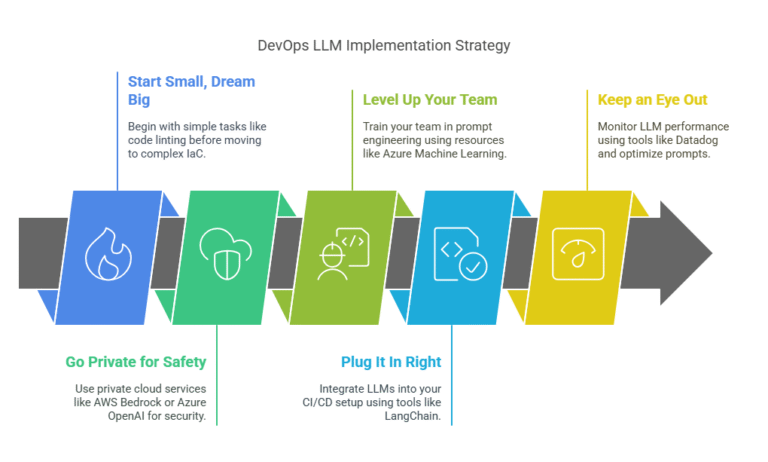
    1. Start Small, Dream Big: Test LLMs on easy stuff like code linting before diving into complex IaC. Think baby steps, like using an LLM to write ESLint rules first.
    2. Go Private for Safety: Use AWS Bedrock or Azure OpenAI for security monitoring systems to keep your data under wraps.
    3. Level Up Your Team: Train folks on prompt engineering—Azure Machine Learning has great courses for this.
    4. Plug It In Right: Tools like LangChain connect LLMs to your CI/CD setup without breaking a sweat.
    5. Keep an Eye Out: Use Datadog to check if your LLM’s outputs are on point, tweaking prompts as you go. LLM performance monitoring and DevOps AI optimization are your friends.

    What’s Next for DevOps LLM in 2025?

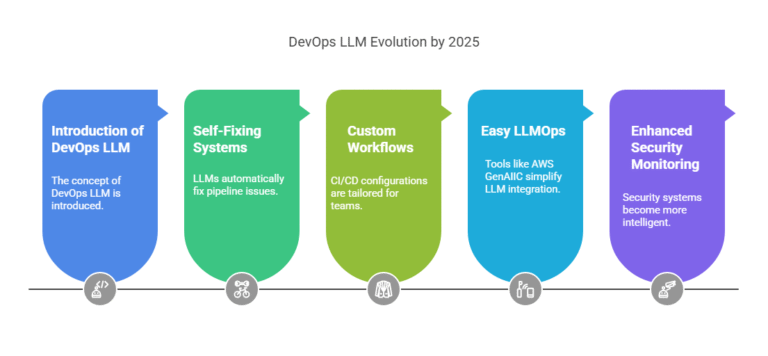
    By 2025, DevOps LLM is gonna be next-level:

    • Self-Fixing Systems: LLMs will patch pipelines like a mechanic fixing your bike, cutting downtime.
    • Custom Workflows: Think CI/CD configs tailored for your team, thanks to digital platform AI.
    • Easy LLMOps: Tools like AWS GenAIIC will make LLMs plug-and-play for cloud migration services.

    DevOps GenAI is paving the way, and security monitoring systems will get smarter, making DevOps LLM a must-have.

    Conclusion

    DevOps LLM is like a turbo boost for your DevOps game, speeding up pipelines, locking down security monitoring systems, and making cloud migration services a walk in the park. Sure, there are bumps—like skill gaps or data security—but the real-world wins in fintech, e-commerce, and healthcare show it’s worth it. With the right playbook and tools like DevSecCops.ai, you can ride the DevOps LLM wave to faster, safer software delivery. 

    Swing by DevSecCops.ai to check out resources and level up your DevOps with LLMs in 2025!

  • Top 5 Ways Digital Platform AI is Revolutionizing Industries

    Top 5 Ways Digital Platform AI is Revolutionizing Industries

    Digital Platform AI is changing the way industries operate for the next generation by introducing artificial intelligence to digital ecosystems, delivering efficiencies, innovations, and scale across platforms such as healthcare and finance. These can be made possible by employing a suite of technologies, such as DevOps GenAI, AI DevOps platforms, or end-to-end DevOps automation, enabling organizations to improve core processes and rethink go-to-market strategies.  This  article highlights five ways Digital Platform AI is changing industries, referencing AI-driven DevOps and intelligent automation. 

    1. Accelerating Software Development with AI DevOps Platforms

    Digital Platform AI is changing software Development through the introduction of AI DevOps platforms that ground the automation of the entire software development lifecycle. The tools use DevOps GenAI to automate routine or repetitive tasks for example code generation, testing, deployment, etc. This reduces errors and speeds up time to market. From this perspective, rapidly delivering software could transform the way industries such as e-commerce, fintech and gaming operate.

    Artificial Intelligence DevOps platforms use machine learning to analyze codebases, find potential bug, and suggest optimizations. For example, AI DevOps platforms can look at historic data and identify patterns within software vulnerabilities so developers can fix the problem before it gets released to production, a true innovation in predictive analytics. The outcome will be high quality applications and less downtime.

    Devops GenAI can help increase productivity through intelligent code auto-completion and generating code snippets based on the surrounding code context.End-to-end DevOps automation through CI/CD (Continuos Integration/ Continuous Deployment) fully automates all manual processes, integrating everything from provisioning cloud-native infrastructure to performance monitoring to workflow orchestration. For example, a fintech company can deploy secure daily updates using an automated DevOps environment which works towards compliance and meeting customer expectations. The automation tools integrate to allow for scalable, reliable development.

    By combining Digital Platform AI with AI-enabled DevOps, organizations can build with smarter and more robust software systems that display creative and cost-effective solutions to delivering value in a digital-first ecosystem.

    2. Enhancing Operational Efficiency with End-to-End DevOps Automation

    Operational excellence is important for all organizations today, and Digital Platform AI and end-to-end DevOps automation are propelling efficiency through operations excellence journeys. Traditional organizations are typically DevOps-oriented but beheld to traditional manual configuration management steps (Node/Plugin based access) in their toolsets processes plus siloed tools and teams which hinder efficiency. Digital Platform AI alleviates the constraints of traditional approaches to deliver logical, end-to-end delivery through intelligent automation across development, testing, and operations.

    DevOps GenAI automates complicated processes like load balancing, incident response, and infrastructure provisioning. Some DevOps technologies use machine learning to continually optimize for cost and efficiency, dynamically assigning cloud-native resources based on demand in real-time. This is especially important for gaming, logistics, and media streaming, since even a momentary downtime or latency can diminish consumer confidence.

    AI-enabled DevOps platforms provide insights on how systems are working through the ongoing collection of metrics such as server latency, application uptime and visitor traffic. They combine the concepts of Digital Platform AI, which identifies metrics for service level monitoring, and automatically reconfigures elements of the architecture or application to ensure service level standards are met with a minimal amount of human oversight as possible. For example, an e-commerce platform may dynamically auto-scale its complete architecture during spike times associated with the holiday shopping season, eliminating the need to locate or issue manual adjustments. As a result, the team can focus on other priorities.

    Incident Management is improved through DevOps solutions that leverage digital intelligence. DevOps GenAI recognizes anomalies in operations, alerts to the root cause, and quickly repairs it to minimize downtime. DevOps GenAI does all of this automatically, proactively, and faster than traditional responses; improving both reliability and agility. In a competitive landscape, organizations using automation like DevOps GenAI to streamline their operations, can quickly evolve to market changes for sustainable growth.

    3. Personalizing Customer Experiences with DevOps GenAI

    In a customer-centric world, Digital Platform AI provides hyper-personalized experiences across industries. DevOps GenAI enables AI-enabled software development, allowing organizations to quickly deploy applications that  utilize real-time data to specifically meet individual consumer needs.

    AI DevOps platforms tap into customer data platforms to analyze behavioral data in real-time, and leverage DevOps technologies to roll out personalized capabilities at scale. Retailers that have an e-commerce site can employ digital platform AI to model customer behavior with the aim of delivering a product recommendation engine that recommends products based on the customer’s history and purchases, as well as user social media behavior. Similarly, in entertainment, streaming services can leverage and integrate machine learning (ML) into their DevOps process to deliver a unique content playlist for consumers and enhance user engagement.

    End-to-end DevOps automation guarantees that these AI-augmented applications are always responsive and up to date. AI DevOps platforms roll out features automatically, A/B test their user interfaces, and improve their algorithms by learning from always on feedback and monitoring to remain competitive. For example, DevOps automation is used in travel to implement dynamic pricing for flights and hotels by offering customers personalized deals to drive conversions.

    Digital Platform AI provides real-time personalization to mobile apps, websites, and other digital channels. It allows DevOps to leverage intelligent automation in cloud-native platforms so organizations can design rich contextual experiences that drive loyalty. The focus has now shifted from one-size-fits-all engagement to personalized experience management. These personalized engagements are restructuring markets. Organizations can no longer afford to be generic in their DevOps and must focus on a personalized journey to drive customer satisfaction and ensure profitability.

    4. Strengthening Security with AI-Driven DevOps Technologies

    Cyber threats are becoming more sophisticated every day, and Digital Platform AI advances security across industries by implementing security controls through DevOps technologies. AI DevOps platforms offer intelligent automation with solid threat detection and incident response to protect digital assets.

    DevOps GenAI is highly adept at recognizing anomalies and predicting breaches with its ability to analyze significantly large data sets. Illustrated further, an AI DevOps platform can analyze network traffic in real-time, scanning for suspicious access attempts or unusual data transfers. It can also use DevOps automation end to end to repair networks by deploying patches to problematic access points, firewall updates to address attack patterns, or isolating affected systems to limit exposure.

    Digital Platform AI has serious implications for sectors such as banking, health-care, and government where the protection of private information is a priority. DevOps technologies with machine learning capabilities enable a near real-time audit and reporting of the configuration of cloud services in compliance with regulatory and industry standards (i.e. GDPR, PHI), which alleviates the burden of compliance and risk management faced by IT teams and adapts with evolving compliance and standards demands.

    Digital Platform AI embeds security in the DevOps workflow, also known as DevSecOps. Integrating security checks into CI/CD pipelines allows AI-enhanced DevOps tools to address detected vulnerabilities as part of the CI/CD process, which goes a long way toward solving problems earlier. So these advancements with DevOps processes allow organizations to build more resilient systems to complex threats and, in doing so, allow the organizations to innovate, and build systems, securely and protect future operations.

    5. Driving Innovation with Scalable AI DevOps Platforms

    Digital Platform AI is revolutionizing the business landscape by providing the platforms and tools for companies to innovate on scalable AI DevOps platforms. With DPAIs, companies can clarify their technology solutions and enhance the development process through smoother solution development processes which allows them to expedite testing, iteration and innovative time to market.

    DevOps is working with GenAI to accelerate prototyping and engineering for applications involving AI capabilities. For example, autonomous vehicle development employs AI DevOps platforms that permit very large-scale experimentation by modeling situations and testing models. In manufacturing, DevOps technology acts as the driving force behind smart factories with the ability to harness and analyze real-time data to optimize production. It also makes it possible to demonstrate software development using AI.

    End-to-end DevOps automation promotes innovation by removing repetitive work and giving teams the freedom to be innovators and create solutions to problems. For example, a company in the biotech industry could leverage an AI DevOps platform to automate data analysis and modeling training to facilitate drug discovery, unlocking new advancements in renewable energy and healthcare.

    Cloud-native DevOps platforms are able to drive innovation to complex systems with little latency. For instance, a healthcare provider could deploy a telemedicine platform across regions and users would have the same experience. In the end, Digital Platform AI and intelligent automation aren’t just providing the ability to innovate, but are defining the next generation of software development.

    Conclusion

    Digital Platform AI accelerates transformation strategies for existing industries with fast development technologies like DevOps GenAI, AI DevOps platforms and end-to-end DevOps automation. The future of processes with DevOps through new technologies is reimagined, resulting in speed of innovation, security, personalized experiences, and revenues for social good. Companies such as DevSecCops.ai are leading this evolution, enabling organizations to adopt AI-enabled DevOps so they can create monetization models and standardize improved productivity outcomes. These digital platforms enable organizations to recognize their transformation journeys through unique productivity tools and intelligence to create competitive strategies. 

    With Digital Platform AI, new innovative opportunities which support intelligent-automation-powered futures and enable AI-platform-powered outcomes are becoming a reality.

  • ArgoCD & CI/CD: The Ultimate Guide to GitOps Deployment

    ArgoCD & CI/CD: The Ultimate Guide to GitOps Deployment

    Introduction

    In the fast moving DevOps world, ArgoCD is quickly becoming the leader in End-to-End DevOps Automation. ArgoCD has positioned itself as the leader for successfully integrating Automated CI/CD Pipelines with GitOps to deliver a highly reliable and scalable application deployment. 

    This guide will discuss how ArgoCD can improve CI/CD workflows, interact with log monitoring tools and security monitoring tools, and integrate with best practices for DevSecOps, and how DevSecCops.ai can improve your deployment pipeline.

    What is CI/CD?

    Continuous Integration and Continuous Deployment (CI/CD) is at the very heart of software delivery today. CI/CD will integrate and automate build, test, and deployment of an application with the intent to minimize human error, achieve an excellent deployment speed, and offer multiple times to release.

    Key Benefits of CI/CD:

    Faster deployments with Automated CI/CD Pipelines
    Improved code quality through automated testing
    Reduced downtime with rollback capabilities
    Enhanced collaboration between Development and Operation teams

    What is ArgoCD?

    ArgoCD provides a declarative, GitOps-based continuous delivery (CD) solution for Kubernetes. It keeps track of applications and their desired state defined in Git repositories, enabling consistency across environments.

    Why Use ArgoCD for CI/CD?

    GitOps-Driven Deployments – Infrastructure as Code (IaC) in Git
    Self-Healing Capabilities – Automatically corrects drift
    Multi-Environment Support – Manage staging, production, and more
    Integration with CI Tools – Works with Jenkins, GitHub Actions, GitLab CI

    CI/CD ArgoCD: A Perfect Match for GitOps

    1. End-to-End DevOps Automation

    ArgoCD bridges the gap between CI and CD by:

    • Pulling changes from Git repositories
    • Applying Kubernetes manifests automatically
    • Ensuring deployments match the Git-defined state

    This End-to-End DevOps Automation minimizes human intervention and ensures consistency.

    2. Automated CI/CD Pipelines with ArgoCD

    A typical CI/CD ArgoCD workflow looks like this:

    1. Code Commit → Developers push changes to Git
    2. CI Pipeline → Build, test, and generate Kubernetes manifests
    3. Git Repository Update → Manifests stored in Git (Single Source of Truth)
    4. ArgoCD Sync → Automatically deploys changes to Kubernetes

    This Automated CI/CD Pipeline ensures rapid, reliable deployments.

    3. Log Monitoring System Integration

    To maintain observability, integrate ArgoCD with a log monitoring system like:

    • ELK Stack (Elasticsearch, Logstash, Kibana)
    • Prometheus + Grafana
    • Loki

    These tools help track deployment logs, detect anomalies, and troubleshoot issues ensuring that any problems in the CI/CD pipeline can be quickly identified and resolved.

    4. Security Monitoring System for Compliance

    Security is critical in CI/CD. ArgoCD integrates with security monitoring systems like:

    • Falco (Runtime security)
    • Aqua Security (Vulnerability scanning)
    • OPA (Open Policy Agent) (Policy enforcement)

    These integrations ensure compliance with DevSecOps principles by providing real-time security monitoring and automated policy enforcement.

    Best Practices for CI/CD ArgoCD Implementation

    1. Use Declarative Configuration

    Declare all Kubernetes resources in Git (YAML/Helm/Kustomize) so you can deploy in a version-controlled way. This way, the changes are tracked, auditable, and implemented.

    2. Enable Automated Syncing

    Configure ArgoCD to automatically sync into Git changes (with approvals for production). This guarantees that your deployments are will always be as current as the code changes.

    3. Implement RBAC (Role-Based Access Control)

    Restrict access to ArgoCD based on team roles to enhance security.

    4. Monitor with Prometheus & Grafana

    Track deployment metrics, sync status, and resource usage for better observability.

    5. Secure Your Pipeline with DevSecOps

    • Scan container images for vulnerabilities (Trivy, Clair)
    • Enforce policies with OPA/Gatekeeper
    • Use DevSecCops.ai for AI-driven security insights

    Conclusion: The Future of CI/CD with ArgoCD & DevSecCops

    ArgoCD is revolutionizing End-to-End DevOps Automation by combining GitOps, Automated CI/CD Pipelines, and Kubernetes-native deployments. By integrating a log monitoring system and security monitoring system, teams achieve both speed and security.

    For organizations looking to enhance their DevSecOps practices, DevSecCops.ai provides advanced security automation, ensuring compliance and threat detection in CI/CD workflows.

    Embrace ArgoCD & CI/CD today to build a robust, scalable, and secure deployment pipeline!

  • How DevOps Technologies Are Transforming Software Delivery

    How DevOps Technologies Are Transforming Software Delivery

    Introduction

    The software development landscape is rapidly changing, and DevOps technologies are driving the revolution. With automation, collaboration, and intelligence integrated in the software delivery pipeline, organizations can deliver software quicker, more reliably, and with greater security..

    In this guide, we’ll look at how DevOps technologies such as CI/CD ArgoCD, AI-based DevOps platforms, hybrid cloud technologies on AWS, security scanning technologies, and generative AI (GenAI) in DevOps are changing the face of modern software development. Also, we’ll feature how DevSecCops.ai is helping organizations optimize DevOps pipelines for speed and security.

    The Rise of DevOps Technologies

    DevOps connects development (Dev) and operations (Ops ) to create a culture of continuous integration, delivery and automation. Due to the changes in accessibility and consumer demand, it has become the norm for businesses. Among the various reasons organizations are adopting DevOps are: 

    ✔ Time to market is faster thanks to automated workflows

    ✔ Increased collaboration within teams

    ✔ Increased scalability with cloud native elements

    ✔ Enhanced security thanks to DevSecOps 

    Now, let’s look at the core DevOps technology disrupting the software delivery supply chain.

    1. CI/CD & ArgoCD: The Backbone of Automation

    What is CI/CD?

    Continuous Integration and Continuous Delivery (CI/CD) automates the software release process, from code commits to production deployments.

    Why ArgoCD for CI/CD?

    ArgoCD, a GitOps-based tool, ensures that Kubernetes deployments align with the state defined in Git repositories. Key benefits:
    Declarative deployments using Infrastructure as Code (IaC)

    Self-healing capabilities that auto-correct configuration drift

    Seamless integration with tools like Jenkins, GitHub Actions, and GitLab CI

    Impact on Software Delivery

    • Reduces manual errors
    • Accelerates release cycles
    • Enhances auditability with Git-based tracking

    2. AI DevOps Platforms: Smarter Automation

    The Role of AI in DevOps

    AI-powered DevOps platforms leverage machine learning to:

    • Predict deployment failures
    • Optimize resource allocation
    • Automate incident response

    Use Cases of AI in DevOps

    🔹 Anomaly Detection – AI identifies performance bottlenecks
    🔹 Auto-Remediation – Self-healing infrastructure
    🔹 Intelligent Log Analysis – Faster troubleshooting

    Leading AI DevOps Platforms

    • Datadog (AI-powered monitoring)
    • Splunk (Predictive analytics)
    • DevSecOps.ai (AI-driven security automation)

    3. Hybrid Cloud AWS: Scalable & Flexible Infrastructure

    What is Hybrid Cloud AWS?

    A hybrid cloud strategy with AWS combines on-premises infrastructure with AWS cloud services, offering:
    Flexibility to run workloads where they perform best
    Cost efficiency by optimizing cloud spending
    Enhanced disaster recovery through redundancy

    AWS DevOps Services

    • AWS CodePipeline (CI/CD automation)
    • AWS EKS (managed Kubernetes)
    • AWS CloudFormation (Infrastructure as Code)

    Benefits for Software Delivery

    • Faster scaling with cloud elasticity
    • Improved compliance with hybrid deployments
    • Seamless migration strategies

    4. Security Scanning Solutions: Embedding DevSecOps

    Why Security Scanning is Critical

    Modern DevOps pipelines require security scanning solutions to:
    ✔ Detect vulnerabilities early (Shift-Left Security)
    ✔ Ensure compliance with industry standards
    ✔ Prevent breaches in production

    Top Security Scanning Tools

    • Snyk (Open-source vulnerability scanning)
    • Aqua Security (Container security)
    • Checkmarx (Static Application Security Testing)

    Integrating Security into DevOps

    • Automated scanning in CI/CD pipelines
    • Policy enforcement with Open Policy Agent (OPA)
    • Runtime protection with Falco

    5. DevOps GenAI: The Future of Intelligent Automation

    What is DevOps GenAI?

    Generative AI (GenAI) is transforming DevOps by:

    • Automating code reviews
    • Generating deployment scripts
    • Enhancing incident management

    Applications of GenAI in DevOps

    🔹 AI-Generated Codetools like GitHub Copilot for DevOps scripts
    🔹 Predictive Incident Management – AI suggests fixes before failures
    🔹 ChatOps – AI-powered chatbots for team collaboration

    Leading GenAI Tools

    • GitHub Copilot (AI pair programming)
    • PagerDuty AIOps (Incident response automation)
    • DevSecOps.ai (AI-powered security insights)

    Best Practices for Adopting DevOps Technologies

    1. Automate Everything

    • Use CI/CD ArgoCD for GitOps deployments
    • Implement Infrastructure as Code (IaC)

    2. Embrace AI & GenAI

    • Leverage AI DevOps platforms for predictive analytics
    • Use DevOps GenAI for intelligent automation

    3. Secure the Pipeline

    • Integrate security scanning solutions early
    • Adopt DevSecOps principles

    4. Optimize Cloud Strategy

    • Use hybrid cloud with AWS for flexibility
    • Monitor costs with AWS Cost Explorer

    5. Foster a DevOps Culture

    • Encourage collaboration between Dev, Ops, and Security
    • Implement ChatOps for real-time communication

    Conclusion: The Future of DevOps with DevSecCops.ai

    DevOps technologies are changing the software delivery experience, enabling faster deployments, smarter automation, and tighter security.  From CI/CD from one of the many ArgoCD solutions to AI-embedded DevOps platforms, hybrid cloud solutions leveraging AWS, security scanning tools, and everything in between including DevOps GenAI, organizations are now able to build resilient, scalable, and secure pipelines. 

    For teams looking to advance their DevSecOps journey, DevSecCops.ai is an AI-powered security automation tool that enables compliance digital platfrom ai and threat detection throughout their CI/CD Lifecycle.

    The future of software delivery is automated, intelligent, and secure, so kick start your DevOps initiative today!

  • Accelerate Your Digital Transformation with a Cloud Migration Service

    Accelerate Your Digital Transformation with a Cloud Migration Service

    Being in the digital era means flexibility, scalability, and the capacity to change. Make no mistake, organizations that fail to adapt will get consumed. Cloud migration services allow organizations to take their legacy environment into the cloud in a quick, secure, and cost-effective manner. 

    Whether you are utilizing new DevOps genai, MLOps platforms, including a log monitoring tool and security monitoring system in order to increase your security level, your cloud migration services will also most likely be a enhancement in support for your digital transformation.

    In this blog, we’ll explore:

    • The 7 steps of cloud migration
    • Top cloud migration tools and solutions
    • Key phases of cloud migration
    • Google Cloud migration services & tools
    • Best cloud migration strategies
    • The role of cloud migration services in modern IT

    Let’s dive in!

    Why Use a Cloud Migration Service?

    Migrating to the cloud is not simple and it takes expertise in infrastructure, security, and compliance. A cloud migration service will allow for a smooth transition with as little downtime as possible. Important benefits of using a cloud migration service are:

    ✅ Cost Optimization – Transform capital expenditures to opex with pay-as-you-go cloud models.

    ✅ Scalability – Scale seamless based on demand.

    Enhanced Security – Leverage advanced security monitoring systems and compliance frameworks.
    Improved Performance – Cloud-native applications run faster with global availability.
    Disaster Recovery – Automated backups and failover mechanisms ensure business continuity.

    For DevOps for beginners, cloud migration accelerates CI/CD pipelines, while MLOps platforms benefit from scalable AI/ML workloads.

    7 Steps of Cloud Migration

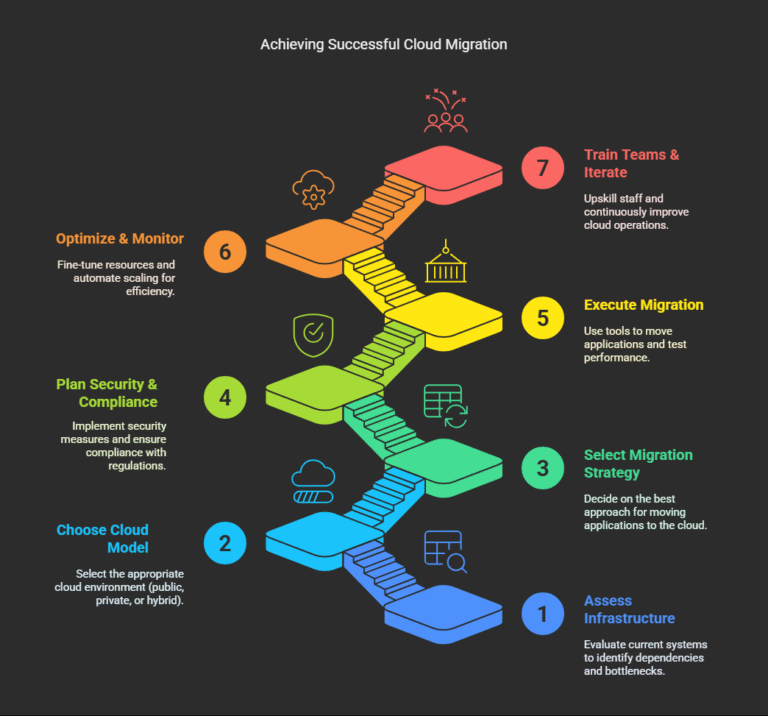
    A structured approach ensures a successful migration. Here’s a proven 7-step cloud migration strategy:

    1. Assess Current Infrastructure

    • Audit existing applications, databases, and workloads.
    • Identify dependencies and performance bottlenecks.

    2. Choose the Right Cloud Model

    • Public Cloud (AWS, Google Cloud, Azure)
    • Private Cloud (On-premises or hosted)
    • Hybrid Cloud (Combination of both)

    3. Select a Migration Strategy

    Common cloud migration strategies include:

    • Rehosting (Lift & Shift) – Move apps without modification.
    • Refactoring – Optimize apps for cloud-native features.
    • Replatforming – Minor adjustments for cloud compatibility.
    • Repurchasing – Shift to SaaS alternatives.
    • Retiring – Decommission unused applications.

    4. Plan Security & Compliance

    • Implement log monitoring tools for visibility.
    • Enforce security monitoring systems for threat detection.

    5. Execute Migration

    • Use cloud migration tools (AWS Migration Hub, Google Migrate for Compute Engine).
    • Test performance post-migration.

    6. Optimize & Monitor

    • Fine-tune resource allocation.
    • Automate scaling with DevOps & GenAI integrations.

    7. Train Teams & Iterate

    • Upskill staff on cloud operations.
    • Continuously improve using analytics.

    Top Cloud Migration Tools & Solutions

    The right cloud migration tools simplify the process:

    Google Cloud Migration Services & Tools

    • Google Migrate for Compute Engine – Lift-and-shift VM migrations.
    • Google Database Migration Service – Seamless database transfers.
    • Anthos – Hybrid and multi-cloud management.

    Multi-Cloud & DevOps Tools

    • AWS Migration Hub – Track migrations across AWS services.
    • Azure Migrate – End-to-end migration assessments.
    • Terraform – Infrastructure as Code (IaC) automation.

    Security & Monitoring Tools

    Best Cloud Migration Strategies

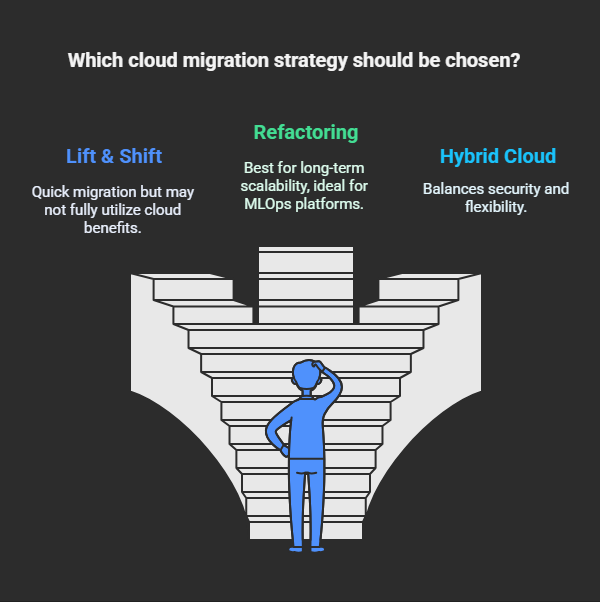
    Choosing the right approach depends on business needs:

    🔹 Lift & Shift (Rehosting) – Fast but may not leverage cloud-native benefits.
    🔹 Refactoring – Best for long-term scalability (ideal for MLOps platforms).
    🔹 Hybrid Cloud – Balances security and flexibility.
    🔹 Multi-Cloud – Avoids vendor lock-in.

    For DevOps teams, refactoring enables microservices and Kubernetes deployments.

    Conclusion: Future-Proof Your Business with Cloud Migration

    A Cloud migration service isn’t just a nice-to-have anymore; it’s a must-have to stay competitive. The cloud offers the capability for innovation at scale – whether it’s DevOps & GenAI or MLOps platforms.

    By following the 7 steps to cloud migration, using the right cloud migration tools, and implementing solid security monitoring, organizations can easily drive digital transformation.

    If you’re in the market for a single tool, check out DevSecCops.ai – an integrated toolset that includes cloud migration, DevOps automation and modern enterprise security powered by AI.

    Are you ready to migrate? Let’s get started today and realized the full power of the cloud!

  • Accelerate Your CI/CD Pipeline with End-to-End DevOps Automation 

    Accelerate Your CI/CD Pipeline with End-to-End DevOps Automation

    Businesses are pressured to develop software faster than ever before within the ever-increasing digital landscape while maintaining the quality of their products. End-to-End DevOps Automation has created the perfect opportunity for having software developed as simply as possible, while also intergrating Digital Platform AI, Infrastructure Monitoring Tools and Security Monitoring Systems for intelligent automation, whether it be into Development or Operations. As an example, whether you’re building Machine Learning Pipelines or managing your Hybrid Cloud AWS environments, the role of DevOps automation in removing manual bottlenecks, reducing errors and driving down the time take for deployment cycles is immeasurable. Any organization that does not have automation embedded in its development or operations simply runs the risk of slower releases from its pipelines, security vulnerabilities and operational inefficiencies.

    In this guide, we’ll explore:
    What is End-to-End DevOps Automation?
    Key Components of a Fully Automated CI/CD Pipeline
    Integrating AI & Machine Learning Pipelines
    Best Tools for Infrastructure & Security Monitoring
    Hybrid Cloud AWS Automation Strategies
    Real-World Case Studies & ROI Metrics

    Let’s dive in!

    What is End-to-End DevOps Automation?

    End-to-End DevOps Automation refers to such complete automation of the software delivery from code commit to production deployment, using CI/CD pipelines, infrastructure-as-code (IaC), and AI monitoring. 

    Why It Matters:

    • 70% Faster Deployments (Accelerate State of DevOps Report) 
    • 50% Fewer Security Vulnerabilities (Snyk 2023 Report)
    • 40% Less Operational Costs (Gartner)

    Key Benefits:

    ✔ Accelerated Time-to-Market – Automated testing & deployment reduces time 

    ✔ Improved Security – Security Monitoring Systems alert you to threats sooner 

    ✔ Scalability – Support for Hybrid Cloud AWS and multi-cloud cases 

    ✔ AI-Based Enhancement – Digital Platform AI predicts failures 

    Key Components of a Fully Automated CI/CD Pipeline

    1. Code Integration & Version Control

    • Tools: GitHub Actions, GitLab CI
    • Best Practice: Auto-trigger builds on code commits

    2. Automated Testing

    • Unit Tests: pytest, JUnit
    • Security Scans: Snyk, SonarQube
    • Performance Tests: JMeter

    3. Infrastructure as Code (IaC)

    • AWS CDK, Terraform – Automate cloud provisioning
    • Ansible – Configuration management

    4. Continuous Deployment (CD)

    • Blue-Green Deployments – Zero downtime
    • Canary Releases – Gradual rollouts

    5. Monitoring & Feedback Loop

    Integrating AI & Machine Learning Pipelines

    1. AI-Powered Testing

    • Digital Platform AI predicts flaky tests
    • Self-healing test scripts

    2. MLOps Automation

    • Machine Learning Pipeline automation with:
      • Data Versioning (DVC)
      • Model Training (MLflow)
      • Auto-Deployment (Kubeflow)

    3. Predictive Scaling

    • AI forecasts traffic spikes
    • Auto-scales Hybrid Cloud AWS resources

    Best Tools for Infrastructure & Security Monitoring

    Tool

    Purpose

    Key Feature

    Prometheus

    Infrastructure Monitoring

    Real-time metrics

    Datadog

    Full-stack Observability

    AI-powered alerts

    Snyk

    Security Scanning

    DevSecOps integration

    PagerDuty

    Incident Response

    Automated escalation

    Hybrid Cloud AWS Automation Strategies

    1. Unified CI/CD Across Clouds

    • AWS CodePipeline + GitHub Actions
    • Terraform for multi-cloud provisioning 

     2. Security Automation

    • AWS GuardDuty + Security Monitoring System
    • Automated compliance checks

    3. Cost Optimization

    • AWS Cost Explorer + AI-driven recommendations

    Real-World Case Studies

    Case Study 1: FinTech Company

    • Challenge: Slow releases (2 weeks per deployment)
    • Solution: End-to-End DevOps Automation
    • Results:
      •  85% Faster Deployments
      •  60% Fewer Security Issues

    Case Study 2: E-Commerce Giant

    • Challenge: Black Friday scaling issues
    • Solution: Hybrid Cloud AWS Automation
    • Results:
      • Auto-scaling saved $200K in downtime
      • AI-driven testing reduced bugs by 40%

    Conclusion: Supercharge Your DevOps with Automation

    End-to-End DevOps Automation is no longer optional—it’s essential for:
    Faster software delivery
    Secure, scalable deployments
    Cost-efficient cloud operations

    For a complete AI-powered DevOps solution, explore  DevSecCops.ai—integrating:
     Automated CI/CD Pipelines
     Security Monitoring Systems
     Hybrid Cloud AWS Optimization

    Ready to automate? Start your DevOps transformation today! 

  • Will AI Replace DevOps Engineers? The Truth About Automation

    Will AI Replace DevOps Engineers? The Truth About Automation

    Introduction

    The emergence of AI in the realm of DevOps has ignited an important conversation: will AI, rather than human engineers, replace DevOps engineers? Although tools powered by AI (e.g., platforms using AI for DevOps-related actions, CI/CD automation, and MLOps platforms) are changing workflows, AI is not aimed to replace engineers. Rather, AI is aimed to augment the jobs engineers do. 

    In this blog post, we will cover the following:

    ✔ The ongoing evolution AI will take in DevOps.

    ✔ AI automating CI/CD, security, MLOps, and other automation efforts.

    ✔ Why human expertise cannot and will not be replaced.

    ✔ Some of AI powered platforms that will help make AI-driven DevOps huge (and what you expect from DevSecCops.ai).

    When you finish reading this post you will understand AI will not replace DevOps careers, but somewhat radically shape them.

    1. The Role of AI in DevOps: Partner, Not Replacement

    What AI Can Do Today

    AI is already handling repetitive tasks in DevOps as follows:

     Generation of code – GitHub Copilot generates IaC scripts (Terraform, Ansible)

     CI/CD optimization – AI senses a pipeline will fail in ArgoCD/Jenkins.

     Security scanning – AI scans for vulnerabilities in real-time.

     MLOps automation – Auto-scaling training jobs in MLOps platforms

    What AI Can’t Do (Yet)

    Strategic Decision-Making – AI doesn’t have business context.

    Complex Debugging – Humans understand edge cases.

    Ethical and Compliance decisions – Humans oversee risk decisions.

    An example is an AI DevOps platform that can auto-generate a Kubernetes YAML file, but someone has to validate that before it is ready for production.

    2. AI in Action: Transforming DevOps Workflows

    A. AI-Powered CI/CD (ArgoCD, Jenkins, GitLab CI)

    AI strengthens Continuous Integration/Continuous Deployment processes through advanced capabilities like:

    Automated fixes of failed production deployments (e.g., rollback and remediation recommendations.)

    Predicting potential issues (e.g., resource limits in Kubernetes, etc.)

    Auto-generating code for deployment pipelines (e.g., Jenkinsfiles, etc.)

    Case: A technology company reduced their ArgoCD deployment failures by 40% through AI-enabled anomaly detection.

    B. AI in Security Scanning Solutions

    AI improves security by:

    • Detecting misconfigs in IaC (Terraform, CloudFormation).
    • Prioritizing CVEs based on exploit likelihood.
    • Auto-generating remediation steps (e.g., patching advice).

    Example:

    bash

    # AI-generated fix for a vulnerable S3 bucket  

    resource “aws_s3_bucket” “logs” {  

      bucket = “secure-logs”  

      acl    = “private” # AI-recommended change from ‘public-read’  

    } 

    C. AI in MLOps Platforms

    AI improves enterprises’ MLOps by:Automating hyperparameters tuning for speed and performance.

    Detecting model drift in production.Creating deployment templates for Kubernetes.Example Tool: Databricks.

    AI – AI automates the scaling of MLOps pipelines.

    3. Why DevOps Engineers Are Still Essential

    Humans Still Beat AI

    🔹 Imagination – Coming up with new system designs.

    🔹 Decision-making – Finding the right balance between quickness and reliability.

    🔹 Teamwork – Connecting developers, operations, and security groups.

    Roles Safe from AI Takeover

    DevOps Architects (building systems for the cloud).

    Site Reliability Engineers (SREs) (setting service targets).

    Security DevOps (DevSecOps) – Handling brand-new threats.

    What’s Next: AI will cut out boring tasks letting engineers focus on work that matters

    4. How DevSecCops.ai Bridges AI and Human Expertise

    DevSecCops.ai stands out as a top AI DevOps platform. It boosts (not replaces) engineers through:

    AI-enhanced CI/CD (ArgoCD & More)

    It creates deployment manifests with built-in security.

    It sees CI/CD failures coming before they occur.

    Smarter Security Checking Solutions

    It looks at IaC for setup errors (AWS, Kubernetes).

    It breaks down risks in simple terms for quick fixes.

    MLOps Platform Connection

    It puts model deployment on autopilot with safeguards.

    It keeps an eye on AI/ML systems for odd behavior.

    Example Workflow:

    Engineer writes a Terraform setup.

    DevSecCops.ai spots a security risk.

    AI offers a fix, engineer says yes.

    Safe infrastructure goes live via ArgoCD.

    Conclusion: AI is a Co-Pilot, Not a Replacement

    AI has a clear influence on DevOps: It handles routine tasks so engineers can develop new ideas. AI DevOps platforms, CI/CD (ArgoCD) tools, and MLOps systems are great helpers—but they can’t match human insight.

    Key Takeaways

    ✔ AI handles tasks (CI/CD, security checks, MLOps), not entire jobs.

    ✔ DevOps engineers grow into designers, planners, and AI supervisors.

    ✔ Systems like DevSecOps.ai boost output without taking over human roles.

    Call to Action

    For Teams: Try DevSecCops.ai to improve security & CI/CD with AI.

    For Engineers: Learn AI-powered DevOps tools to stay competitive.

    For Leaders: Put money into AI and human teamwork, not just automation.

    The future of DevOps isn’t about AI replacing humans—it’s about AI working with humans.