
Migrate Your On-Premise Infrastructure Without the Disruption
A secure, structured on-premise to cloud migration strategy for AWS and Azure — built to minimize disruption, control cost, and improve scalability and resilience.
Is your on-premise infrastructure holding your business back?
As infrastructure ages, migration from on-premise to cloud removes the overhead of maintaining physical servers while giving you a scalable, resilient foundation for growth.
Reduce infrastructure overhead
Eliminate the cost of maintaining aging hardware and data-center operations.
Scale with business demand
Add or shrink capacity as workloads and users change — no procurement delays.
Modernize aging infrastructure
Replace legacy constraints with an environment built for current applications.
Improve resilience & continuity
Stronger backup, recovery, and disaster recovery than a single physical site.
Strengthen security & control
Centralized visibility and access control aligned with cloud-native security.
Accelerate IT operations
Provision, deploy, and scale in minutes instead of weeks.
Our On-Premise to Cloud Migration Process
A structured approach to moving on-premise workloads to the cloud — from discovery and dependency mapping to migration, validation, and ongoing optimization.
Discover & Assess
Audit servers, applications, databases, storage, networks, and workload dependencies.
Plan & Design
Define the migration strategy, target cloud architecture, workload priorities, and cutover approach.
Prepare & Map
Map on-premise resources to the target environment, resolve compatibility gaps, and establish rollback measures.
Migrate & Replicate
Move workloads in controlled waves using replication and synchronization to maintain data consistency.
Validate & Cut Over
Test applications, connectivity, performance, security, and data integrity before production cutover.
Optimize & Govern
Right-size cloud resources, optimize cost and performance, and establish ongoing security and governance.
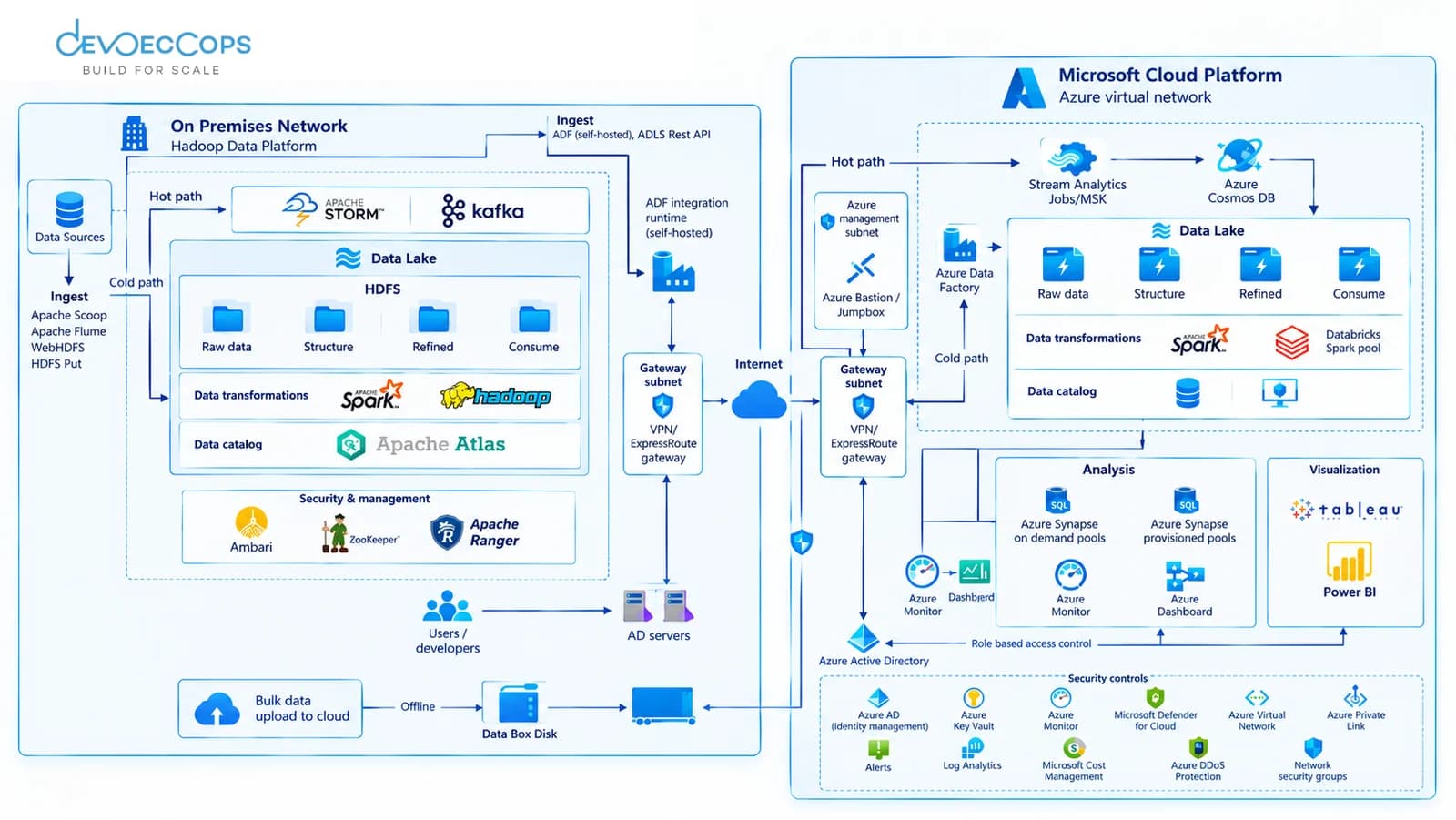
On-Premise to Cloud Migration Architecture
Moving off an on-prem data platform isn't a single cutover — it's a dual-path architecture that runs hot and cold data paths side by side while ingest, security, and identity are bridged between the on-premises network and the cloud. The reference architecture below shows how an on-premises Hadoop-style data platform maps onto an equivalent cloud-native stack during migration.
Migration Strategies: Rehost, Replatform, Refactor
Not every workload leaving your on premises environment should move the same way. We assess each on-prem system individually and assign it one of these three strategies based on urgency, future investment, and how tightly it's coupled to other on-premise infrastructure.
| Strategy | What It Means | Best For |
|---|---|---|
| Rehost | Lift-and-shift — move on-prem VMs or servers to equivalent cloud instances with minimal change. | Fast exits under time pressure (lease ending, hardware end-of-life) where re-architecting can wait. |
| Replatform | Move the workload to the cloud while swapping a few components for managed cloud services — e.g. self-hosted MySQL to RDS. | Teams that want lower operational overhead post-migration without a full rebuild. |
| Refactor | Re-architect the application into cloud-native patterns — containers, managed Kubernetes, serverless — while migrating. | Workloads that will see heavy future investment, where the old on-premises architecture is now the bottleneck. |
Data Center Exit
A full data center migration cloud exit means every workload is moved, every rack is emptied, and every contract tied to the facility is closed — not just an application cutover while servers keep running in the background. For businesses leaving a colocation facility, owned data center, or hosted environment entirely, exit planning has to run alongside the technical migration from day one.
VMware & Hypervisor Exit
Convert or rebuild VMware-hosted workloads as native cloud instances, so licensing and hypervisor costs end with the facility, not after it.
Rack Decommissioning
Physical server, storage, and network gear is retired and disposed of or resold once the last workload has cut over — coordinated so nothing is pulled before its replacement is validated.
Lease & Contract Close-Out
Facility leases, maintenance contracts, and support agreements are closed on a schedule tied to the cutover plan, not left running after the last rack is empty.
On-Premise to Cloud Migration FAQs
Common questions about timeline, cost, and downtime when moving off on premises infrastructure.
Q01How long does an on-premise to cloud migration take?
Most on-prem to cloud migrations take 8–12 weeks for a full facility exit, depending on workload count and how tightly systems are coupled to on-premises infrastructure. A single application rehost can take as little as 2–3 weeks; a full data center exit with rack decommissioning runs longer.
Q02How much does an on-premise to cloud migration cost?
Cost depends on the number of workloads, the migration strategy used per workload (rehost, replatform, or refactor), and whether a full data center exit is in scope. We scope this precisely during a free migration assessment rather than quoting a flat rate upfront.
Q03How do you avoid downtime during an on-premise migration?
We run the on-premises and cloud environments side by side during a phased cutover — replicating data continuously, validating the target environment before switching traffic, and keeping a tested rollback plan ready. Most cutovers complete with zero customer-facing downtime.
Related Migration Services
Need your data centre and the cloud to stay connected during the migration? Read our site-to-site VPN guide for the IPsec tunnel basics and an AWS Terraform setup.
On-Premise Workloads We've Moved to AWS
Ready to Exit Your
Datacenter Without the Risk?
Get a structured on-premise to cloud migration assessment covering cost, resilience, and disruption planning — no obligation, no sales pressure.