
That is why a site-to-site VPN is usually the first thing built when a company links an office or data centre to the cloud. This DevSecCops.ai guide explains how the tunnel works, when it is the right tool, how it compares with a remote access VPN and with alternatives such as Direct Connect and SD-WAN, and how to build one on AWS with Terraform.
In this guide: What it is · How it works · Types · Site-to-site vs remote access · Site-to-site vs encrypted connection · When you need one · Planning · Setup phases · AWS setup · Alternatives · Benefits and trade-offs · Security · Troubleshooting · FAQ
Short on time? Download the free Site-to-Site VPN Readiness Kit from DevSecCops.ai, or book a free DevOps assessment and talk to an engineer about your setup.
Key Takeaways
- A site-to-site VPN joins whole networks, not single devices. The tunnel ends on gateways, so servers and laptops need no client software.
- Most tunnels use IPsec with IKEv2 for key exchange. The tunnel protects traffic only while it crosses the internet.
- Cloud providers sell the cloud end as a managed service. An AWS connection always comes with two tunnels.
- Failed projects rarely fail because of weak encryption. Overlapping IP ranges, missing routes and a tunnel nobody monitors cause most of the pain.
- A VPN is the fastest and cheapest way to link networks. When you need guaranteed bandwidth or many branches, look at a dedicated link, SD-WAN or SASE.
What Is a Site-to-Site VPN?
A site-to-site VPN is a permanent, encrypted connection between two or more private networks that runs over the public internet. The gateways at each end do the work, which is why people also call it a network-to-network or gateway-to-gateway VPN.
A gateway can be a firewall, a router, a small appliance or a managed cloud service. Three practical consequences follow from that design:
- It connects subnets, not devices. Anything that can route across the link is covered, from database replication to file shares, SSH and monitoring agents.
- Nobody logs in. The gateways build and maintain the tunnel. To a user, a server in the cloud is just another private address.
- It is not application-aware. The tunnel carries whatever the routing table sends into it, so you control exposure with routes and firewall rules, not with the VPN itself.
A site-to-site VPN protects data in transit between the two gateways. It does not protect a compromised laptop, a weak password or an application with a flaw, so it works best as one layer in a wider security design.
How Does a Site-to-Site VPN Work?
The easiest way to understand the mechanics is to follow one packet. Imagine an application server in the office (10.10.4.20) querying a database in an AWS VPC (10.30.2.15).
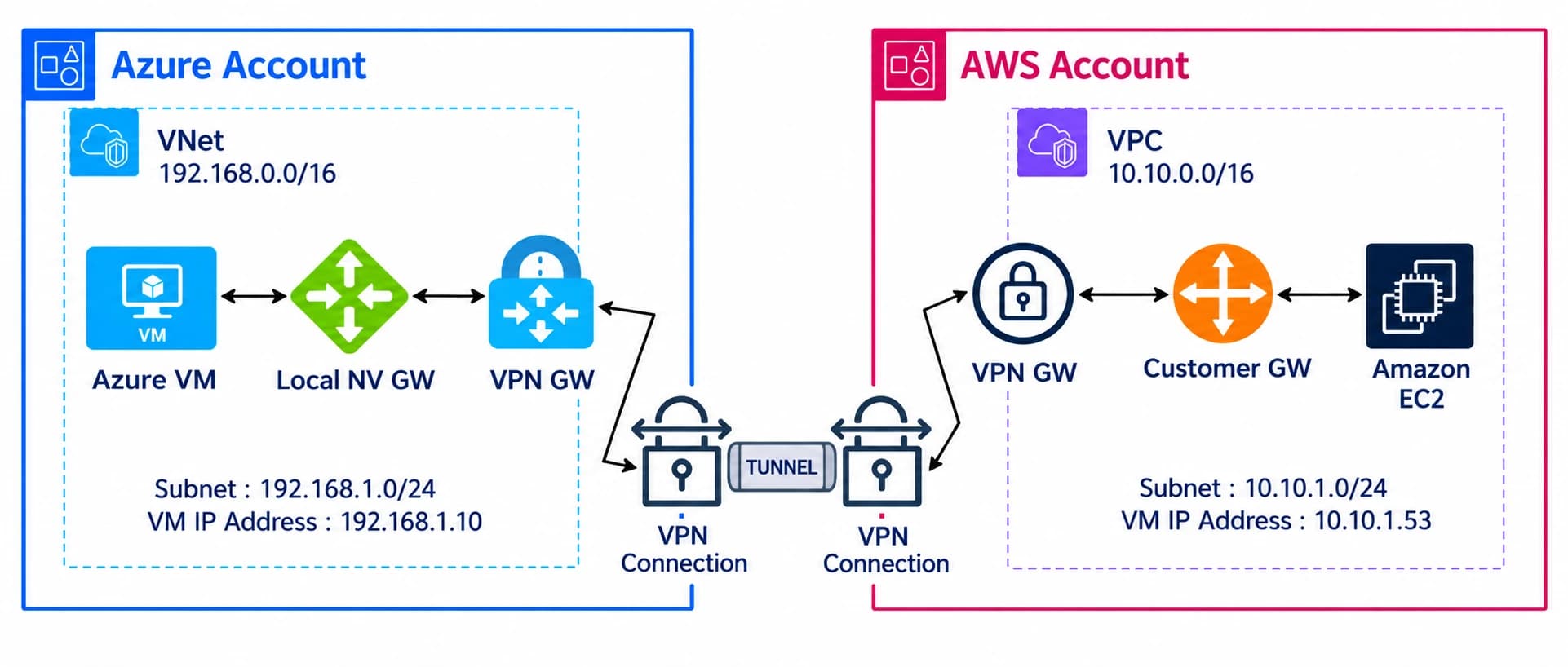
- The server sends the packet to its default gateway. The routing table says that 10.30.0.0/16 is reachable through the VPN gateway.
- The gateway matches the packet to the tunnel, encrypts and authenticates it with IPsec's Encapsulating Security Payload (ESP), and wraps it in a new packet addressed from its own public IP to the AWS gateway.
- The wrapped packet crosses the internet. Anyone watching sees two gateway addresses, packet sizes and timing, and nothing else.
- The AWS gateway checks the integrity of the packet, decrypts it and forwards the original into the VPC, where security groups decide whether it reaches the database.
- The reply travels the same way in reverse.
What Happens Before the First Packet
The gateways first build the tunnel using the Internet Key Exchange, ideally version 2 (IKEv2). In the first exchange they agree on encryption and integrity algorithms and run a Diffie-Hellman exchange to create shared secrets. In the second they prove who they are, using a pre-shared key or digital certificates, and set up the child security association that actually carries your traffic.
After that the gateways work in the background. They replace session keys on a timer, send keepalives to detect a dead peer, and rebuild the tunnel if it drops. When one gateway sits behind NAT, traffic is wrapped in UDP port 4500 (NAT traversal) so it still passes. For the tunnel to form, the firewalls in between must allow UDP 500, UDP 4500 and the ESP protocol.
Policy-Based or Route-Based
A policy-based VPN encrypts only traffic that matches a rule, such as "10.10.0.0/16 to 10.30.0.0/16". A route-based VPN creates a virtual tunnel interface and encrypts whatever the routing table sends to it. Route-based is the better choice for cloud links because it supports dynamic routing with BGP, handles several networks cleanly and is easier to automate.
Types of Site-to-Site VPN
The types differ by who owns the networks at each end and how the sites are arranged.
Intranet VPN
An intranet VPN joins networks owned by one organisation, such as a head office, branches and a data centre. Because one team controls every end, you can apply one security policy across all of them.
Extranet VPN
An extranet VPN joins your network to another organisation, such as a supplier, a payment processor or an auditor. The partner should reach only the subnets or services you name, so use narrow routes, firewall rules and logging. Treat it as a higher-risk connection than an intranet link.
Cloud VPN
A cloud VPN ends on a managed gateway run by the provider: AWS Site-to-Site VPN, Azure VPN Gateway or Google Cloud VPN. Your office firewall is the other end. This is the usual first step when extending an on-premise network into the cloud.
Topologies: Hub-and-Spoke, Full Mesh and Dynamic Mesh
With more than a few sites you must choose a layout. In hub-and-spoke, every branch connects to a central hub. It is simple to run, but branch-to-branch traffic passes through the hub. In a full mesh, every site connects to every other, which gives the shortest paths but the most tunnels to manage. Dynamic multipoint designs such as DMVPN build direct branch-to-branch tunnels only when needed, trading simplicity for efficiency.
Site-to-Site VPN vs Remote Access VPN
A site-to-site VPN connects networks. A remote access VPN connects one person's device to a network, and the person starts it by signing in.
| Site-to-site VPN | Remote access VPN | |
|---|---|---|
| What it connects | One network to another | One device to a network |
| Who starts it | The gateways, automatically | The user, on demand |
| Software on devices | None | Usually a client or a built-in setting |
| Typical protocols | IPsec, and WireGuard in some products | IPsec, SSL/TLS or WireGuard, depending on the product |
| Who it covers | Everyone on the connected networks | Individual accounts |
| Best for | Office to data centre, branch to head office, on-premise to cloud | Staff working from home, hotels or travel |
| AWS name | AWS Site-to-Site VPN | AWS Client VPN |
| Azure name | VPN Gateway (site-to-site connection) | VPN Gateway (point-to-site connection) |
| Weak spot | Does nothing for travelling staff | Depends on every device being healthy |
If you see "site-to-site vs point-to-site" in Azure documentation, point-to-site is Azure's term for a remote access VPN.
The two are not rivals. A company with offices, a cloud network and a hybrid workforce will usually run site-to-site tunnels between locations and either a remote access VPN or a zero trust architecture for individual users. Zero trust checks identity and device health per application, instead of placing a user on a network.
Site-to-Site VPN vs an Encrypted Connection
Networking forums often ask how a site-to-site VPN differs from "an encrypted connection". An encrypted connection is the general idea: any link where data is scrambled in transit. A site-to-site VPN is one specific way to get it, applied to everything between two networks.
| Encrypted connection (HTTPS, SSH) | Site-to-site VPN | |
|---|---|---|
| Protects | One application session | All traffic between two networks |
| Layer | Application or transport | Network |
| Who must support it | Each application and client | Only the two gateways |
| Example | A browser talking to a web server | An office linked to an AWS VPC |
Every site-to-site VPN is an encrypted connection, but not the other way round. Keep using TLS for sensitive internal services inside the tunnel, because the VPN protects traffic only while it crosses the internet.
When Do You Need a Site-to-Site VPN?
Choose a site-to-site VPN when two networks need steady private connectivity and you do not want every user or application to change how it works. Here is how common situations score:
| Situation | Fit | Why |
|---|---|---|
| Branch offices reaching systems at head office | Strong | Always-on, no client software, one policy |
| Office or data centre to AWS, Azure or Google Cloud | Strong | Keeps databases and admin ports off the public internet |
| Two companies after a merger | Strong, as a stopgap | Systems can talk long before networks are merged |
| Partner or supplier access | Good, with limits | Use narrow routes and logging |
| Disaster recovery replication | Good | Private path to a recovery site or region, but check bandwidth |
| CI/CD runners reaching private build or test systems | Good | Pipelines in the cloud can use on-premise resources |
| Bulk data moves or sustained high throughput | Weak | Internet variability and per-tunnel limits; consider a dedicated link |
| Latency-critical traffic that needs a guarantee | Weak | A VPN has no service-level guarantee on its own |
| Individual staff on laptops and phones | Wrong tool | Use remote access VPN or zero trust access |
A site-to-site VPN is also often the bridge during an on-premise to cloud migration, because workloads move in stages while old and new environments must keep talking. It can also help with compliance. Standards such as PCI DSS expect strong cryptography for data crossing public networks, and an IPsec tunnel is one accepted way to provide it.
Planning a hybrid or cloud connection? DevSecCops.ai engineers design, build and monitor secure network links as part of cloud migrations. Not sure whether a VPN, Direct Connect or SD-WAN fits?
Not sure whether a VPN, Direct Connect or SD-WAN fits your migration?
Book a Free DevOps AssessmentPlan Before You Build: Addressing, Routing and Capacity
Most problems trace back to decisions made before anyone touches a gateway. Settle three things first.
1. Give Every Network a Unique Address Range
Overlapping ranges are the most common reason a tunnel shows "up" while no traffic flows. A simple plan might look like this:
| Network | Range |
|---|---|
| Head office | 10.10.0.0/16 |
| Data centre | 10.20.0.0/16 |
| AWS production VPC | 10.30.0.0/16 |
| AWS non-production VPC | 10.40.0.0/16 |
If ranges already overlap, renumber one side, or translate addresses with NAT. Renumbering is nearly always cleaner in the long run.
2. Pick Static Routes or BGP
Static routes are fine for one office and one VPC. Once you have several sites or want automatic failover, use BGP. The gateways then advertise their networks to each other and shift traffic when a tunnel fails, with no manual change.
3. Size for the Peak, Not the Average
Encryption uses CPU, so check the throughput your firewall delivers with IPsec turned on, not the headline figure on its datasheet. Estimate peak traffic between sites, add headroom, and note any per-tunnel limit on the cloud side. For important sites, plan two internet links from different providers.
Free download: the DevSecCops.ai Site-to-Site VPN Readiness Kit. Skip the blank page. The kit includes an address-plan and routing worksheet, a gateway and firewall pre-flight checklist, a Terraform starter module for AWS Site-to-Site VPN and a one-page troubleshooting runbook.
Get the address-plan worksheet, pre-flight checklist, Terraform reference and troubleshooting runbook as one PDF.
How to Set Up a Site-to-Site VPN: Six Build Phases
The sequence below works for most vendors.
- Design. List the sites, traffic types and compliance needs, then fix the address plan, routing method and topology.
- Prepare. Confirm each gateway supports IPsec, IKEv2 and route-based tunnels. Order business-grade internet with an SLA, plus a second link for critical sites.
- Configure the tunnel. On both gateways, set the peer's public IP, IKEv2, the identity method (certificate or pre-shared key) and matching encryption, integrity, Diffie-Hellman and lifetime settings. Any mismatch stops the tunnel from forming.
- Route. Send traffic for each remote network into the tunnel, by static route or BGP, and open only the firewall rules the design calls for.
- Prove. Test connectivity, measure throughput, then deliberately shut one tunnel to confirm failover works before real traffic depends on it.
- Operate. Keep gateway configuration in version control, send logs to a central place, and alert on tunnel state, throughput and errors.
If your team has no network engineers, a managed service can speed this up. Keep ownership of your keys, configuration and logs either way.
AWS Site-to-Site VPN: How It Works in the Cloud
AWS Site-to-Site VPN terminates the IPsec tunnel on the AWS side, and your office or data centre firewall is the other end. It has four building blocks:
- Customer gateway: an AWS object that describes your on-premise device, including its public IP address.
- Virtual private gateway or transit gateway: the AWS end of the tunnel. A virtual private gateway attaches to one VPC. A transit gateway acts as a hub for many VPCs and on-premise networks.
- VPN connection: the link between them. Every connection includes two tunnels that end in different AWS endpoints, so one failure does not cut you off.
- Routing: static routes or BGP. BGP is usually better because route updates and failover happen automatically.
Facts That Catch Teams Out
- Configure both tunnels. AWS occasionally replaces tunnel endpoints during maintenance. If only one tunnel is configured, that event is an outage.
- Each tunnel has a bandwidth ceiling, about 1.25 Gbps at the time of writing. With BGP on a transit gateway you can spread traffic across tunnels using ECMP, and newer large-bandwidth tunnel options exist. Check the current AWS limits before sizing.
- Inside the tunnel, each side gets a /30 from the 169.254.0.0/16 link-local range for BGP peering. Pick these ranges deliberately so they never clash.
- Only one tunnel may carry traffic. Without ECMP, that is normal behaviour, not a fault.
- Pricing is charged per connection-hour plus data transfer, so check the AWS pricing page for your region.
Virtual Private Gateway or Transit Gateway?
For anything beyond a first connection, a landing zone normally places the transit gateway and VPN connections in a shared network account, so every workload account inherits the same connectivity and guardrails.
| Virtual private gateway | Transit gateway | |
|---|---|---|
| Attaches to | One VPC | Many VPCs and sites |
| Best for | One office, one VPC | Hub-and-spoke across accounts and regions |
| Aggregating tunnels (ECMP) | No | Yes, with BGP |
| Complexity | Low | Higher |
Setup in Seven Steps
- Plan non-overlapping CIDR ranges for the VPC and every on-premise network.
- Create a customer gateway with the public IP of your firewall.
- Create a virtual private gateway and attach it to the VPC, or create a transit gateway for several VPCs.
- Create the VPN connection and choose dynamic routing with BGP if your device supports it.
- Download the sample configuration from AWS for your device type, adjust it to your design and apply it.
- Enable route propagation on the VPC route tables, and allow the traffic in security groups and network ACLs.
- Check that both tunnels show as up, then watch tunnel state and traffic in Amazon CloudWatch.
Terraform Example
Defining the VPN as code makes it repeatable and reviewable. This example assumes a VPC (aws_vpc.main) and a private route table (aws_route_table.private) already exist. Replace the IP address and ASN with your own values.
resource "aws_customer_gateway" "office" {
  bgp_asn    = "65000"
  ip_address = "203.0.113.10"   # public IP of your office firewall
  type       = "ipsec.1"

  tags = { Name = "office-firewall" }
}

resource "aws_vpn_gateway" "main" {
  vpc_id = aws_vpc.main.id

  tags = { Name = "main-vgw" }
}

resource "aws_vpn_connection" "office" {
  vpn_gateway_id      = aws_vpn_gateway.main.id
  customer_gateway_id = aws_customer_gateway.office.id
  type                = "ipsec.1"
  static_routes_only  = false   # use BGP

  tunnel1_ike_versions = ["ikev2"]
  tunnel2_ike_versions = ["ikev2"]

  tags = { Name = "office-to-aws" }
}

# Without this, the tunnels come up but no traffic flows.
resource "aws_vpn_gateway_route_propagation" "private" {
  vpn_gateway_id = aws_vpn_gateway.main.id
  route_table_id = aws_route_table.private.id
}
$ terraform apply
aws_customer_gateway.office: Creating...
aws_vpn_gateway.main: Creating...
aws_vpn_connection.office: Creating... [10s elapsed]
aws_vpn_gateway_route_propagation.private: Creating...
Apply complete! 4 resources added, 0 changed, 0 destroyed.
In production you would also set tunnel inside CIDRs and cryptographic options, and keep pre-shared keys in a secrets manager rather than in code. At DevSecCops.ai, our Terraform consulting team builds these modules so every environment stays consistent. For full parameter details, see the AWS Site-to-Site VPN documentation.
Want this Terraform module as a ready-to-use starting point?
Azure and Google Cloud Equivalents
- Azure: a VPN Gateway in your virtual network, a local network gateway that describes your on-premise device, and a connection object between the two.
- Google Cloud: HA VPN with Cloud Router, which gives two interfaces and BGP routing for resilience.
Site-to-Site VPN Alternatives: Direct Connect, SD-WAN and SASE
A VPN is not always the right answer. Compare it with the main alternatives:
| Option | Best for | Trade-off |
|---|---|---|
| Site-to-site VPN | Fast, low-cost private links between sites and cloud | Runs over the internet, so no bandwidth or latency guarantee |
| Dedicated cloud link (AWS Direct Connect) | Steady high bandwidth and predictable latency | Higher cost and a longer lead time; often paired with a VPN as backup |
| MPLS | A carrier-managed private WAN with performance guarantees | Costly per site and slow to change; not encrypted by itself |
| SD-WAN | Many branches needing central policy across several links | More tooling and licences to manage |
| SASE | WAN, firewall and access control delivered from the cloud | A larger architecture change and a vendor decision |
| Remote access VPN or zero trust | Individual users | Does not link networks |
A common path is to start with a VPN, add a dedicated link for the heavy traffic and keep the VPN as the backup route. If you are unsure which fits your migration, the DevSecCops.ai cloud migration services team can help you decide.
Benefits and Trade-Offs of a Site-to-Site VPN
What you gain, and the catch that comes with it:
| What you gain | The catch |
|---|---|
| Traffic between sites is unreadable on the internet | Protection ends at the gateways, so you still need TLS and strong logins inside |
| Sites behave like one private network | You must plan addresses and routes carefully, and overlaps cause trouble |
| Costs far less than a dedicated circuit and is quick to add | Performance follows the internet link; there is no guarantee |
| You manage a few gateways, not every user device | Gateway CPU limits throughput as traffic grows |
| New sites join by adding one gateway and its routes | Dozens of hand-built tunnels get error-prone, so automate or move to SD-WAN or SASE |
| Two tunnels or two providers keep services running if one path fails | Mobile staff are not covered, and fault-finding spans the tunnel, the link and the app |
Site-to-Site VPN Security Best Practices
A tunnel is only as strong as its configuration. NIST's guide to IPsec VPNs, SP 800-77 Rev. 1, is a good reference. In practice:
Cryptography
- Use IKEv2. Prefer AES-GCM, which provides encryption and integrity together, plus SHA-2 for the key exchange functions.
- Use a modern Diffie-Hellman group (group 14 or higher, or an elliptic-curve group), turn on perfect forward secrecy, and disable legacy groups 1, 2 and 5.
Keys
- Prefer certificates. If you use pre-shared keys, make them long and random, store them in a secrets manager and rotate them.
Reach
- Route only the subnets that need to talk, and narrow access further with firewall rules, security groups and network ACLs.
- Segment networks so one compromised site cannot roam across the rest.
- Give extranet partners narrow, logged and regularly reviewed access.
Resilience and Visibility
- Run two tunnels, test failover, and keep gateway firmware patched.
- Send tunnel and gateway logs to a central place, and alert on tunnel flaps, failed negotiations and unusual traffic.
- Do not rely on the tunnel alone. Keep TLS and strong authentication inside it, and move towards zero trust.
Common Site-to-Site VPN Problems and Fixes
Work from the bottom up. Each layer depends on the one below it.
- Reachability. Can each gateway reach the other's public IP, and do firewalls allow UDP 500, UDP 4500 and ESP?
- Tunnel negotiation. Do IKE and IPsec settings, identities and keys match on both sides? Gateway logs usually name the mismatch.
- Routing. Does each side have a route to the other's network, and are BGP routes advertised and learned?
- Access rules. Do security groups, network ACLs and host firewalls allow the traffic?
- Performance. Is the problem size, loss or latency rather than connectivity?
Common symptoms and where to look:
| Symptom | Likely cause | What to check |
|---|---|---|
| Tunnel will not come up | Mismatched IKE or IPsec settings, wrong peer IP or key, blocked ports | Compare both sides line by line and confirm ports and key |
| Tunnel up, no traffic | Overlapping ranges, missing routes or propagation, blocked by security rules | Check CIDRs, route tables and firewall rules on both ends |
| Small requests work, large transfers hang | MTU or MSS too large once tunnel headers are added | Clamp TCP MSS on the tunnel interface; AWS suggests values near 1399 for MTU and 1359 for MSS |
| Tunnel keeps dropping | Unstable internet link, mismatched lifetimes, dead-peer settings or NAT timeouts | Align lifetimes, review dead-peer detection and check the ISP link |
| Only one tunnel carries traffic | Route preference, or the second tunnel was never tested | Review BGP preferences, then run a failover test |
| Some subnets unreachable | Routes not advertised or learned | Check BGP advertisements and static routes on both sides |
The best fix is early warning. Alert on tunnel state, throughput and latency, and keep a short runbook. Good cloud observability means you find a failing tunnel before your users do.
Tunnel misbehaving, or not sure it is built right? A DevSecCops.ai engineer can review your design, routing and monitoring with you.
Tunnel misbehaving, or not sure it is built right?
Book a Free DevOps AssessmentConclusion: Is a Site-to-Site VPN Right for You?
A site-to-site VPN is the simplest secure way to join two networks across the internet. It suits offices, data centres and cloud networks that need always-on private connectivity, and it is the usual first bridge in a move to the cloud. Plan your address ranges first, build two tunnels, limit what each side can reach, and monitor from day one. If you need guaranteed bandwidth, many branches or user-level access, look at dedicated links, SD-WAN or zero trust alongside it. Whichever route you take, DevSecCops.ai can help you design it, build it as code and monitor it from day one.
Site-to-Site VPN FAQ
Q01What is a site-to-site VPN in simple terms?
It is a permanent encrypted link between two networks over the internet. Gateways at each site scramble the traffic and unscramble it at the other end, so the sites act like one private network and users install nothing.
Q02What is the difference between a site-to-site VPN and a remote access VPN?
A site-to-site VPN connects whole networks and runs all the time. A remote access VPN connects one person's device to a network and starts when they sign in. Many companies use both.
Q03What is the difference between a site-to-site VPN and an encrypted connection?
An encrypted connection, such as HTTPS or SSH, protects one application session. A site-to-site VPN encrypts everything passing between two networks at the network layer, whichever application produced it.
Q04Is a site-to-site VPN secure?
Yes, when configured well. Use IKEv2, current algorithms, strong keys or certificates, narrow routes, patched gateways and monitoring. It protects data in transit only, so you still need endpoint security and application logins.
Q05What equipment do I need?
Each site needs a gateway that supports IPsec, such as a firewall or router, and a dependable internet link. In the cloud the provider supplies the gateway, so you only need your own device on-site.
Q06Which protocol should I use?
IPsec with IKEv2 is the safe default because almost every vendor supports it. WireGuard or TLS-based tunnels exist in some products. MPLS is a carrier service, not an encryption method.
Q07Can SASE replace a site-to-site VPN?
It can, but it is a bigger change. SASE delivers networking and security from the cloud. Some firms keep IPsec tunnels for key data centres and use SASE for cloud applications and remote users.
Q08How many tunnels does an AWS Site-to-Site VPN have, and what does it cost?
Every connection has two tunnels for redundancy. You pay per connection-hour plus data transfer, so check the AWS pricing page for your region.
Q09Can DevSecCops.ai set up and manage a site-to-site VPN for us?
Yes. DevSecCops.ai designs hybrid connections, builds them as Terraform code and sets up monitoring and alerting, as part of cloud migration and landing zone work. Book a free assessment and an engineer will review your sites, address ranges and cloud target with you.
Your Next Step: Choose How You Want to Move Forward
DevSecCops.ai helps teams plan, build and run secure hybrid connections as part of our cloud migration services, from VPN design and Terraform code to monitoring and cost review.
Pick the path that matches where you are today:
| Where you are | Your next step |
|---|---|
| Still planning and need a structure | Download the free Site-to-Site VPN Readiness Kit |
| Design ready, want an expert second opinion | Book a Free DevOps Assessment and ask for a VPN design review |
| Want a team to build and run it | Talk to DevSecCops.ai about a hybrid connectivity project |
Talk to an engineer if any of these sound familiar:
- Your office and cloud address ranges overlap, or you have not checked.
- Your AWS connection has only one tunnel configured.
- Nobody is alerted when a tunnel goes down.
- A partner or supplier tunnel has not had its access reviewed recently.
- A migration date is set but the network link is not designed yet.
Each of these is cheaper to fix on paper than after go-live. A DevSecCops.ai engineer will look at your setup with you. Prefer to start on your own? Download the free kit and come back when you are ready.