
Linux /proc directory explained, access process and system information for DevOps and MLOps
The /proc directory in Linux known as the proc file system or procfs, is a virtual file system. The /proc file system is used in real-time process and system information monitoring. The /proc file system is foundational system monitoring and automation in DevOps use cases.
Modern infrastructure teams integrate with DevOps technologies, AI DevOps platforms, MLOps pipelines, log monitoring systems, and security monitoring systems to provide automation of operations.
This article explores the structure of the proc file system in Linux, its key use cases, and how DevOps and MLOps professionals can harness it for performance, observability, and security.

The /proc directory is a pseudo-file system that resides in memory, not on disk. It dynamically presents runtime system data such as CPU details, memory usage, and per-process information. For example:
Since /proc is a virtual interface, its contents reflect the current state of the system in real time. This makes it ideal for monitoring, diagnostics, and automation.
DevOps tools frequently query data from /proc to monitor performance, trigger alerts, and optimize CI/CD pipelines. For instance:
According to internal case studies, DevOps teams that incorporated /proc data into their pipelines saw up to 40% faster incident response times and improved pipeline efficiency.
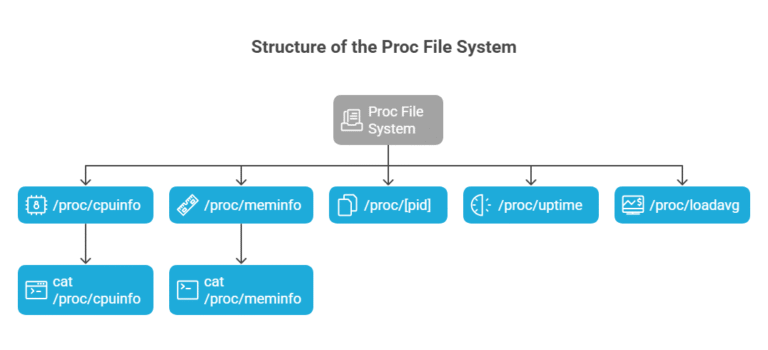
The proc file system organizes runtime information into files and subdirectories. Some commonly used files include:
Accessing these files is as simple as running commands like:
Bash
cat /proc/cpuinfo
cat /proc/meminfo
Automation allows DevOps engineers to write scripts to extract information from /proc, add to a Git repo, and automatically deployed using Jenkins or ArgoCD.
As an example, the event could be a script that checks /proc/meminfo, which triggers alerts for memory usage when a certain point is passed. Additionally, this reduces human oversight and builds event-driven CI/CD in practice.
Modern DevOps platforms with AI capabilities can process /proc data to detect anomalies and predict failures. For example:
Teams using AI-enhanced DevOps tools reported improved system uptime and more reliable deployment pipelines, especially in hybrid cloud environments.
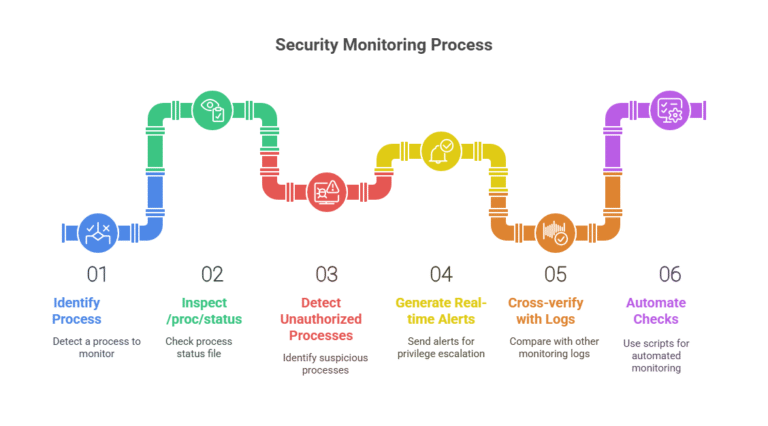
Security tools like Sysdig and Falco inspect /proc/[pid]/status and other files to monitor process behavior. This enables:
Security scripts stored in Git repositories can automate these checks, reinforcing secure DevOps practices aligned with DevSecOps methodologies.
MLOps platforms like Amazon SageMaker benefit from /proc data to allocate compute resources intelligently. Examples include:
Scripts automating these checks can be stored in Git repositories and executed during model training jobs, enhancing performance and cost-efficiency.pi
To enable automated deployments of monitoring scripts:
Initialize a bare Git repository:
bash
git init –bare monitoring-scripts.git
Push scripts from a working repo:
bash
git remote add origin /path/to/monitoring-scripts.git
git push origin main
This ensures version control, traceability, and consistency in your DevOps workflows.
In hybrid environments, /proc helps ensure compatibility between on-premises systems and AWS instances. During cloud migration:
Firms leveraging this method during cloud migration have reported smoother transitions and improved post-migration observability.
If you’re new to DevOps, start with basic /proc commands:
Bash
cat /proc/cpuinfo # View CPU details
cat /proc/meminfo # Check memory usage
cat /proc/uptime # See system uptime
You can automate these into shell scripts and manage them with Git. Use beginner-friendly platforms to schedule and monitor these scripts for hands-on learning.

The Linux /proc directory is a powerful virtual file system that underpins observability, automation, and security in DevOps and MLOps workflows. By combining /proc data with modern tools like AI DevOps platforms, log monitoring systems, and CI/CD automation, teams can achieve scalable, efficient, and secure operations.
Whether you’re a beginner or a seasoned engineer, mastering /proc can greatly enhance your infrastructure insight and control.
Learn more at DevSecCops.ai—your partner in automated, AI-driven DevOps and platform engineering.